
I remember the days when my team was pushing updates to production. I was always concerned. Is something going to break? Did we test enough?
Luckily, AI is now advancing fast, and that's affecting testing. It’s reshaping the whole landscape across the entire software development life cycle (SDLC). In fact, it has impacted every phase of it, from how we plan features to how we monitor apps in production.
This article will explore [how AI](/blog/how-ai-generated-tests-are-changing-developer-workflows-forever) is transforming the SDLC, why agentic QA is becoming a core function that unlocks everything else, and how it can propel your team to deploy with genuine certainty.
Traditional SDLC Can’t Handle the Pace of Developers
When I was studying software engineering in my master's program, SDLC was presented as a clean, sequential process. The phases were neatly laid out: planning, design, development, testing, deployment, and maintenance, and on paper, it made perfect sense. But in practice? It worked fine back when we were shipping quarterly, but dev teams don’t operate this way anymore.
SDLC traditionally has this pattern:
Gather requirements → design the architecture → write the code → give it to QA for testing → deploy if the tests pass → monitor production
The same pattern is even part of the Agile methodology (just a shorter sprint).
The problem isn’t the structure itself, though. It’s the fact that every phase except one has evolved to keep pace with modern demands. We’ve automated deployment using CI/CD, got infrastructure as code (IaC), added real-time monitoring tools, and much more. But we still write test scripts manually, as if they somehow got left behind while everything else moved forward.
QA Bottleneck and Its Hidden Costs
Traditionally, QA has always been seen as a bottleneck. In its scripted automation form (think Selenium or Cypress), it’s really just technical debt in disguise. Ongoing maintenance never ends, as the UI of the app undergoes constant changes.
QA teams spend hours just fixing the tests that break over trivial UI changes, not actual defects. That’s time not spent innovating, and it leaves everyone feeling like their work doesn’t really matter.
Test scripts can only check if things worked as expected. Real users, however, are curious and often unpredictable. They click the wrong buttons, enter data in unexpected formats, and uncover the bugs that tests miss. No matter how much effort goes into traditional QA, it still struggles to truly reduce risk. And this is exactly what the modern, AI-driven SDLC aims to solve.
Modern SDLC - Transforming the Landscape with AI
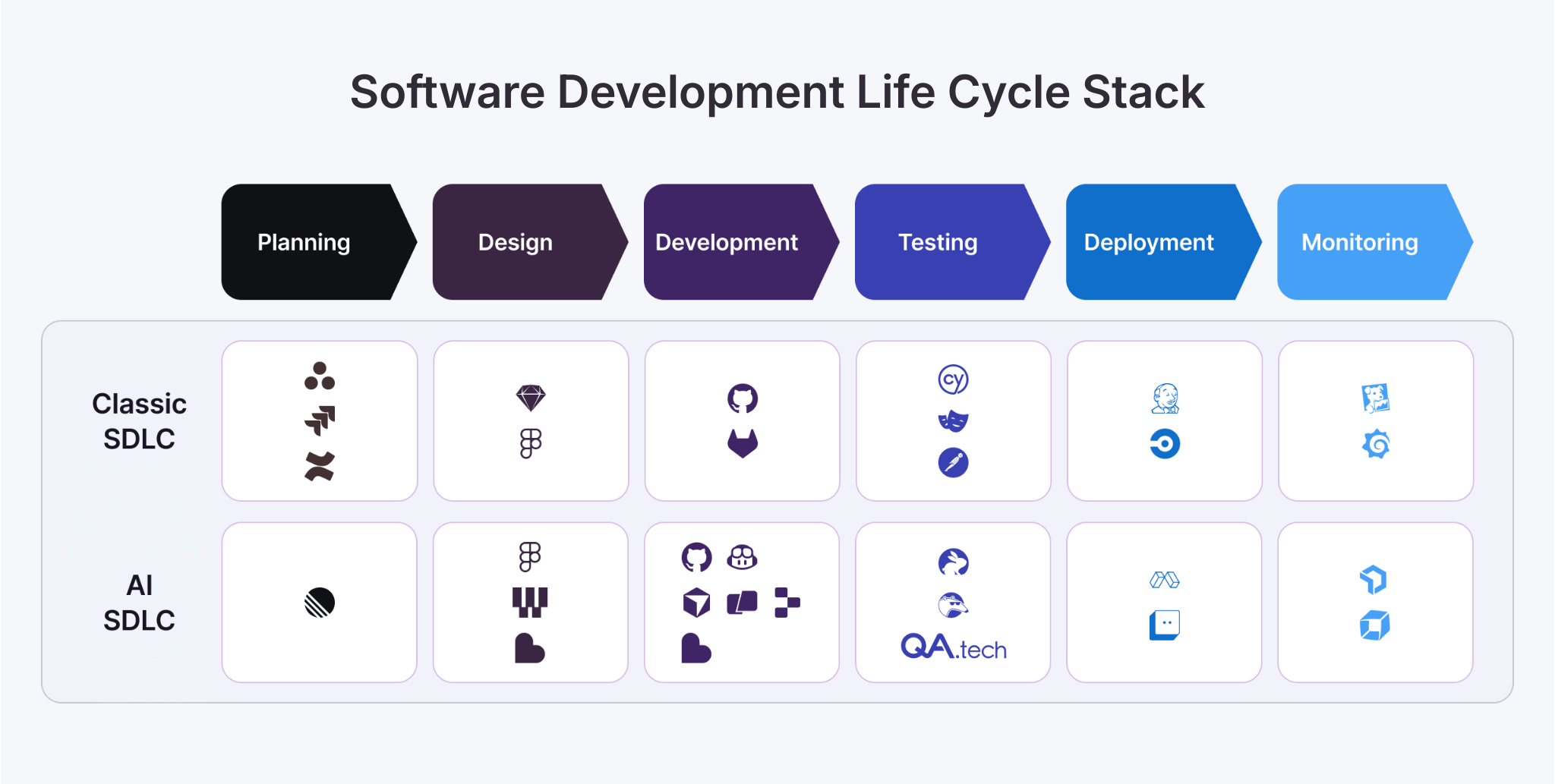
SDLC as we know it today (or AI-SDLC) is more of a next step rather than a complete reinvention. AI is now used in every stage of the SDLC.
Using AI for Planning and Gathering Requirements
Analysts used to spend weeks transforming business needs into requirement documents. Today, we have modern AI tools that can analyze thousands of user comment submissions, support tickets, and usage patterns to highlight what is truly important. For example, tools like Rovo (by Jira) can be used to identify bug clusters in high-risk modules. And instead of relying on guesses, teams can now leverage AI to predict which features will have the most impact in the future and which technical debt should be addressed immediately rather than down the line.
AI in Design
Here, we’re not just talking about aesthetically pleasing mock-ups. AI in design can actually suggest architecture patterns, generate UI prototypes, and even create initial models. In fact, I’ve witnessed teams cut their design iteration time in half using AI-assisted tools. Tools like Figma AI, for example, can significantly speed up your design workflows.
AI in Development
GitHub Copilot and Cursor have changed the way I write code. There’s no need to worry, though. They are not here to replace developers, that is not the point. Instead, they can help write lots of boilerplate, suggest patterns, and catch common mistakes before they become bugs.
AI in Testing (QA)
While AI can assist in nearly every phase of SDLC, its impact is the most dramatic in testing. As dev velocity outpaces the regular QA process and product complexity grows, the friction becomes more overwhelming.
This is why AI agents are essential. They crawl your app and model it dynamically. Then, they create tests simply by reading a natural language prompt. Tools like QA.tech are turning this into reality today. As a result, testing is no longer the SDLC bottleneck and development is faster than ever.
AI in Deployment
When it comes to deployment strategies, AI helps us validate health checks and monitor performance metrics more confidently by automatically triggering rollbacks when something looks off. Thanks to this, we’ve all moved from a “deploy and pray” to a “deploy with certainty” state of mind. Tools like LaunchDarkly use AI to validate deployments, run progressive rollouts, and catch issues before they impact users.
AI in Monitoring
Detection of unwanted behavior in production has changed over the years. AI can establish a baseline of your own traffic and alert you whenever something deviates from expected behavior. For instance, AI tools like New Relic AI monitoring can detect performance degradation, get instant insights, and much more. What’s even more impressive is that AI doesn’t just wait for something to go wrong. Instead, it anticipates issues before users even have a chance to report them.
Why AI-Powered Testing Changes Everything for Teams Adopting AI-SDLC
Let me show you what this looks like in practice. I’ll compare two scenarios. In the first one, we’ll test a checkout flow with code-based tests and in the second one, we’ll use an AI-powered, agent-based approach.
Traditional Scripted Testing
In scripted testing, you create a test with tools like Selenium or Playwright. You select elements with CSS selectors and spell out every step: go to products, add to cart, fill in shipping information, apply a discount code, and check out. Finally, you write assertions for each action.
It takes about 10-12 hours for a solid, well-rounded test suite, and that’s just writing. Maintaining is a whole other story. Any UI change, browser update, or new payment method may cause the test to fail.
It’s automation, yes, but one that requires constant human intervention.
QA Testing with AI
Unlike traditional tests, AI agents don’t follow scripts. They simply understand your application.
The agent scans your web app, mapping its structure and gathering relationship details between pages, forms, and interactions. AI tools like QA.tech build a dynamic model of how your application behaves. When you add a new feature, they automatically detect and explore it.
Creating tests becomes a conversation between a human and an AI agent. I can for example write in plain English, “Test the checkout flow with a discount code.” The AI agent figures out the steps, creates the test, and gets it up and running.
The AI agent doesn't just follow my script, but explores additional cases. What if someone changes the order mid-checkout or they apply two discount codes? What happens when they navigate back to the previous page? These are all edge cases I might not think about, but the AI agent discovers them through exploration.
When your UI changes, AI agents adapt to it. What if developers changed a CSS class for a button? The AI agent finds it based on its function, not a selector. What if you had to change the entire flow and the design of your checkout page? The agent maps the new structure and updates tests accordingly.
The developer experiences changes, too. Instead of getting a vague "test failed" message, you get detailed bug reports with console logs, network requests, screenshots, and exact reproduction steps. If you are using tools like QA.tech, you’ll get automatic comments on pull requests with actionable feedback before you even merge.
Here are real-life examples.
If I were testing the checkout workflow using the traditional approach (scripted testing, that is), the code would look something like this:
// Traditional E2E test
test('checkout with discount', async ({ page }) => {
  await page.goto('/mobile-phones');
  await page.click('[data-testid="product-5"]');
  await page.click('button:has-text("Add to Cart")');
  await page.fill('#discount-code', 'OFF30');
  await page.click('[data-testid="apply-discount"]');
  // more code goes here
});
But here’s what my code configuration would look like with AI-driven testing that uses natural language:
# QA.tech test configuration
test:
  name: "Checkout with discount code"
  prompt: "Navigate to mobiles page, add a phone to cart, apply discount code OFF30, and complete checkout process"
  assertions:
    - "Discount is applied accurately with discount percentage"
    - "Final price must reflect discounted amount"
The AI agent handles everything and updates to UI changes automatically.
The Ups and Downs of Adopting Agentic AI
I’ve talked to developers, testers, and engineering leaders who have made this shift, and the results are impressive.
Research from McKinsey shows that high-performing teams see up to 45% quality improvement when they rethink team structure and processes (not just adopt new tools).
Here’s what teams are actually experiencing nowadays using AI:
| Benefits | Challenges |
|---|---|
| Speed: AI agents speed up the whole cycle, provide immediate and continuous feedback, remove the bottleneck of traditional QA, and allow code to be shipped faster and more frequently. | Adoption: Your team needs to shift from writing tests to guiding AI agents. That's a different skill set, and building confidence takes time. |
| Coverage improvements: Testing improves in both depth and frequency. You're no longer limited by how many test cases a person can write in a sprint. AI agents explore thousands of scenarios, running continuously as part of your CI/CD pipeline. | Transparency: The agent has to be transparent about what it has learned and tested. |
| Developer experience: Developers now don’t have to wait for hours or days for testing to complete. AI agents run tests in minutes, and you receive actionable feedback in your pull request. | Supervision: Though powerful, AI agents are still tools. As such, they require human expertise to guide their objectives and validate critical business assertions. |
KPIs for AI-Driven SDLC
How do you know if AI-driven testing is working? Here are the metrics that teams actually track to measure their impact:
- Time to coverage (TTC): Percentage of user flows and edge cases covered. With agentic AI, this drops from days or hours to minutes.
- Test maintenance time: Hours spent updating and fixing broken tests. Thanks to AI-powered testing, Pricer’s team now saves 390 hours every quarter, which is like adding two full-time testers.
- Mean time to detection (MTTD): How quickly bugs are found after code is written. I've seen this drop from days to minutes.
- Mean time to resolution (MTTR) for production bugs: The time it takes to fix issues once they are detected. AI improves coverage and generates thorough reports, thereby decreasing MTTR.
- Defect escape rate (DER): Percentage of defects that escape into production after testing has measured the effectiveness of testing. Upsales prevented at least one catastrophic release and caught two crash-causing bugs before they reached users.
The best practices here involve not just tracking these metrics, but setting ambitious, achievable targets based on real-world success. For instance, when SHOPLAB introduced QA.Tech into their working processes, they reduced their manual testing cycle down to 30% of what it used to take.
Agentic QA Is Our Future
You've seen how AI transforms each stage of the SDLC, why testing has become the breakout stage, and what agentic QA delivers in practice. It’s more than just an automation of a manual process, it actually represents a whole new paradigm. We can now deploy intelligent agents that understand applications and explore them autonomously. As a result, we get both speed and quality, not one or the other.
This isn’t the future. Teams are doing it now. They are shipping faster, catching more bugs, and spending less time maintaining test infrastructure.
Early adopters have already pulled ahead. Ready to join them? Book a quick demo with QA.tech and meet your new AI QA agent.
QA.tech also exposes an MCP server so coding agents can trigger tests directly.