Imagine this scenario: you haven’t come up with your test scripts yet, even though you can practically hear bug reports piling up. You’re stuck in the classic “we'll add tests later” loop, the one where “later” keeps getting postponed because setting up E2E testing sounds like a week-long project.
But what if I told you it’s possible to skip the scripting entirely and get E2E test coverage done in under a day? And the best part is, this doesn’t refer to simple and small tests only, it goes for tests that expose real bugs, too.
In this article, I’ll share how you can get E2E automation running in under a day. By the end, you’ll understand why teams are making a switch to automated QA as we speak.
Stop Scripting and Automate with AI
Writing scripted line-by-line tests isn’t recommended for fast-moving teams, as every time you push code to production, you face hours of copy-pasting, updating selectors, or perhaps figuring out why the code broke at just the slightest UI change, like a button color.
The old, traditional approach treats you like a mechanic. You write and maintain every test script, and that’s even before you start dealing with flakiness. Here’s what it looks like:
// Traditional approach - you maintain this forever
await page.locator('#email').fill('hello@example.com');
await page.locator('#password').fill('hello123');
await page.locator('button[type="submit"]').click();
await expect(page.locator('.home')).toBeVisible();
In the above code, every CSS class change breaks things. Every new field means more updates. And UI redesign? Time to start all over again.
But the new approach is completely different. No script writing, no selectors: you just describe your goal in natural language, and AI handles everything for you.
For the same test as the one above, the AI-based approach would look something like this:
"Test to allow users to log in with their valid credentials and see the home page."Traditional QA takes about an hour just to set up a fragile test cycle. With AI-powered testing, though, you can start running tests now and tweak them later. There's no need to build test infrastructure. You can simply explain the expected behavior, while AI deals with the validation.
Two-Step Path to Same-Day Automation
Automating QA testing in under a day is an easy process. All it takes is connecting the application and delegating the work to AI agents.
Here’s how it looks in practice.
Step 1: Zero-Config Connection
To automate QA testing, you need to connect the application and delegate the work to AI agents:
- Connect via GitHub App: If you want the PR review agent to test every pull request automatically, just install the GitHub App from your project dashboard and select the repository you need to test.
- Interactive testing (via chat): Use natural language to provide the agent with all the details you want to test in your application. To set it up, log in and connect your application by providing its URL. The onboarding agent will then start scanning your app.
And there you go. No YAML files, no workflow configuration, no “works on my machine” debugging sessions. You’re live in minutes.
If you want to see this process in action, check out the deep dive on how AI testing agents learn about your website.
Step 2: Delegating to the AI Agent System
Once connected, you don’t need to write script code. Instead, you can provide your input in natural language.
Open the chat assistant in your dashboard and describe what you want to test, for example:
“Test my application with the top 5 most important tests.”
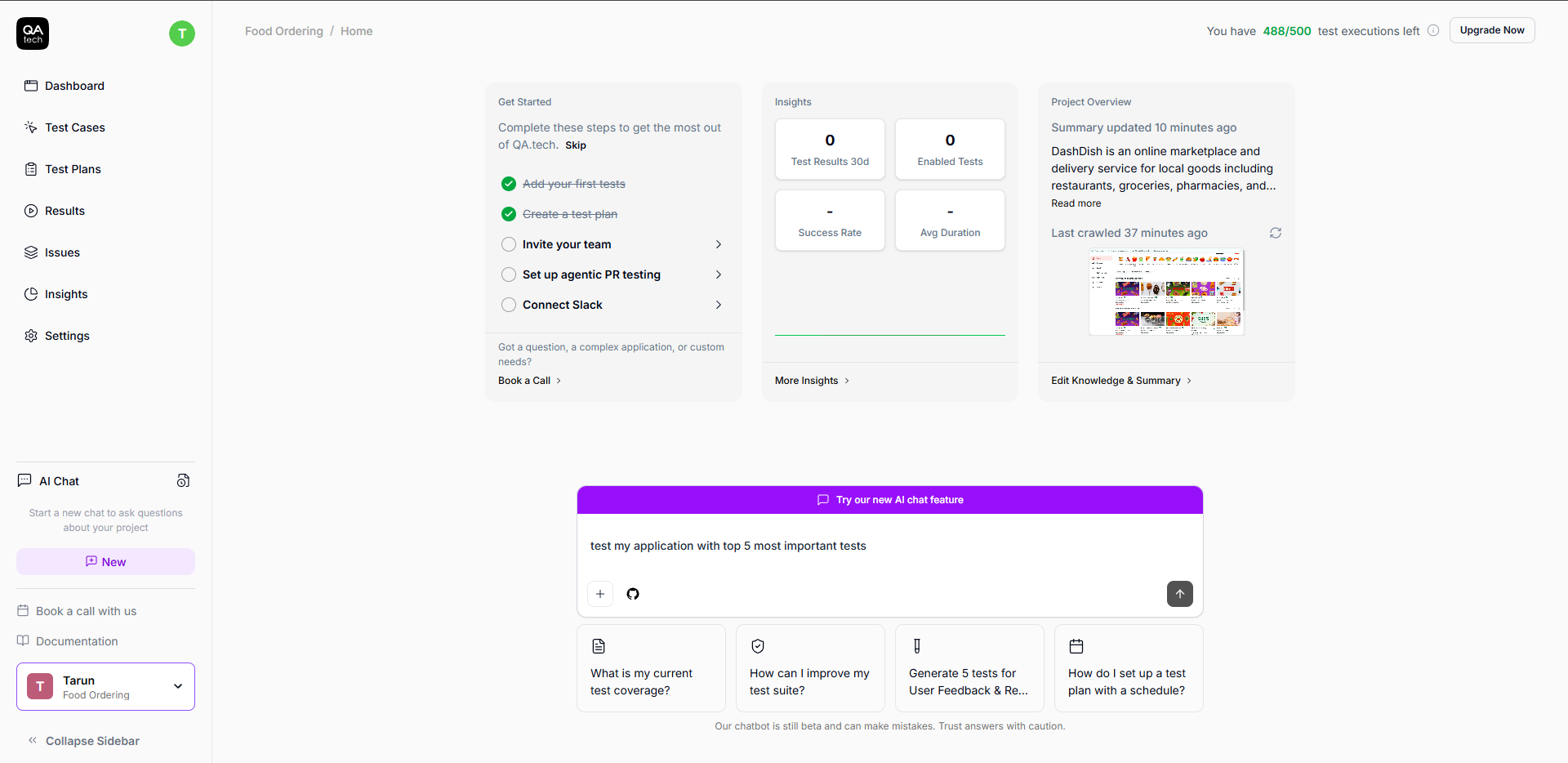
When you provide your input to the agent, it converts the plain language instructions to E2E working tests. There’s no need to refer to page.locator() calls. You’re having a conversation about what really matters.
We’ve broken down the testing role into specialized agents that work together as a team:
- Test generation: Takes your plain-language intent and creates the rich E2E test.
- PR review: Automatically runs tests on your preview environment on each pull request (we will discuss this in the next section).
- Exploratory: Goes beyond defined test cases, looks for unusual ones, and tests your application just like an expert human QA would.
You no longer need to write or maintain test scripts. Now, you get to lead a team of intelligent agents instead.
Your Day, Hour by Hour
Here's how you can set up QA in a single day.
Hour 1: Initial Setup
Connect your staging environment or GitHub App to allow the QA.tech‘s agent to scan and build a knowledge graph. The complete setup takes about 30 to 45 minutes, depending on your application structure.
Hour 2-3: First Tests Running
Running your first test is as simple as chatting with your friend. Open the chat assistant and start describing your critical user journeys. Start simple, like:
“Test my application with the top 5 most important tests.”
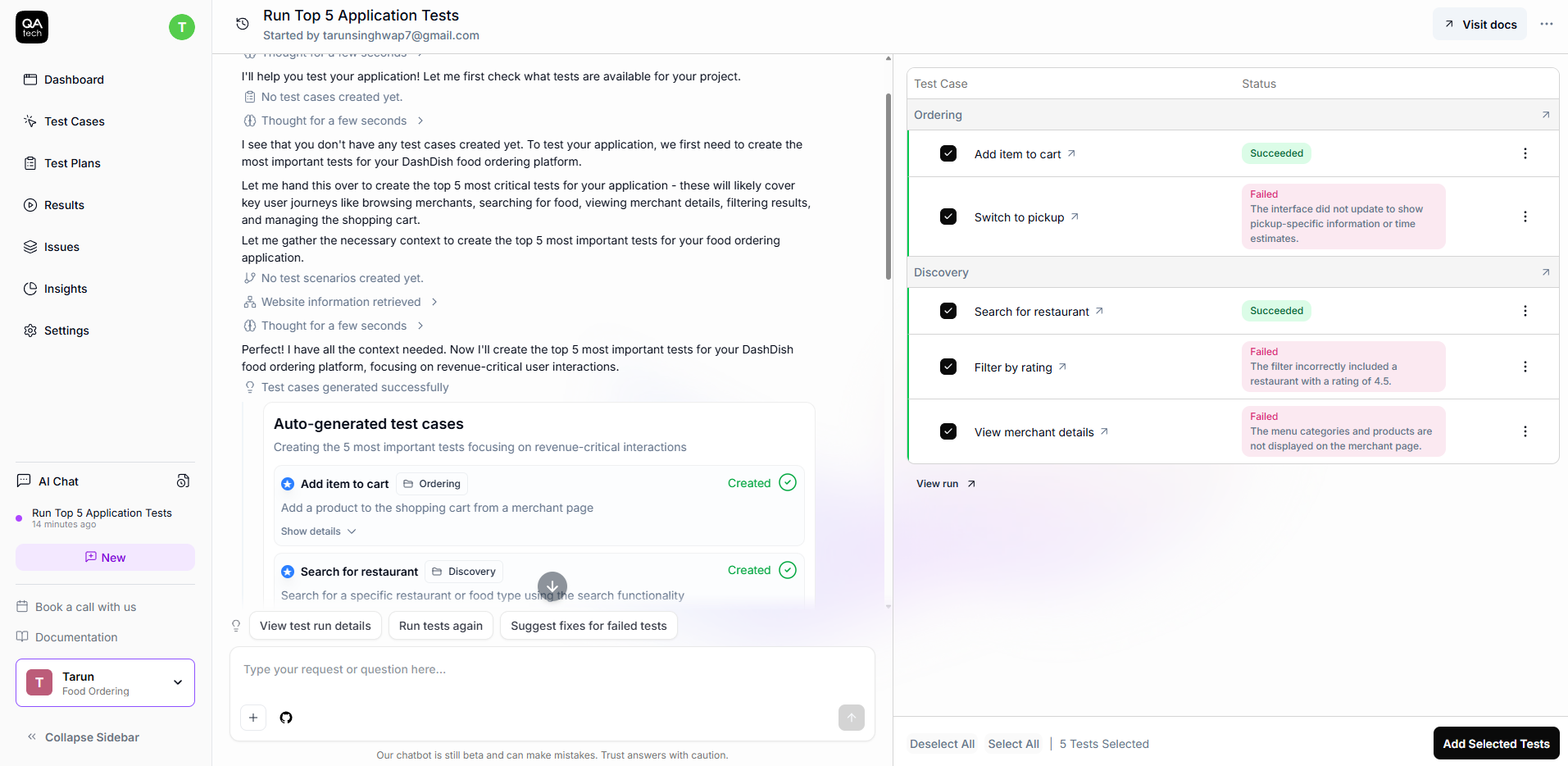
See how the agent has created the 5 most important tests (for a demo food ordering app) in less than 2 minutes by analyzing my application? It prioritizes revenue-critical paths, like checkout and adding items to the cart, and creates realistic test scenarios based on actual user flows.
Here’s an example of a “passed” test below:
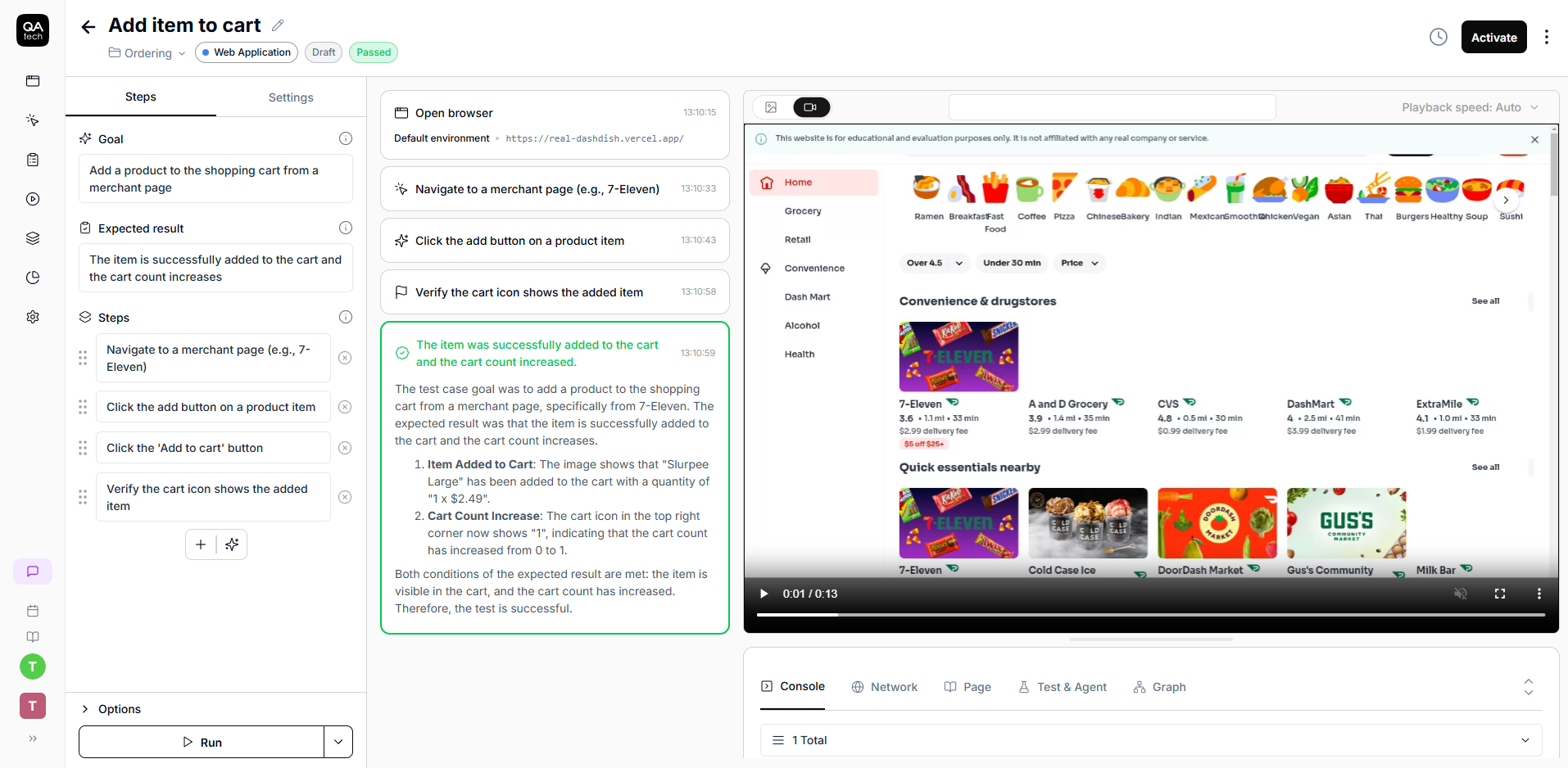
The agent automatically creates and runs the test. If it passes, great! It will boost your confidence. If it fails, that’s great, too, as you’ve just caught a bug you didn't know about.
Hour 4-5: Connecting Your Workflow
Add the GitHub App via your project dashboard. Choose your repositories, create a test PR, and watch the PR review agent work its magic.
Next, decide where you want notifications to go; Slack, email, or wherever it is that your team works. Then, configure how often tests should run, whether it's on every PR, nightly, on demand, or all of the above.
When you open a PR, you can expect to receive an automated review comment within minutes. You will learn exactly what was tested and what passed.
Here’s how you can add the GitHub Action for fully integrated CI/CD:
# .github/workflows/qatech.yml
name: QA.tech Tests

on:
  pull_request:
    branches: [ main ]

jobs:
  test:
    runs-on: ubuntu-latest
    steps:
      - uses: QAdottech/run-action@v2
        with:
          project_id: ${{ secrets.QATECH_PROJECT_ID }}
          api_token: ${{ secrets.QATECH_API_TOKEN }}
          blocking: true
Add your QATECH_API_TOKEN and QATECH_PROJECT_ID as GitHub secrets, and that’s it. Tests can now run on every PR automatically. For more details on working with GitHub Actions workflow, check out this run E2E tests on every pull request. You can also watch this video for a deep dive on how all this works with preview deployments.
Hour 6-7: Deepening Coverage
This is where you add the stuff that is obvious to you, but not to AI. Let the system know about your edge cases like “Discount codes should work, but expired discount codes shouldn’t.” Include specific assertions about your business logic, and teach it about the special behaviors for your specific product.
Refine your test scenarios based on what you’re seeing after the initial test results. Approve what makes sense for your workflow, so tests run when you want them to and trigger automatically when needed.
By the end of the day, you will have a fully functional, automatically maintained E2E test suite within your development pipeline, and the smart system will take care of scheduling the tests.
Real Results of Agentic QA Agent
After the setup, the PR review agent in the GitHub App plays the key role. Basically, whenever you open or update a PR, the agent:
- Analyzes code changes and determines which tests are relevant to the user-facing code changes;
- Runs only relevant tests against your PR’s preview deployment URL;
- Posts an approval or decline review directly on the PR.
Clearly, this is a game-changer. It checks functional issues before you even start your code review, and your teammates can focus completely on code quality instead of manual testing.
Developer-Friendly Bug Reports
When testing reveals problems, you won’t just get a “test failed” message. You will receive bug reports that contain everything you need, such as plain-English steps to reproduce the issue, full console logs detailing exactly what happened, network requests that either failed or returned nothing, and video playback so that you can see it happen in action.
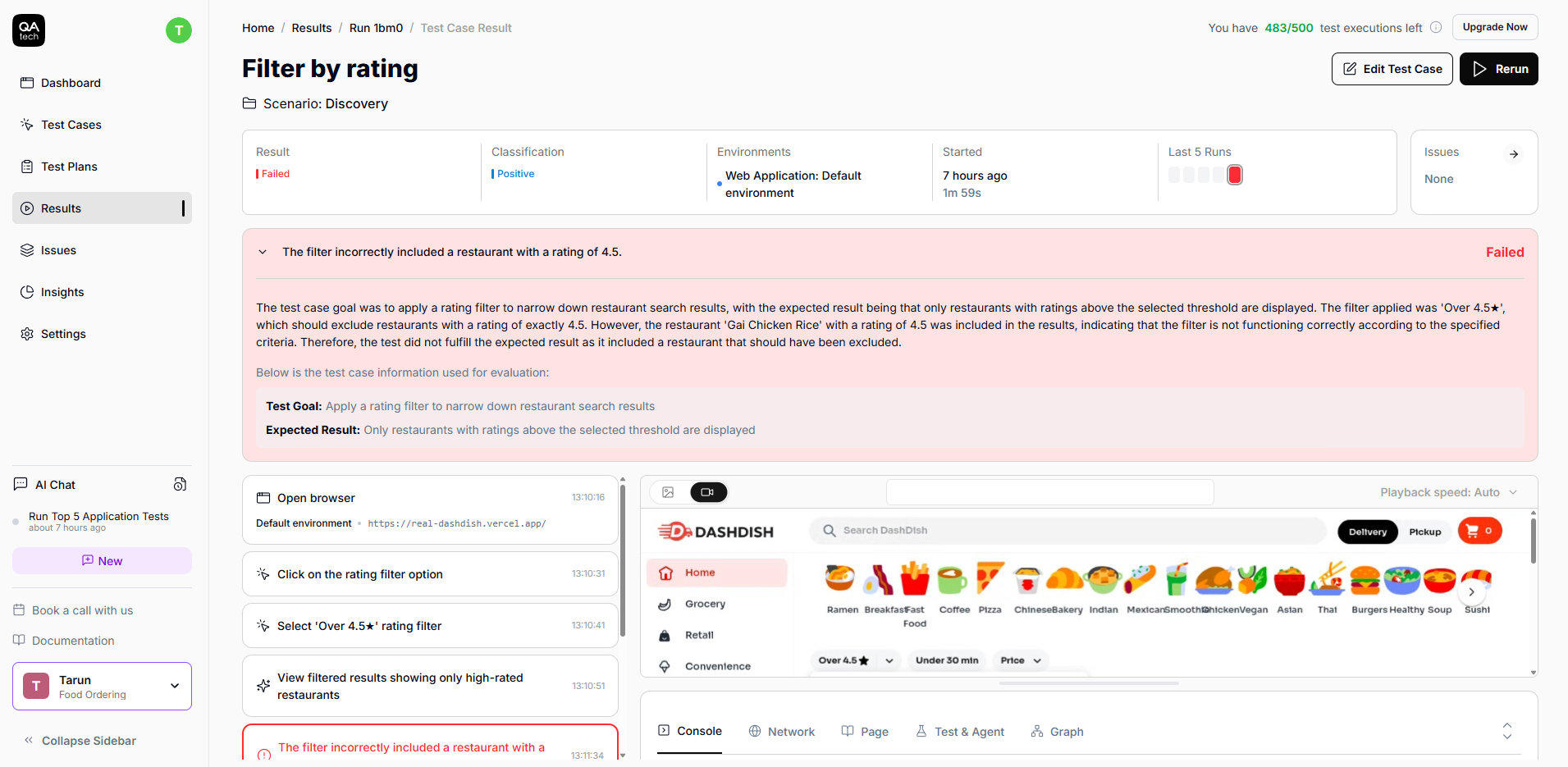
From failed test to tracked bug in one click, with zero context switching: that’s how easy it is to work with AI agents using QA.tech.
Conclusion
You no longer need weeks or a dedicated QA team to perform tests. All it takes is a couple of hours (and the willingness to stop treating QA as something you’ll deal with later).
After you've set your AI up, you'll notice how valuable it is almost immediately. Every PR will automatically be tested, and every bug will be caught before customers even see it. Your team can now focus on building features.
If you’re ready to help your team get more productive and ship software with confidence, book a quick demo call and see how QA.tech can automate your first test suite by the end of the day.
QA.tech's autonomous testing agents approach exactly this – testing by intent rather than brittle scripts.