
Balancing between test coverage and faster release cycles has been a major challenge in software development. As new features get added to the app, regression tests inevitably grow. This impacts release timelines since larger test suites require more infrastructure and maintenance effort. At the same time, teams are under constant pressure to deliver features faster.
This tutorial will help you understand how to come up with a scalable regression testing approach by improving test strategies, adopting industry best practices, and using AI for testing.
Need for Scalable Regression Testing
As software teams progress through the development, testing, and releasing the final product to the market, they face multiple challenges. A scalable regression testing strategy is essential in order to preserve consistent software quality as the codebase grows.
The issues below highlight why software teams need scalable regression testing.
Execution of Large Regression Suites
A regression suite includes complex test scenarios that have to be executed across multiple environments, which is both time-consuming and resource-intensive. Differences in environment configurations add further complexity, often leading to inconsistent results and increased maintenance effort.
Delayed Feedback Cycles
A slower execution of regression tests delays feedback to developers, which makes it harder to identify and fix issues in the early development cycle. When defects are discovered at later stages, they require more rework. As a result, the cost is higher and the release is delayed. This also reduces confidence in delivering updates frequently.
Slower Execution by Manual Teams
Manual testing teams often suffer from slower execution, as repetitive regression scenarios are verified by hand, which requires considerable time and effort. This increases the chances of human error and, again, delays the feedback.
Speedy Regression Tests for Frequent Deployments
As teams push for frequent and early releases, they need regression tests that can be run quickly and provide faster feedback on builds. Slow regression cycles create bottlenecks and make it difficult to deliver software at rapid pace continuously.
Improvize Test Strategies
A well-thought-out test strategy enables faster feedback and more reliable releases. By focusing on the most critical test cases, improving coverage, and using smarter automation, teams can work more efficiently and ensure quality.
The following approaches can help software teams build an effective regression testing strategy.
Implement the Test Pyramid
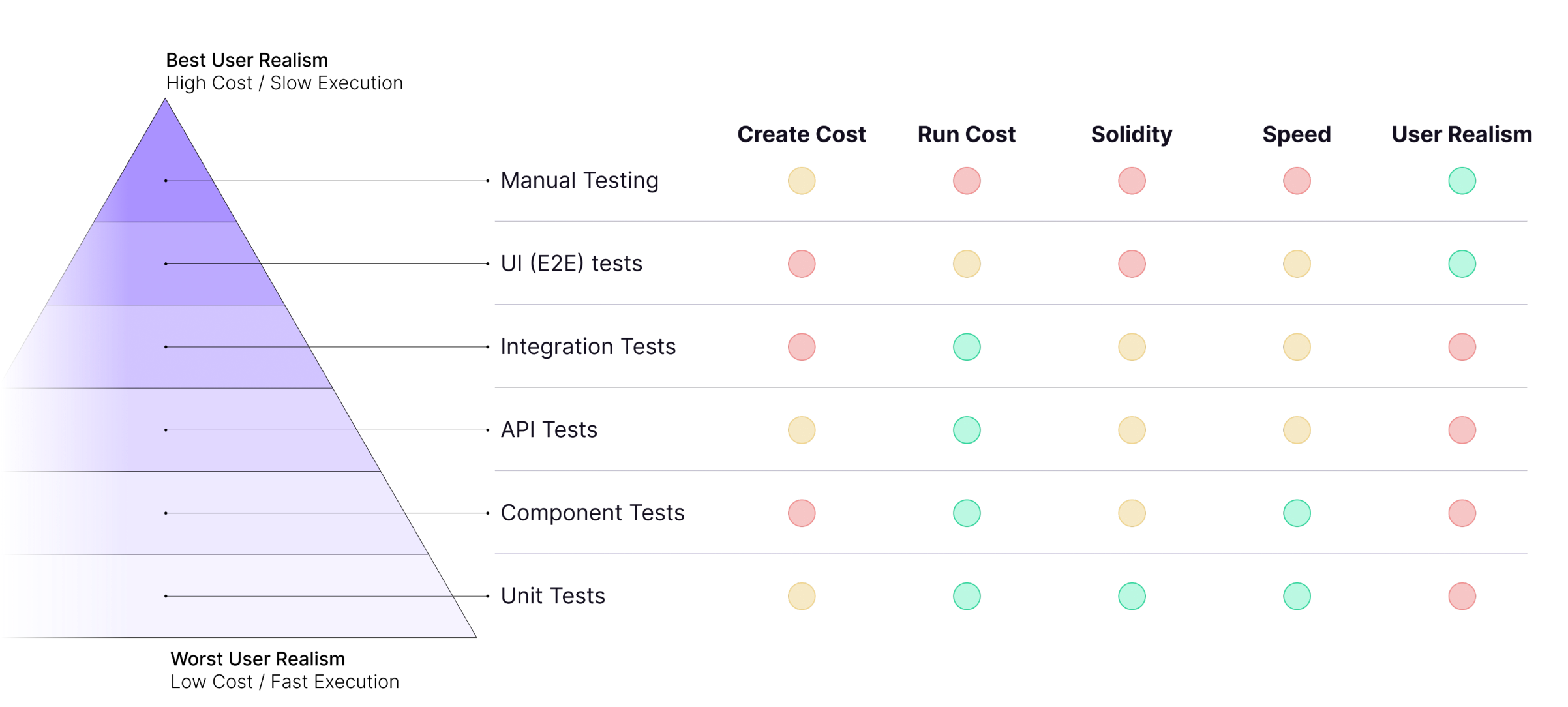
The Test Pyramid is one of those frameworks that look perfect on paper. And it is useful, as it shows you exactly how different types of tests stack up in terms of cost and impact.
But here’s the other side of the coin: the most reliable and user-focused tests are the ones grinding your release cycles to a halt. They’re slow and resource-intensive, and they need constant support to run and maintain.
So, teams end up in this no-win situation. You either run comprehensive E2E tests and blow your sprint timelines, or you just skip them and cross your fingers hoping that nothing breaks in production.
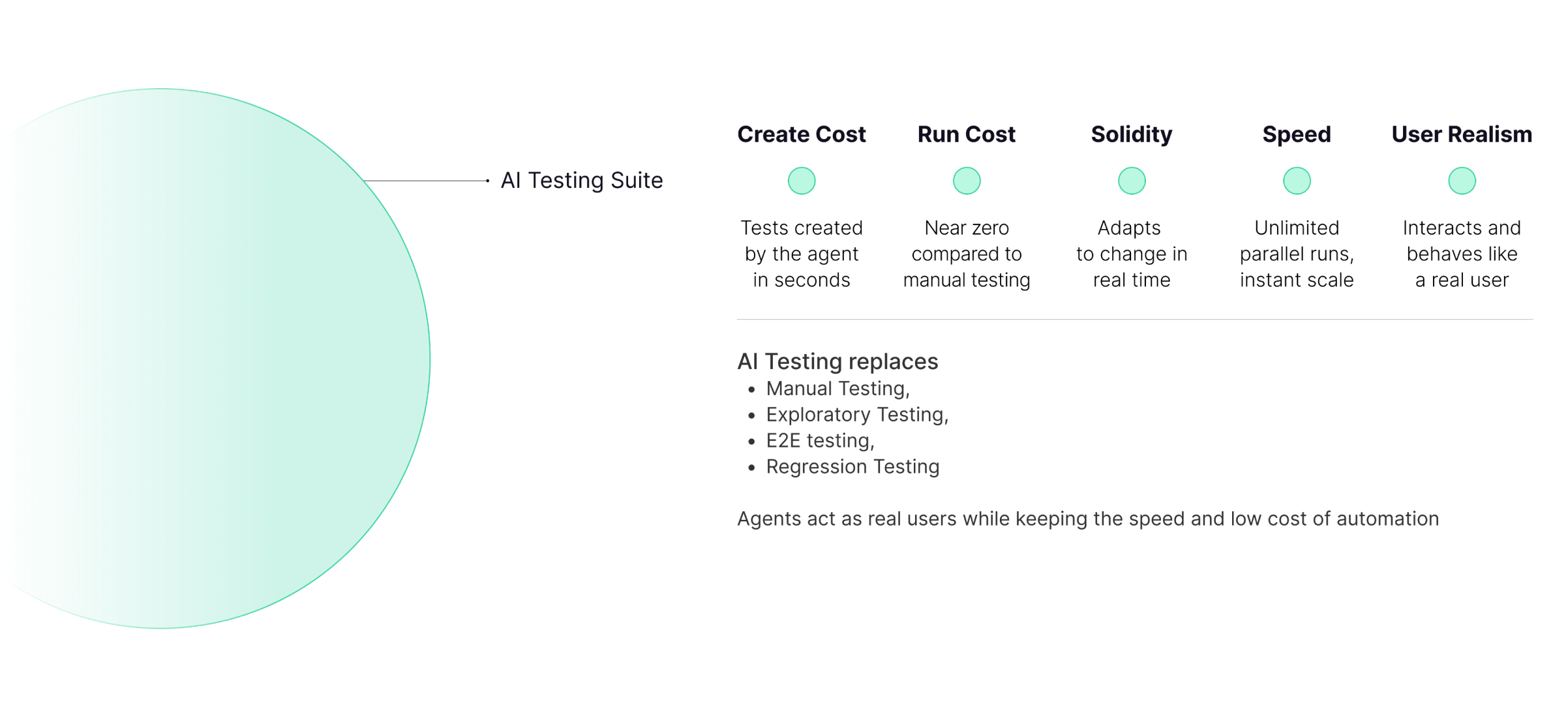
Luckily, with tools like QA.tech, you don’t have to choose between comprehensive testing and fast releases. You get both. The AI agent takes on the heavy lifting part of E2E testing (that is, crawling your application, generating test cases, and running them across different environments). Your team gets the coverage you need without the bottleneck you’re used to. You now get to have the best of both worlds, while also delivering the top-quality product to your users. Talk about a true shift.
Here are some of the additional benefits AI testing provides:
- Autogenerated tests: AI agents quickly crawl the application and auto-generate test cases for the end-to-end journey and relevant product changes.
- High test coverage: AI-driven testing tools explore applications and generate test cases based on the observed user workflows. This way, they can help achieve higher test coverage.
- Faster feedback: This type of testing provides faster feedback on builds thanks to auto-generated test cases that cover a major part of the application and are executed in a short time.
- Greater reliability: These tools can adapt to certain UI and UX changes through self-healing mechanisms, reducing the overhead caused by test flakiness.
Use Shift-Left Testing
By automating unit, API, and integration tests early, you limit reliance on slow end-to-end tests and keep the regression suite lightweight.
Once E2E tests have been written, automation test engineers can communicate with developers to move the respective tests from the end-to-end suite to the unit or integration phase, thereby enabling early feedback on the builds.
Shift-left testing supports scalable automated regression testing by identifying defects early, when they are easier and cheaper to fix. When testers from the requirements and design phases are involved as well, the entire process can be planned and built in parallel with development.
Organize Tests
Organizing tests into appropriate suites allows teams to run a specific set for regression purposes. However, there’s no “one-size-fits-all” approach, and what works for an ecommerce brand may not work for a fintech company. That said, grouping tests into logical suites like smoke, sanity, and full regression gives you options.
The goal is flexibility: maybe your team runs smoke tests on every commit, performs sanity checks periodically, and executes full regression overnight. Or, alternatively, suites may trigger based on the changes in the code. The structure itself matters less than having the ability to run what you need when you need it.
Modern approaches also include conditional monitoring, such as running specific test suites based on which services or features were changed in the deployment. As a result, test runs remain relevant and efficient.
Prioritize Frequently Failing Tests
Focusing on tests that fail often allows software teams to spot the risky areas of their application. By running these tests first, critical and severe issues can be detected and fixed early. These tests also provide insights into the stability of the build and save you time by reducing the need for long test runs.
Parallel Execution
Sequential test execution has become a major bottleneck for continuous delivery. Running tests in parallel at scale removes this obstacle, as it delivers feedback significantly faster without compromising coverage or quality. Hundreds or thousands of tests are run simultaneously across a distributed infrastructure, including operating systems, browser combinations, and mobile devices.
Cloud-Based Parallel Execution
Parallel test execution has evolved from rudimentary grid-based setups to advanced, cloud-native architectures that scale dynamically on demand.
Earlier approaches required teams to maintain costly test grids with fixed capacity. Modern cloud platforms, however, can spin up hundreds of test executors on demand, scale down when idle, and distribute workloads globally for better performance. This shift has made parallel testing accessible to teams of all sizes.
Benefits of Running Regression Tests in Parallel
Running regression tests in parallel helps software teams achieve results much faster than they would by running them sequentially. They can also maintain comprehensive test coverage without slowing down release cycles.
In addition, parallel execution makes regression testing more scalable as applications and test suites grow.
Continuous Testing in CI/CD Pipelines
With the demand for high-quality software rising and digital transformation galloping across industries, continuous testing has become essential. Software companies need to adapt quickly to frequent changes throughout the SDLC by integrating continuous testing within CI/CD pipelines.
Implementing CI/CD Pipeline
Here’s how a CI/CD pipeline looks in practice:
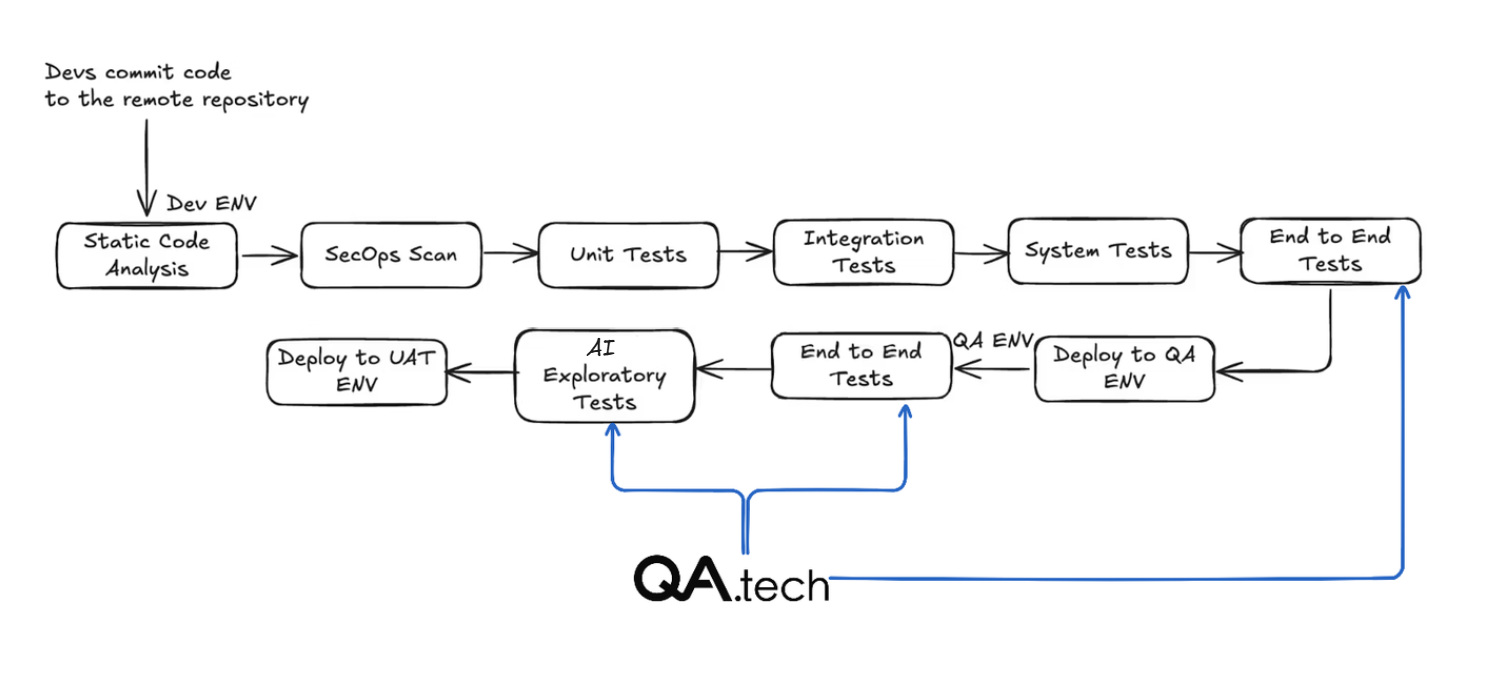
Traditional pipelines like this one can drag for hours, and that becomes a bottleneck. The longest waits? Stages 3 and 5, where E2E tests run (see the diagram above).
And this is where AI testing makes the world of difference. With QA.tech, E2E testing runs in parallel, automatically adapts to updates, and completes faster than your build process.
- Stage 1: Run the static code analysis and SecOps scan to find the hidden vulnerabilities in the code.
- Stage 2: Run unit tests, integration tests, and systems tests on the dev environment as soon as a commit is pushed to the remote repo by the developers.
- Stage 3: Once they pass, run regression tests, including end-to-end tests.
- Stage 4: Deploy the build to the QA environment.
- Stage 5: Run the regression tests, including end-to-end tests on the QA environment. You don't need to rerun the unit and integration tests here, as the build has already passed those tests in the lower environment.
- Stage 6: This is where QA.tech’s AI exploratory testing proves its worth. You no longer have to manually verify tests and click through the same flows repeatedly. Instead, AI agents (like QA.tech) explore your application the way a real user would. This AI agent becomes your companion in the testing pipeline and helps you verify critical UX decisions and new UI features.
- Stage 7: If everything works smoothly, the build can be deployed to the UAT environment.
- Additional points to consider: Performance, security, and similar tests might create a load on the respective environment and block the overall pipeline, which is why it’s recommended to run these in a separate pipeline. Also, only regression tests should be executed unless indicated otherwise (apart from the dev environment). This is because the build has already passed unit, integration, and system tests in the lower environment.
Ways to Use AI Testing
QA.tech works in two distinct ways, each solving different testing challenges:
- Early bug detection with PR testing: QA.tech offers AI exploratory testing that provides immediate feedback on code updates. The AI agent discovers new functionality, tests it, and flags issues right in the PR before merging.
- Classic AI-testing approach: As for comprehensive regression testing, QA.tech runs on your regular schedule (daily/weekly/monthly) or after deployments. The AI agent maintains your complete test suite, adapts to UI changes, and runs complete regression cycles without manual maintenance.
AI-Powered PR Testing
Before a new code is merged into the main branch, it should go through the same checks within the continuous integration pipeline. Running tests on pull requests enables you to flag failures and errors related to code quality, test stability, and integration directly on the PR.
With tools like GitHub App for PR Reviews by QA.tech, you can leverage AI exploratory testing to analyze code changes, generate missing tests, and much more. Here, the AI agent automatically discovers and tests the new functionality introduced in the PR, providing meaningful feedback on actual user impact without PR-specific test configurations or dealing with flaky test failures.
Because the AI understands the context and adapts to changes, it allows QA teams to resolve issues quickly before they are merged with the main branch. It leads to improved software reliability and greater confidence in releases.
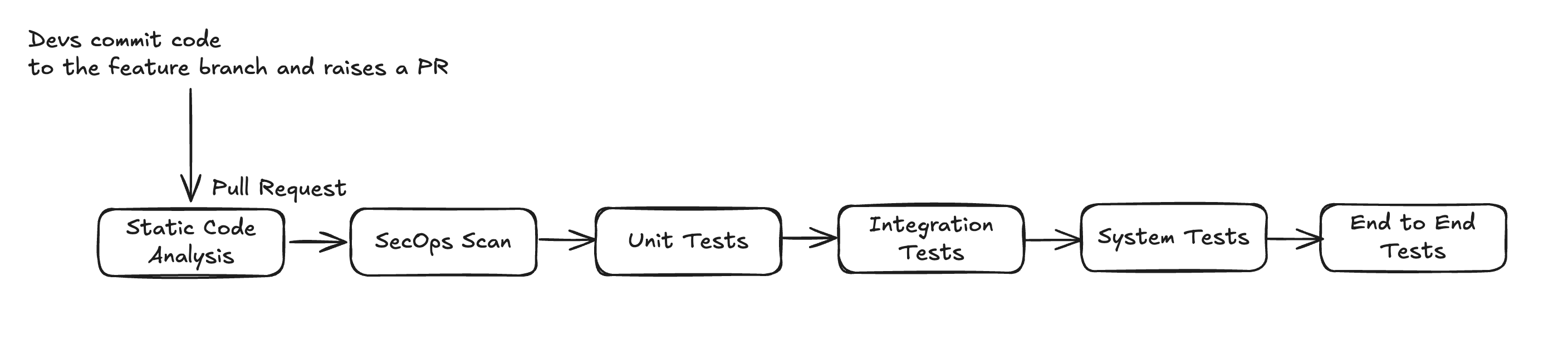
However, PR testing comes with its own set of challenges. For starters, these tests can fail when code changes don’t have a full context or when dependencies across different modules aren’t clearly understood. In addition, running a full regression test suite on every pull request can increase execution time and slow down the feedback process.
Flaky tests also kill regression test suites, but there’s nothing to worry about when you’ve got QA.tech in your corner. Its AI agent self heals, automatically adapting to UI changes and timing issues. With it, you don’t just manage flakiness, you eliminate it.
Using Cloud Testing Platforms
Cloud testing platforms give you instant access to testing infrastructure: no setup, no configuration overhead. With tools like QA.tech, tests can run faster and in parallel across multiple browsers, devices, and configurations, improving test coverage and feedback speed.
QA.tech integrates directly into your CI/CD pipeline. It lets you trigger tests on every deployment or pull request or schedule runs based on your workflow. As a result, tests run efficiently and at a lower cost.
Below, you’ll find some of the benefits.
- Test generation and execution: QA.tech’s AI agent crawls your app, learns user workflows, and auto-generates test case drafts. Your team reviews the generated test drafts and picks which one goes into the regression test suite. The tests can be executed in 3 ways:
- By triggering the tests from the UI
- By triggering the test as a part of the pipeline
- By scheduling recurring runs (daily, weekly, or based on other conditions)
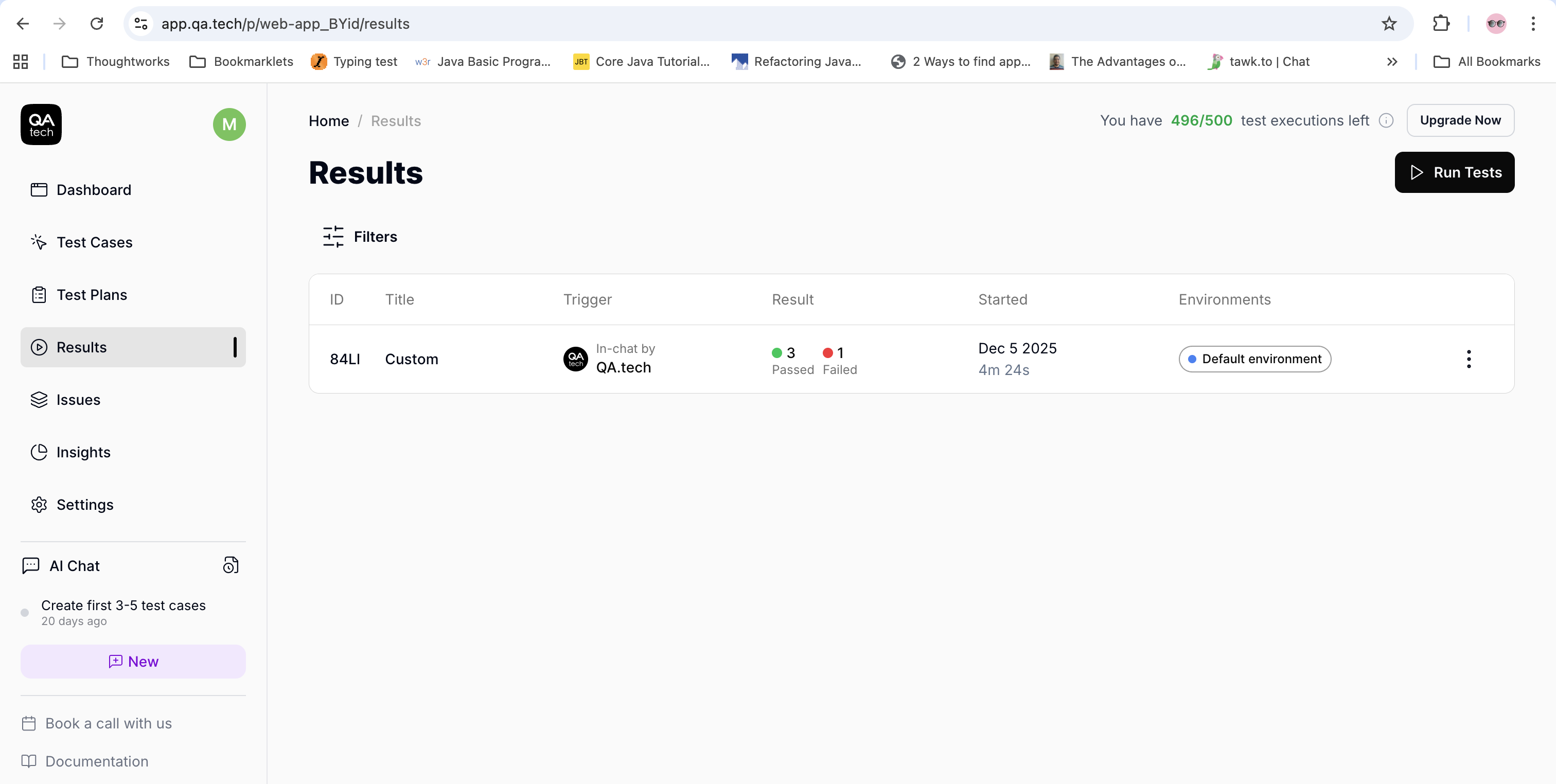
- Parallel execution: As mentioned, QA.tech performs parallel execution of tests. Each test chain runs in its own isolated browser session, so there’s no interference between them. Tests within the same chain run one after another and can continue from the previous state using “Resume from” dependencies.
- At the same time, multiple chains run in parallel, fully isolated from each other for faster and more reliable execution. Parallelism is handled automatically by the orchestration layer, requiring no setup on the testing team’s end.
- In terms of security, crawling is limited to publicly accessible pages or authenticated areas explicitly provided by the team. All data, including page structure, assets, and test metadata, is processed in isolated containers, and nothing is stored beyond the required test artefacts.
- CI/CD integration: Tests can be easily integrated and run within the CI/CD pipelines using the following approaches:
- API-driven testing:This approach should be used for regression testing, scheduled test runs, or whenever the software teams need full control over which tests are executed.
- AI exploratory testing: With this one, the AI agent will automatically discover and test new functionalities. It is best suited for GitHub PRs.
- Test execution notifications: QA.tech sends Slack notifications and weekly email summaries to keep the entire team informed.
- Slack notifications are sent as soon as the test execution is complete. They include details like the Pass/Fail status, test duration, and failure information. Learn more about Slack integration here.
- Email summaries are sent every Monday at 6 a.m. CET. They feature test statistics, pass rate, time saved, and suggestions.
Comprehensive Test Reports
QA.tech provides a detailed test report, which includes:
- Step-by-step execution details
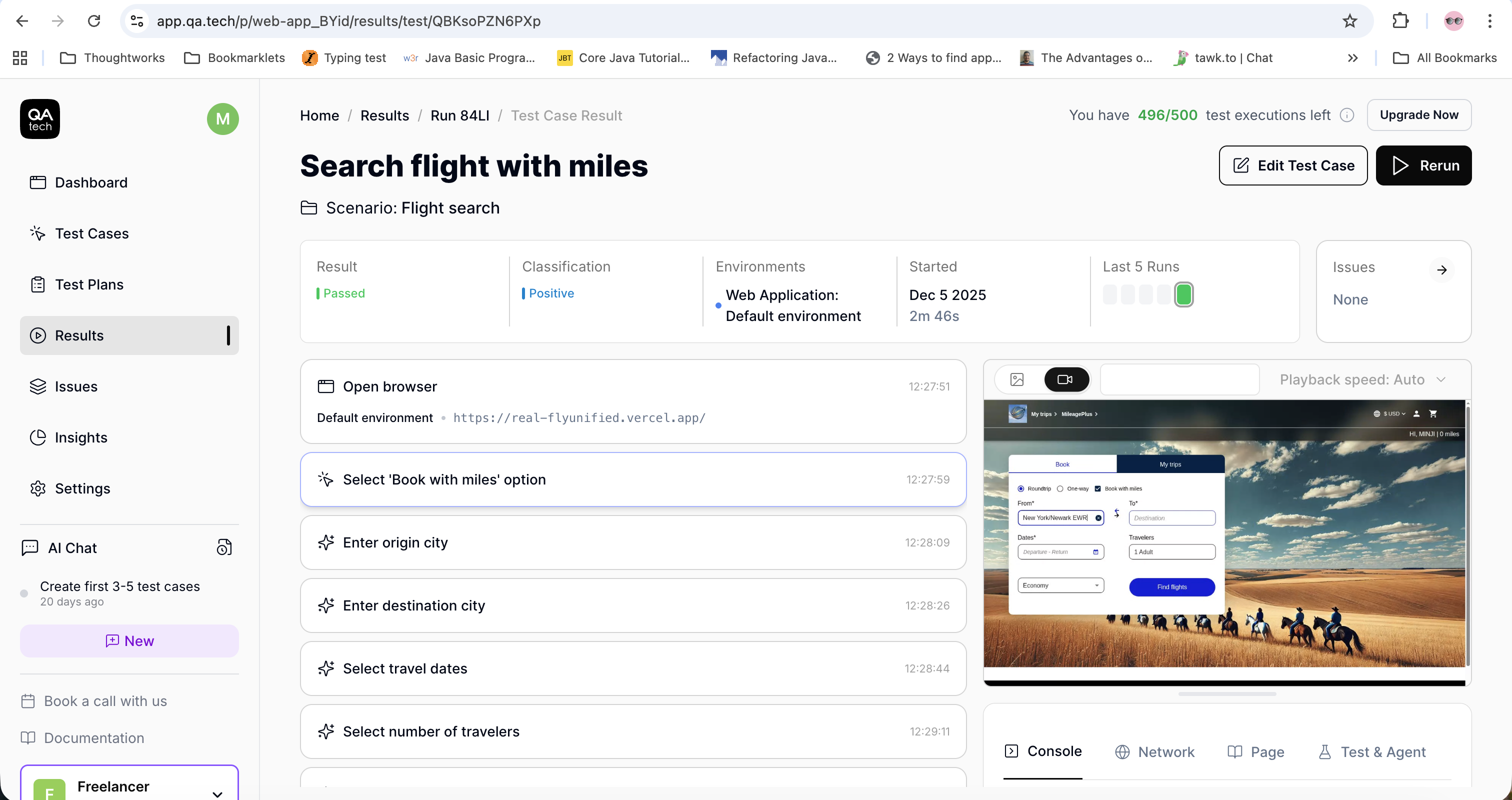
- Number of tests passed/failed
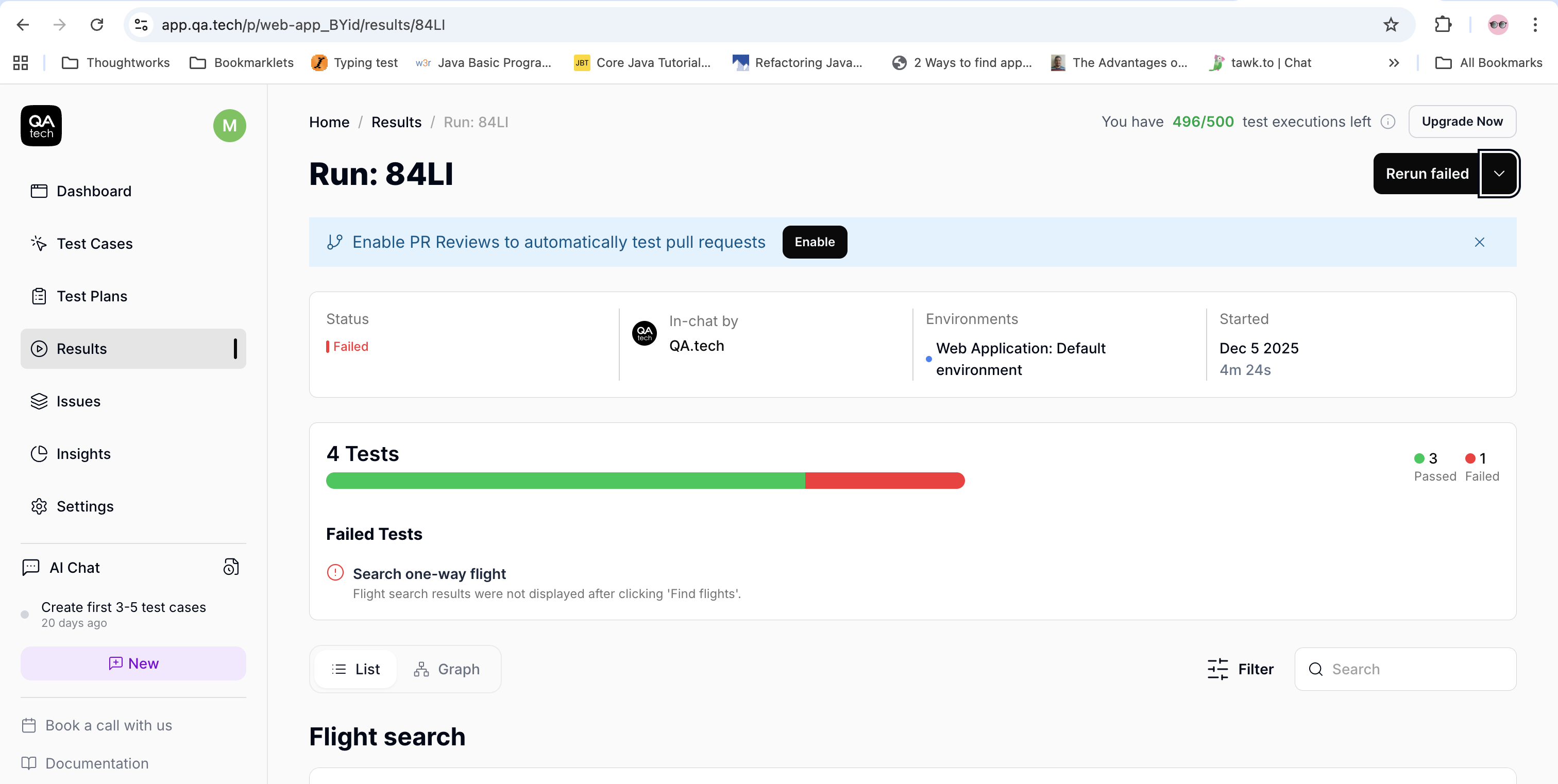
- Total time taken to run the tests
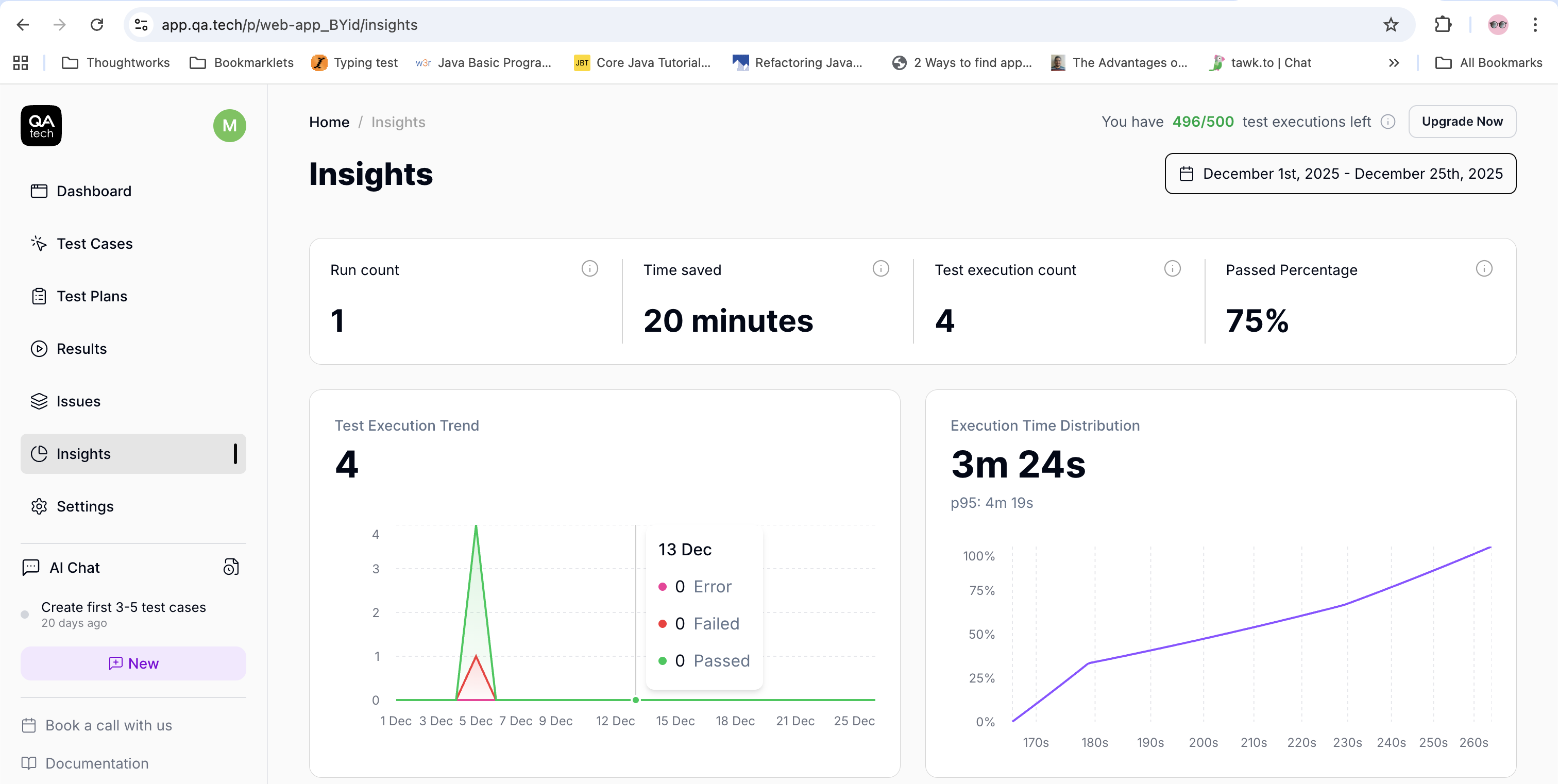
- Video recording of the test execution
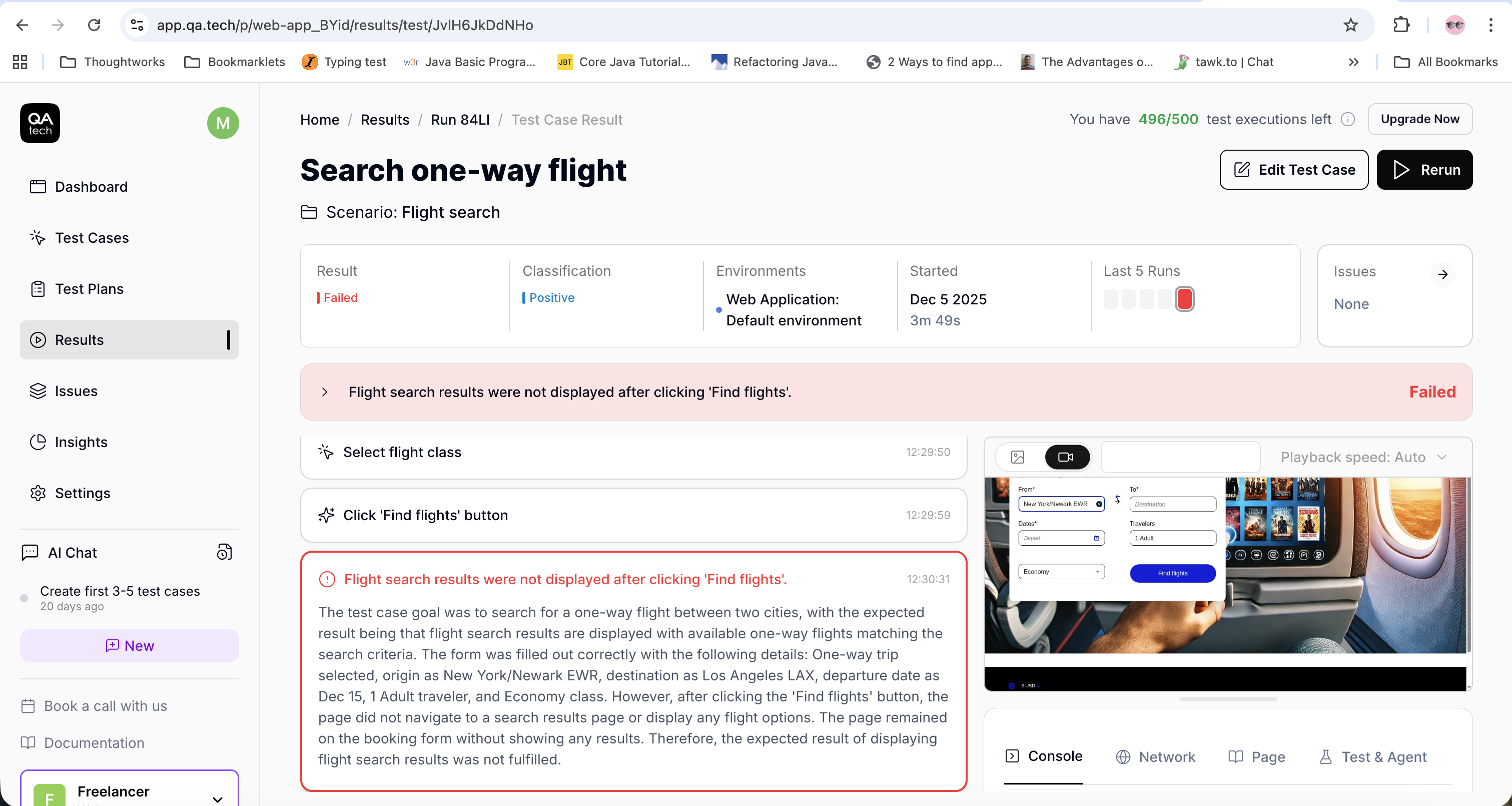
- Logs of the test execution
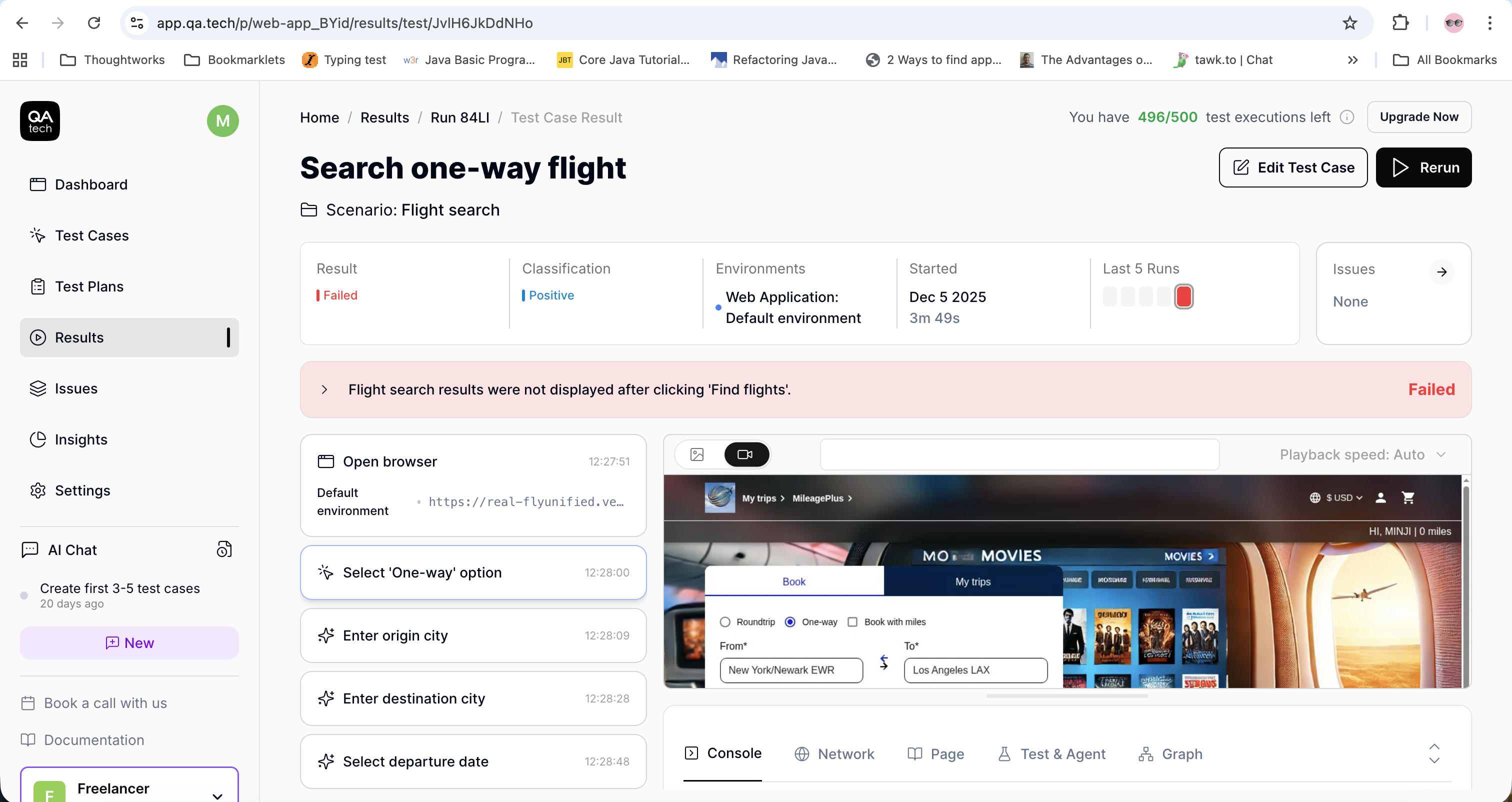
These insights help stakeholders make informed decisions during go/no-go meetings.
Test Analytics
Monitoring test analytics helps teams prioritize what to fix, what to automate next, and which tests to run first. By tracking metrics such as pass/fail trends, flaky tests, execution time, and coverage, software teams can quickly identify unstable tests and high-risk areas of their application.
Dashboard for CI/CD
A dashboard should be created to display the details and current statuses of different stages in the CI/CD pipeline. It should include the environment and test execution details, test status (pass/fail), red/green status of the pipeline, time taken to run the tests and to complete the whole pipeline, and the video recording/screenshots of the test executed.
CI/CD Pipeline Monitoring
The CI/CD dashboard and pipelines should be regularly reviewed to understand the cause of failures at different stages. Pay particular attention to test execution times and frequently failed test cases, as this will help you pinpoint the software’s breaking point. The visibility of the pipeline across the team ensures transparency and enables fast collaboration.
Best Practices for Maintaining the Regression Test Suite
The following list features some of the best practices that can help teams maintain the regression test suite effectively:
- Update the regression test suite regularly as soon as a new feature is added.
- Review the regression test suite for redundant test cases. Such tests should be removed since they do not add any value. The regression test suite should also be reviewed by business analysts and product owners to improve visibility, ensure alignment with expectations, and identify missing or unclear requirements early.
- Identify and fix flaky tests, as they can be a blocker when executing regression test suites.
- Explore the website using an AI agent, like QA.tech, and automatically generate test cases based on newly added features. This will not only help your team work more efficiently but also reduce test flakiness, as the AI agent provides failure details and automatically heals and fixes failing tests.
Wrap Up
Automation plays a key role in balancing speed and quality. With faster feedback and a well-defined test strategy, it ensures that regression testing remains effective as applications grow.
Using the right tools and technologies helps teams scale their test suites further without increasing maintenance overhead. A strong and smart automation strategy can create a sustainable approach to scalable regression testing.
With platforms like QA.tech, which enable 10x faster AI-driven testing, regression suites can be scaled efficiently without compromising coverage or quality.
Ready to scale your regression testing with AI? Book a demo call for free to see how QA.tech can transform your testing workflow, or get in touch with our team to discuss your specific challenges.
QA.tech's autonomous testing agents approach exactly this – testing by intent rather than brittle scripts.