TL;DR: agentic testing vs traditional test automation
Traditional test automation runs a script a human wrote: fixed steps, fixed selectors, fixed assertions. Agentic testing hands the agent a goal and the agent plans the steps, drives the UI, verifies the outcome and re-plans when the product changes. QA.tech is the autonomous example in this comparison; Playwright, Selenium and Cypress are the scripted one. Most teams need a small amount of the first and as much as they can get of the second.
You may think traditional test automation and agentic testing are similar, but they are actually completely separate breeds. They solve distinct problems and fail in unique ways; in fact, they belong to entirely different parts of your test suite.
Now, if you are already using tools like Playwright, Selenium, or Cypress, you may be wondering if agentic testing would actually provide any additional benefits. This article will help you out by analyzing both approaches to see where they work and where they fall short.
Let’s find out when it makes sense to use one over the other.
How Traditional Automation Works
First up, let me start with this: you have more control with traditional test automation. You write a script that guides a browser (or an API, or a mobile device) through a set sequence of steps. Then, you pick an element by its selector and interact with it. Finally, you check the result. The test does exactly what you’ve told it to do. It’s as simple as that.
Let’s check out a standard Playwright test for a login flow as an example:
import { test, expect } from '@playwright/test';

test('user can log in with valid credentials', async ({ page }) => {
  await page.goto('https://app.example.com/login');

  await page.fill('[data-testid="email-input"]', 'alice@example.com');
  await page.fill('[data-testid="password-input"]', 'correcthorsebattery');
  await page.click('[data-testid="login-button"]');

  // Wait for redirect and assert we landed on the dashboard
  await expect(page).toHaveURL(/\/dashboard/);
  await expect(page.locator('h1')).toContainText('Welcome back, Sam');
});
Twelve clean, readable lines. The tests run in a couple of seconds and return a pass/fail.
You can just drop this into any CI pipeline, and it will work. But (and there’s a big but), every selector in that test is a joining point between your test and your UI. If you rename data-testid="login-button" to data-testid="sign-in-btn" during a refactor, the test breaks, even though the login flow works just fine. Now imagine if that happened across a hundred tests… You've got yourself a maintenance problem that eats hours in every sprint. Both approaches are forms of dynamic testing – they run the software – but only one of them adapts while it runs.
Then there’s the fact that traditional tests quietly ignore so many things, like unexpected cookie banners, A/B test variants, one-off modals ("Rate our app!"), or layout shifts after a dependency update. Anything you haven’t addressed explicitly is a potential false failure in a scripted test.
Pros and Cons of Test Automation
Traditional automation does have its strengths:
- Precise control: You get to control every interaction and assertion in testing, and if something fails, you know exactly why it happened.
- Deterministic: Feed it the same input, and it will follow exactly the same execution steps every single time, which is perfect for CI pipelines.
- Fast execution: Scripts run fast because there is no reasoning layer slowing them down. It all goes straight into execution.
- Deep ecosystem: There is nothing experimental in traditional automation tools. Due to years of tooling, plugins, CI integrations, and debugging workflows, everything has been tested, and the ecosystem is mature.
However, there are some weaknesses to keep in mind, too:
- Selector dependency: Once you create a small change in class name or DOM structure, you’ve killed multiple tests, even when nothing is actually broken for the user.
- High maintenance cost: Since the UI evolves all the time, keeping these tests up to date is basically a full time job. Vendors often pitch self-healing tests as the fix, but the reality is more nuanced than the marketing suggests.
- No adaptability to UI changes: If something unexpected pops up (say, a new modal) the tests don’t adapt. They break instead.
- Coding skills required: You need to know how to code to write meaningful tests. This limits test coverage for most teams, and a lot of real user flows never get covered.
How Agentic Testing Works
Agentic testing takes an entirely different approach. Instead of scripting individual interactions, you describe an intent; that is, what the user is trying to accomplish. This is the model behind QA.tech's AI QA testing platform. The AI agent then figures out the navigation, element identification, interaction, and evaluation on its own.
For example, you describe an intent like this:
"Verify that a user can log in with valid credentials and reach the dashboard."
From there, the agent navigates the UI, identifies elements using visual and DOM signal, interacts with inputs and buttons, and evaluates whether the goal has been achieved.
In QA.tech, this is what it looks like:
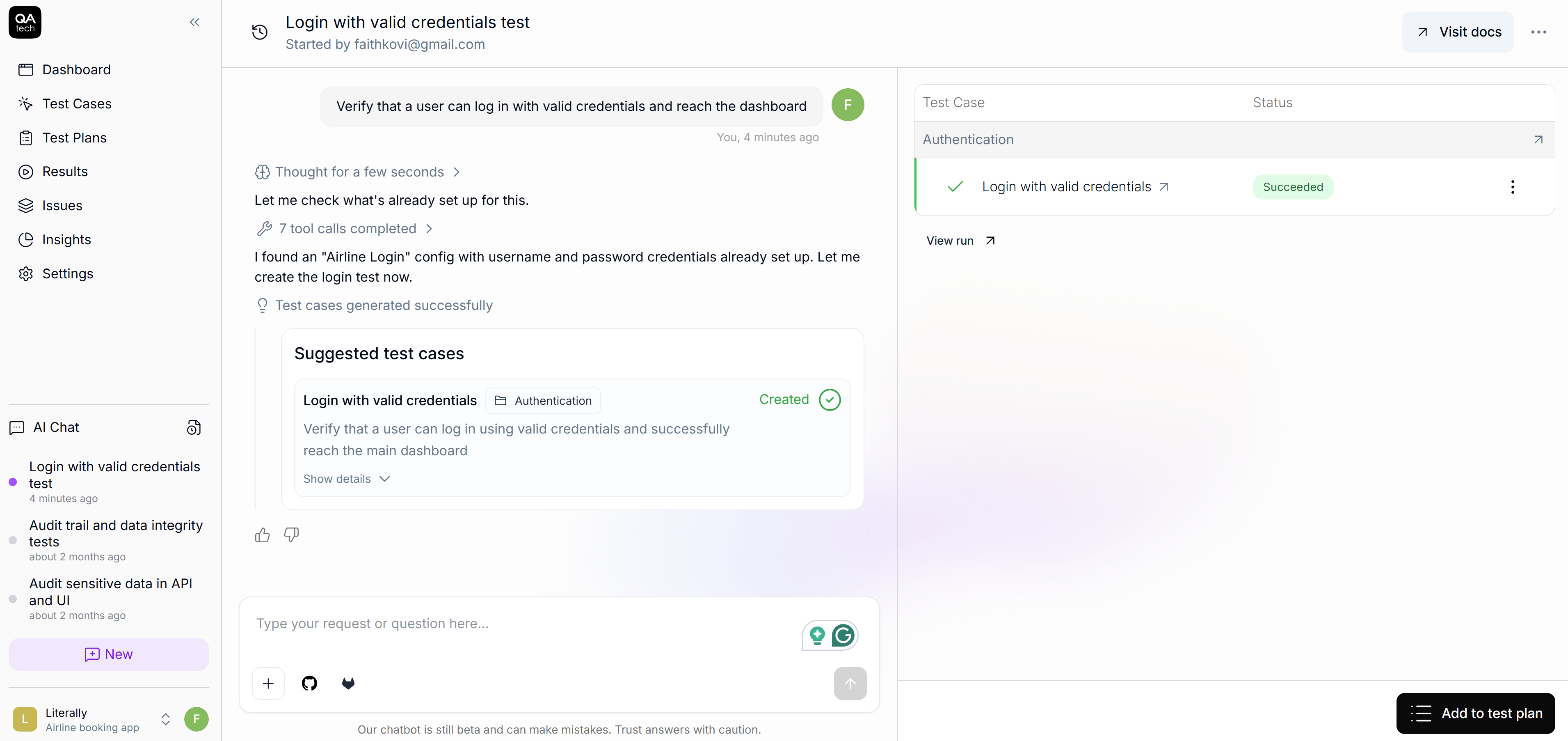
When QA.tech runs this test, the agent opens the application, visually identifies the login form, enters the credentials, submits, and then evaluates whether the outcome matches the expected result.
The agent produces a step-by-step trace you can review after the run:
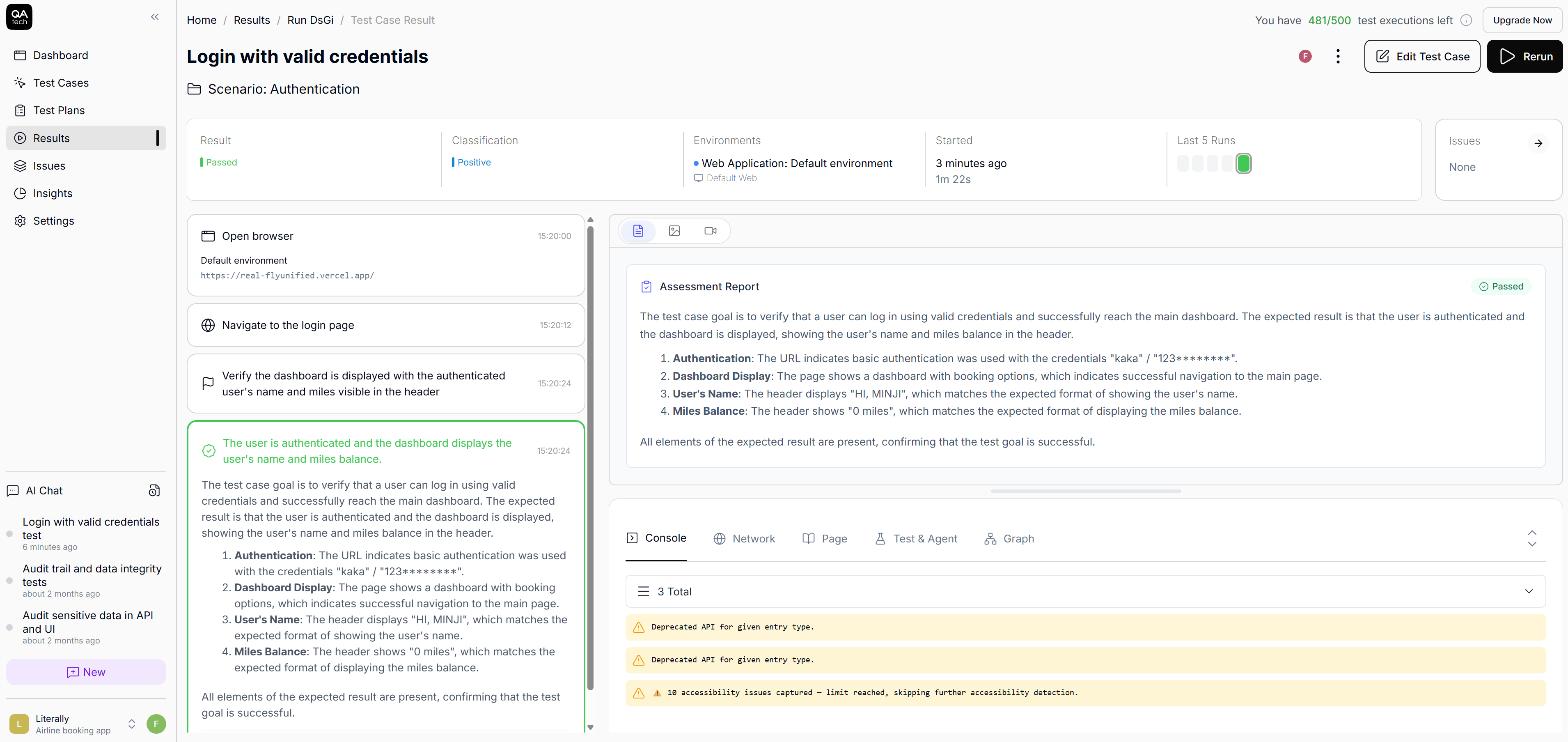
These steps aren't fixed, and if your design team decides to swap the login button from <button> to a <div role="button"> or move the email field above the password field, the agent adapts. If you run the same test tomorrow after making a change in the UI, the agent might take a slightly different path, but it will reach the same goal.
Pros and Cons of Agentic Testing
Below, you will find the pros of agentic testing:
- No selectors to maintain: You are not tied to identifiers when testing, so you don’t need to maintain selectors.
- Adapted to UI changes: When the UI changes, tests don’t fail. The system adapts.
- Accessible to non-coders: You’re no longer blocked by who can write JavaScript or Python. The QA leads, product manager, and even designers can define meaningful tests.
- Exploratory paths covered: Instead of scripting every single path it needs to take, you just tell it what you want to achieve, and it figures out how to get there. It even explores the paths you never thought to test for.
However, agentic testing workflow does come with some weaknesses:
- Highly interactive UIs: Apps that behave like live workspaces (collaborative editors like Notion, for instance) can be difficult for agents to test.
- WebGL heavy UIs: Agents also struggle with WebGL games or WebGL-based UIs.
- Session-to-session UI changes: UIs that are highly dynamic from session to session can reduce the reliability of tests.
Side-by-Side Comparison
Let’s see how these differences are reflected in your day-to-day tasks:
| Dimension | Traditional Automation | Agentic Testing |
|---|---|---|
| Test authoring | Code (JS/Python/Java) | Natural language |
| Element targeting | Selectors (CSS/XPath/data-tested) | Vision + DOM reasoning |
| Maintenance on UI change | Manual script updates | Automatic adaptation |
| Handling popups/modals | Explicit handling code | Agent adapts dynamically |
| Determinism | Fully deterministic | Goal-consistent but may vary in steps |
| CI/CD integration | Mature | Growing (QA.tech supports GitHub Actions, GitLab) |
| Best for | Precise assertions, API-level checks | E2E flows, regression, fast-changing UIs |
Be Practical: Use Both
There’s no need to rip out your existing test suite overnight. Deciding what stays in it is the harder question, and we take a position on it in how big a regression suite should be. A smarter move would be to use each approach where it’s strongest.
For instance, traditional automation can be applied for critical business logic, exact calculations, and APIs. These are stable and well-defined. Plus, they need deterministic precision. Agentic testing, on the other hand, works well for fast-changing UIs and end-to-end user flows. If you're evaluating vendors, start with our roundup of the best agentic QA tools in 2026.
Many teams land on around 20% scripted and 80% agentic testing. However, your ratio will depend on your own product. For instance, a fintech calculating tax to the cent will certainly need more scripted tests than a content platform, where flows are mostly navigational. Remember to take everything we’ve discussed so far into consideration before making your decision.
Wrap-Up
As you can see, neither option is inherently better. It all comes down to your use case. If you need to verify that a currency conversion returns exactly the right value down to the decimal, use traditional automation. However, if you want to make sure a user can sign up, browse products, add something to a cart, and check out across fifty different UI states, agentic testing is the way to go.
Here’s some light reading:
In case you want to understand how the model works, start with What is Agentic Testing?
If you want to see how agentic testing works firsthand, you’ll be glad to hear that QA.tech lets you write your first test in plain English and run it in minutes.
Want to discuss how all this fits your test suite? Book a demo with the QA.tech team.