
In a typical CI/CD pipeline, finding the balance is difficult. An early startup often has minimal checks because the goal is to push changes fast, so bugs tend to slip through. As the company grows and builds a user base, the opposite problem appears: the pipeline slows down due to too many processes. PRs stay open for weeks, and senior devs spend too much time reviewing code instead of doing critical work.
In both scenarios, an AI agent can make all the difference. It keeps tabs on push changes at every stage of your app's growth. Triggered by actions like opening a PR or pushing a branch, it runs regression suites, conducts exploratory PR reviews, and validates performance across devices and environments
In this guide, I'll explain how to integrate the QA.tech AI agent into your CI/CD pipeline. I'll cover the integration process, test modes, benefits, and code privacy, and compare GitHub Actions to GitLab CI/CD. This distinction is important because one has a built-in blocking mode, while the other requires you to write cURL requests.
Ready to smooth out your CI/CD operations? Let's begin.
In case you’d rather jump straight into documentation, though, you can visit this page.
GitLab CI/CD vs. GitHub Actions: AI QA Integration
By integrating an AI agent into your CI/CD pipeline, you can automatically trigger existing QA.tech tests whenever certain actions occur in your project's repo. This works with any pipeline capable of sending REST POST requests, including GitHub, GitLab, Bitbucket, Azure DevOps, and Jenkins.
Fortunately, this integration is super easy. All you need is your QA.tech API token for authentication and the short IDs of the relevant tests. If you’re usingGitHub Actions, you'll also need your project's ID.
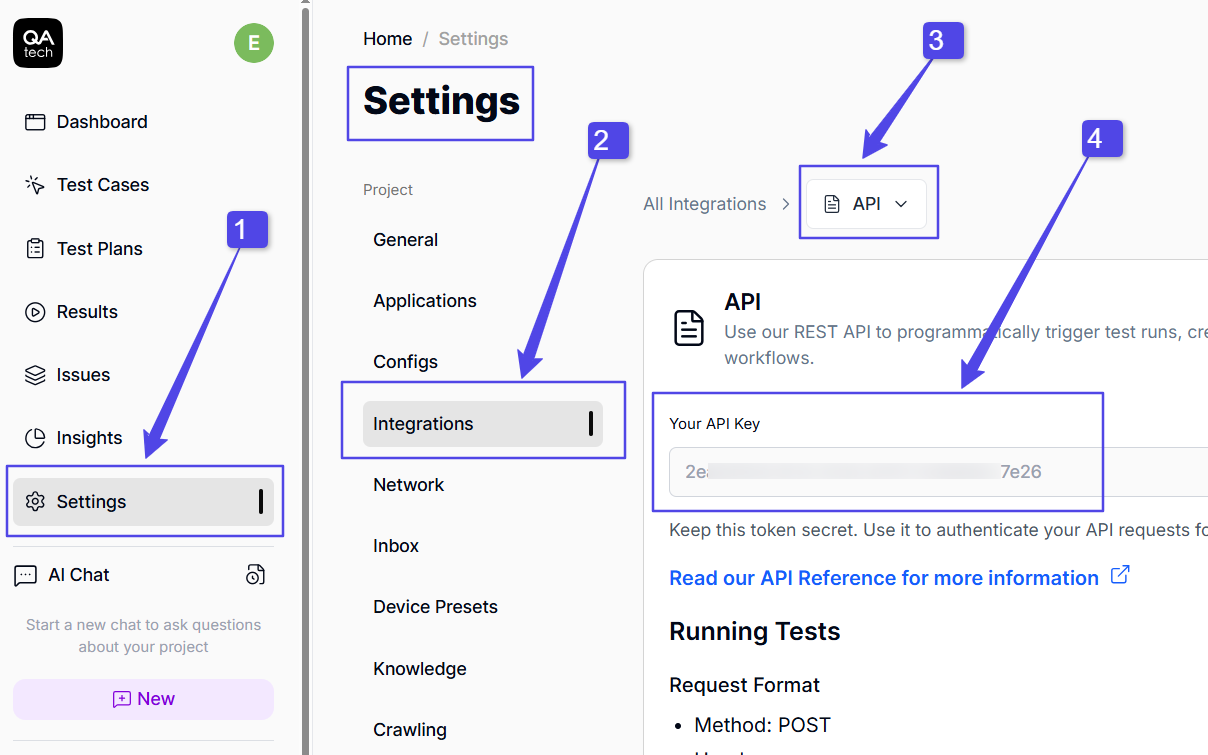
To get the token, go to Integrations within Settings. Then, click API and copy the API key.
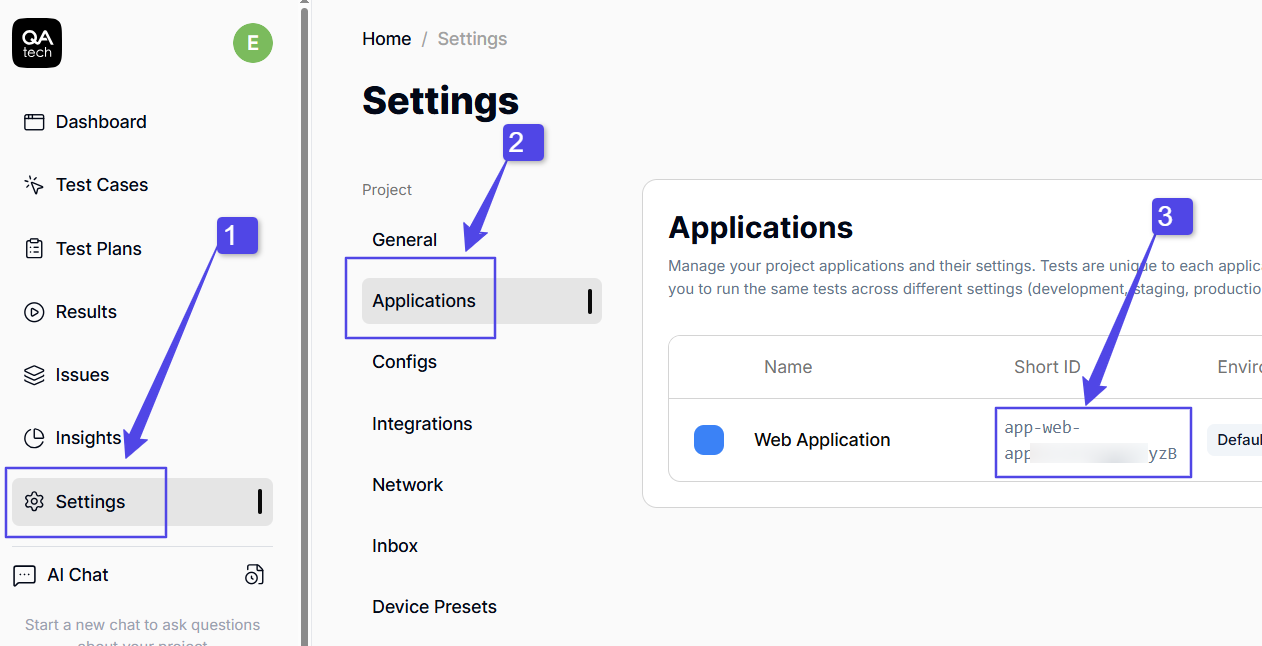
The project ID is found in Applications under Settings. Copy the ID of the application you want to target.
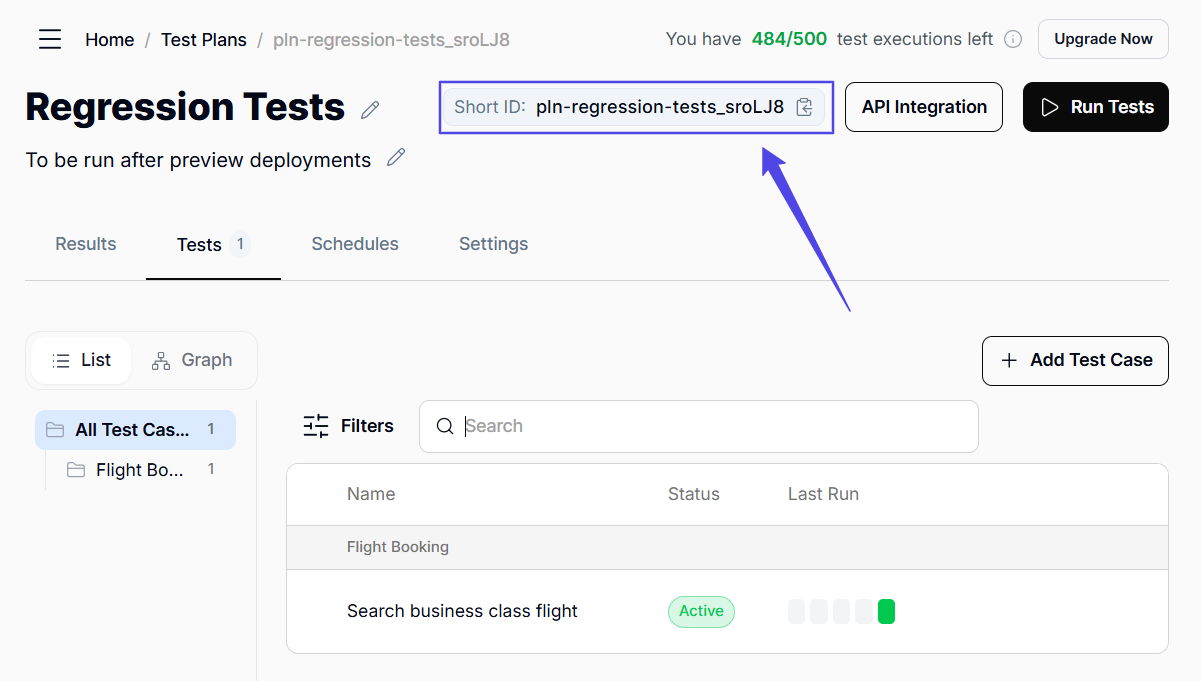
You can get a test ID by clicking Test Plans in the left sidebar, then copying the short ID that appears on the page.
Now that you have all the data you need, you can store the token and project ID safely in your repo.
In GitHub, go to your project’s repo and click Settings. Navigate to Secrets and Variables, and select Actions. Create a new secret with a custom name and paste the value.
When it comes to GitLab, you should go to Settings, click CI/CD, and select Variables. Add a new protected and masked variable with a custom key.
Once that’s out of the way, you'll be ready to run tests from your pipeline. All that’s left is to write the workflows that define when the REST API calls to QA.tech should be triggered.
Overall, the integration of AI into both GitHub and GitLab is very similar. They both let you continuously test deployments to ensure features don't break with new pushes. That said, GitHub Actions is slightly different because it requires a project ID in the workflows. It’s also better to an extent because it lets you avoid dealing with cURL requests if you don't want to.
GitLab CI/CD vs. GitHub Actions: AI QA Implementation Modes
With the agent integrated and your API token stored, you are ready to trigger tests programmatically when certain actions occur in your repository.
The QA.tech API allows you to define exactly what should happen and when. You can configure which actions trigger test runs, select the exact tests to run on each trigger, and specify environment and device presets. You get total control over which test should be executed, when they should run in the pipeline, and how you’ll handle the results.
A GitHub workflow that triggers the agent on pushes to the main and staging branches will look like this:
name: MyApp Tests
on:
  push:
    branches: [main, staging]

jobs:
  test:
    runs-on: ubuntu-latest
    steps:
      - uses: QAdottech/run-action@v2
        with:
          project_id: ${{ secrets.MY_APP_PROJECT_ID }}
          api_token: ${{ secrets.MY_APP_API_TOKEN }}
          blocking: true
And here’s a GitLab example:
stages:
  - custom

trigger_qatech:
  stage: custom

  variables:
    API_TOKEN: $MY_APP_API_TOKEN
    CUSTOM_REQUEST_BODY: '{"testPlanShortId": "pln-regression-tests_sroLJ8"}'

  rules:
    - if: '$CI_COMMIT_BRANCH == "main"'
    - if: '$CI_COMMIT_BRANCH == "staging"'

  script: >
    curl --request POST
    --url "https://api.qa.tech/v1/run"
    --header "Authorization: Bearer $API_TOKEN"
    --header "Content-Type: application/json"
    --data "${CUSTOM_REQUEST_BODY}"
Both GitHub Actions and GitLab support multiple workflow modes, allowing you to define which tests should run when specific actions occur. For instance, tests can be triggered when there is a:
- Push to a branch/stage
- Pull request or merge request on a particular stage/branch
- Preview deployment
- Scheduled tests via cron jobs
Although their capabilities are very similar, GitHub Actions is more intuitive. All you need to do is state the trigger and include the token, project ID, and test short IDs in the workflow YAML file.
In contrast, GitLab requires cURL requests, which can get complicated when multiple steps depend on each other. Also, GitLab requires you to create a new schedule in the repo unlike GitHub, where you can easily set a scheduled time for a cron job.
And another thing: if you are not comfortable with writing requests, GitHub is the way to go. However, if you are okay with writing API calls, and your repo is already on GitLab, then this is the obvious choice. Still, the difference is not that dramatic because GitHub CI/CD also supports direct API requests.
GitLab CI/CD vs. GitHub Actions: AI QA Blocking Mode
You can implement a blocking mode that prevents a workflow from proceeding until a test run returns results. This enables you to act on test outputs, define actions for specific test stages, and avoid pushing breaking changes. Test outcomes can be written in a file, sent to a Slack channel, or used to pause a deployment if tests fail.
Blocking mode is built into GitHub Actions. You just set blocking to true and define post-run actions. For example:
name: MyApp Tests
on:
  push:
    branches: [main]

jobs:
  test:
    runs-on: ubuntu-latest
    steps:
      - uses: QAdottech/run-action@v2
        with:
          project_id: ${{ secrets.MY_APP_PROJECT_ID }}
          api_token: ${{ secrets.MY_APP_API_TOKEN }}

          # set blocking to true
          blocking: true
With GitLab CI and other pipeline types, you have to poll run logic to wait for test results. While this approach is a bit more complex, it still supports post-testing actions.
Whether you use GitHub Actions or GitLab for blocking tests depends mostly on where your project repository currently resides.
GitHub App: PR Review
QA.tech supports PR reviews through GitHub App. The AI agent automatically reviews every pull request opened on a specified branch. It analyzes code diff to find user-facing changes, and it inspects preview deployments to test new or modified user paths.
You don't have much control here, as the process is largely automated. The agent automatically selects relevant existing tests from your QA.tech account and generates some for new paths. The goal is to ensure that new changes work as intended and that they account for edge cases, too.
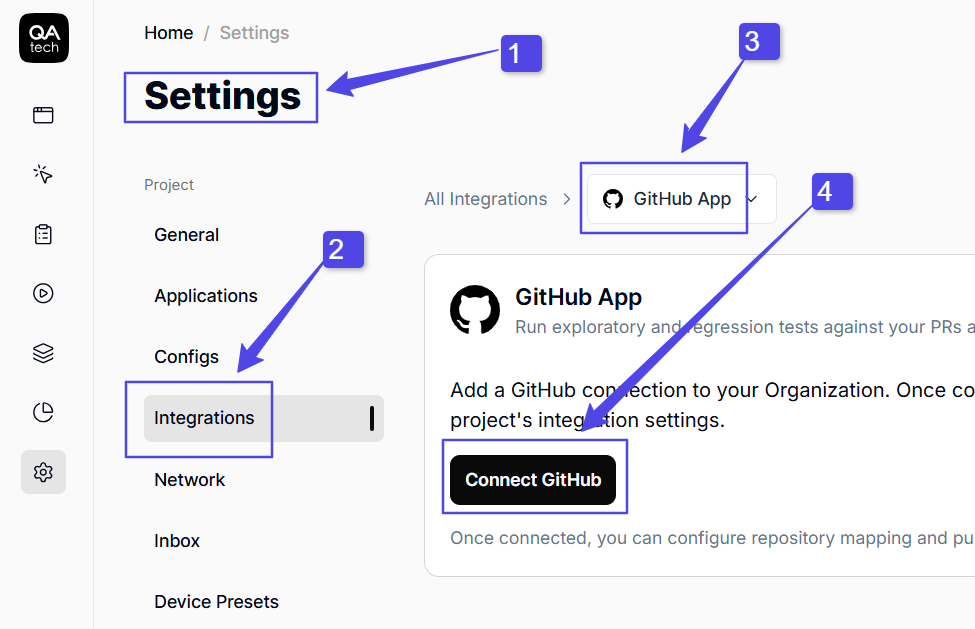
To integrate GitHub App for PR reviews, open Integrations within Settings in QA.tech. Then, select GitHub App and click Connect GitHub. Follow the on-screen instructions, and keep in mind that you’ll have to specify a preview deployment URL.
After each PR review, the AI agent adds comments directly onto your repo's page, with a recommendation to either accept or reject the pull request.
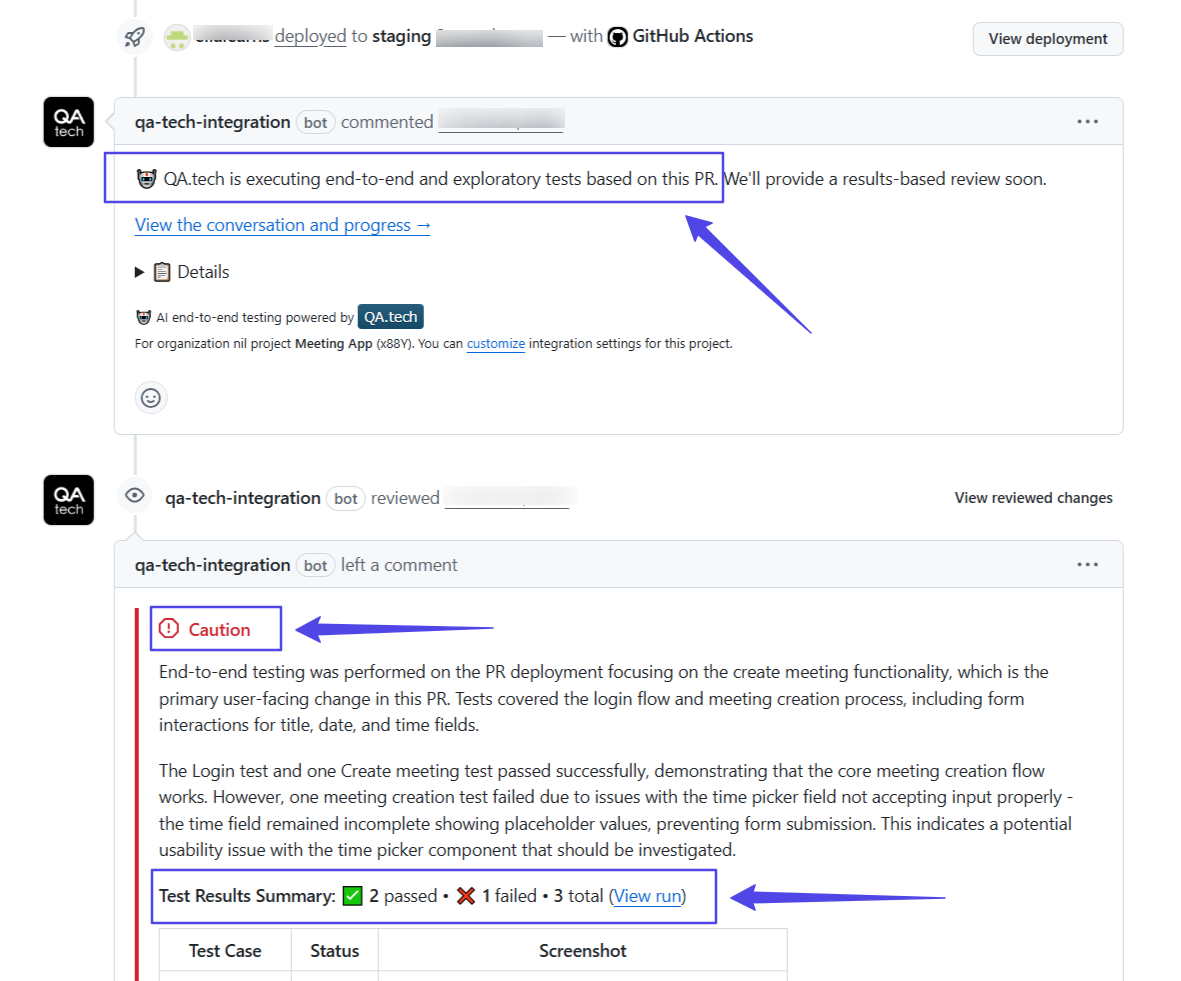
Auto PR reviews give senior developers insight into how new features integrate with the existing codebase. As a result, even if you continue with manual reviews, the time spent on them will be significantly reduced.
GitLab CI/CD vs. GitHub Actions: Which One Is Better for AI QA in Pipelines?
If your team conducts many code reviews and the pipeline has multiple moving parts, GitHub Actions is the better choice. Not only are the workflows easier to set up with built-in blocking, but the GitHub App also supports PR reviews.
Both regression and exploratory tests can run automatically every time a new pull request is opened. That alone takes a ton of workload off your senior team. And even when manual reviews are still needed, it's much easier to identify the issues and understand how to fix them.
However, if your project already lives on GitLab or other CI/CD tools like Jenkins, there's no urgent need to make the switch. Yes, you will have to write the cURL request, but it should be manageable. Plus, you can often duplicate it and slightly modify it for other workflows.
As for automated merge request reviews, they are missing at the moment, but don't worry. Our team is working hard to bring this feature GitLab projects soon.
Benefits of AI QA in Your CI/CD Pipelines
As a project grows, CI/CD can become a maze of processes and reviews that demands hours of dev time. Often, developers spend more time maintaining regression suites and reviewing pull requests than actually coding or building new features.
Essentially, integrating AI into your CI/CD pipeline will take a ton of tedious work off your hands, saving you both time and money. But there are even more specific benefits your team will enjoy if you decide to add QA.tech to your deployment pipelines:
- Automated regression tests: QA.tech generates tests based on your app's UI and automatically updates them when there are changes. As a result, there will be no more struggling with maintaining flaky E2E test suites.
- Test code at every deployment stage: You can define test plans that automatically run at every stage, including branch pushes, preview deployments, and smoke tests.
- Multiple test environments and devices: Your team can easily test for multiple environments and devices, including both desktop and mobile screens.
- Auto-review PRs: With agentic exploratory tests, you can get an overview of how a new PR fits into the existing codebase. As a result, you’ll be able to see and fix breaking changes immediately.
- Auto post-run actions: QA.tech lets you use blocking mode to pause a workflow while tests are running in the background. You can also set up post-run actions, such as Slack notifications and status page updates.
Your Codebase Remains Private
The QA.tech agent never analyzes your entire codebase. Instead, it inspects deployments. Since the agent runs your app and completes flows like a real user would, every test triggered in the CI/CD pipeline requires a deployment. This keeps your actual code private, streamlines your pipeline processes, and greatly reduces the number of bugs that reach users.
Ready to integrate an AI agent into your CI/CD pipeline? Get a demo to start.
Related reading
- QA Agents for E2E Ecommerce Testing
- Mobile Testing
- AI in CI/CD Pipelines: Boost Test Efficiency & Predictive Quality Assurance
- Automating QA with AI in GitLab CI/CD: A Step-by-Step Guide
- AI Testing in CI/CD: How to Run E2E Tests on Every Pull Request
If you are weighing managed AI testing platforms, here is how QA.tech compares with Mabl.