How AI QA Tools Understand Your App: Moving Away from Scripted QA


If you’ve been in QA or development long enough, you probably know what it feels like when you push a feature, and minutes later, your email inbox lights up with notifications.
You rush to check the logs, expecting a legitimate logic error, but instead, you find multiple E2E tests failed just because of an update in a CSS class. The app works fine for the user, but your test suite thinks the application is broken.
This is the reality of broken tests in QA, and honestly, we’ve put up with it for long enough. Luckily, there’s a shift in how we approach this problem: you’re no longer asked to write test scripts, you’re expected to tell AI what to test.
Let’s see how AI has changed the way we understand and test applications and how it has helped us move away from the world of scripted testing.
The Problem With Scripted QA
Before we focus on how AI understands your app, let’s see how traditional test automation works and which pattern it follows.
It’s generally simple. You write the test script on what exactly to click, type, and expect, something along these lines:
cy.get('#email').type('test@test.com')
cy.get('#password').type('ps123')
cy.get('#login-button').click()
cy.get('.success-msg').should('be.visible')
And it all works perfectly until someone changes the class from “login-button” to “login-btn”. Now your test is broken, even though the login itself still works.
So, the fundamental issue here is brittleness. These scripted tests are tied to implementation details like implicit or explicit waits, data attributes, CSS selectors, XPath queries, etc. When a developer changes or refactors the code or when someone reorganizes the DOM structure or updates the class names, your tests break.
And here’s what makes it frustrating: scripts that are tested successfully in the dev environment may fail in production due to other factors beyond code quality. A failure could be caused by race conditions or improper JavaScript initialization.
Unsurprisingly, this results in a loss of trust. When your QA team raises a failure in such circumstances, your developers will begin questioning whether it's a genuine bug or a flaky test. And when you stop trusting your tests, you’re back to manual verification before every release.
How AI Understands Your App
So, how does AI solve this problem? The short answer to this is context.
Think of how you look at a page. You don’t inspect each element; rather, you scan visually, looking for a “Submit Form” button with input fields, for instance.
Today, AI-powered test automation tools, such as QA.tech, can perform actions in a similar manner to a human engineer. These solutions don’t depend entirely on the syntax from the code base. Instead, they build a fundamental structure of your application. The AI analyzes how elements relate to each other, thereby recognizing the pattern across your interface.
Here’s what it looks like in practice:
- An input field with the “Email” label is used for entering an email address, regardless of what the input field’s ID is.
- If there is an icon of a trash can in the list row, it most likely deletes that row from the database when clicked.
An AI system looks at multiple signals: how your UI is structured via the document object model (DOM), how it looks through visual properties, and how it provides access for assistive technology via accessibility labels. AI generates a complete semantic representation of your application. It knows what elements do, not just what they're called in the code.
Learning the App’s Behavior, Not Just Its Structure
Still, the structure is only a part of the problem. Real apps are used in real, often unexpected ways that rarely match what the original test suite anticipates.
AI agents go a step further by observing actual patterns in your app’s behavior. Instead of just taking screenshots like an automation tool, they learn the flow. For example, many users skip the homepage and jump directly into search, or they apply filters and only then open the product to see details.
Scripted tests only check what you’ve explicitly told them to test. Anything outside those defined limits is guaranteed to be missed. Tools like QA.tech, on the other hand, allow you to integrate AI agents directly into your pipeline and monitor your pull requests (PR) automatically, whenever you push any new feature, like a filter system or UI update (you can find more details on integrating AI agents to test your next pull request here).
The difference in both approaches is obvious:
Keeping Tests Stable Despite UI Changes
Let’s go back to our scenario, where we discussed what happens when someone changes a CSS class of a login button.
With traditional scripts, the test would fail unless you manually updated the selector. And if you have 50 tests that click the Submit button, you suddenly need to update all of them.
In AI-driven testing, things work differently. If an ID is missing, the system can still identify a button with the "Submit" text in roughly the same place, performing the same task as before. In most cases, the test still passes. That’s what people usually mean by resilience (and it’s something QA engineers often lack in traditional testing).
None of this is magic, though. It’s simply pattern matching combined with user intent, which is why these tests remain stable through code refactoring, design system updates, or changes in the component hierarchy.
That said, they still have some limitations. If you completely redesign your system workflow (for example, moving your 1-step payment checkout process to a 2-step process), you’ll need to update your prompt according to the new flow. Those cases are flagged by AI and still require human judgment, not just automation.
What Testing Looks Like in the Real World
But where do we start? How do we go from “no tests” to “full coverage” without writing any code?
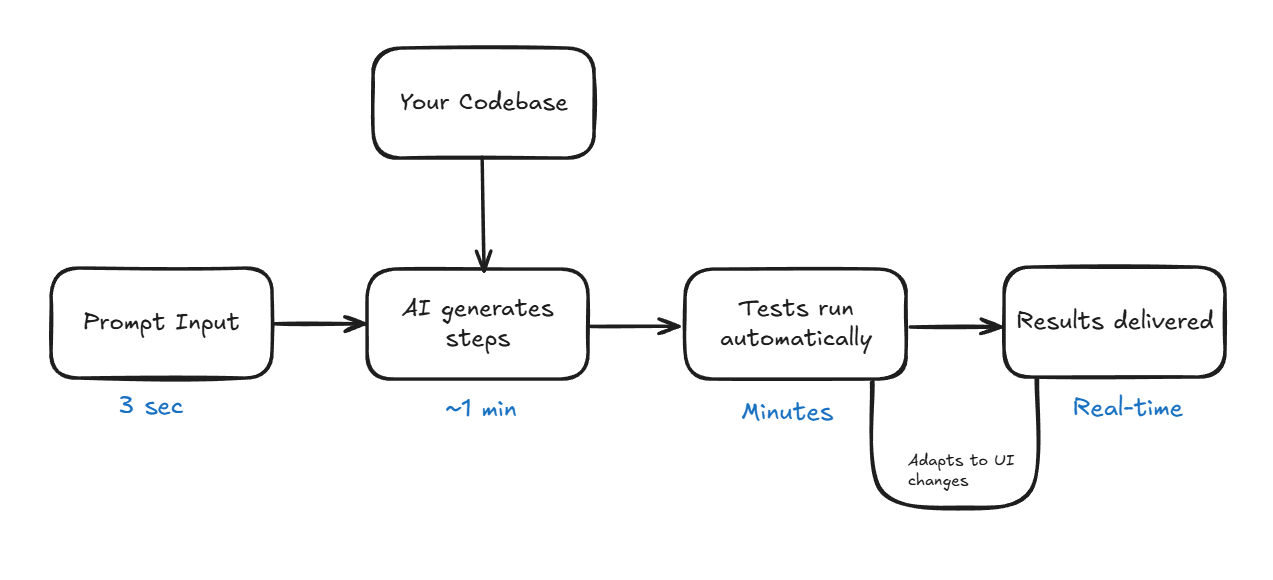
The answer is simple: get practical. Below is a realistic walkthrough of how to use AI testing tools like QA.tech:
- You write prompts: Start by describing what you want to test based on your system flow. For example, if you want to test the checkout flow from the cart through the payment page to the final confirmation, your prompt should be phrased something like this: “Test whether the user can check out the items in a cart, move to the payment page to complete the payment, and see a confirmation message.”
- AI generates the test: Tools like QA.tech analyze your application and recognize the supporting processes to generate the specific test actions you want to conduct. All these steps are visible in the dashboard.
- Tests run automatically: Tests are executed by the agent while still being a part of your development pipeline. When a bug is detected, you’ll get a detailed report, as well as console log, network requests, screenshots, and steps to recreate the issue.
- You get reports and results: When a test fails, you’ll receive all the necessary debugging information, such as an explanation of the action taken, what was expected, what happened instead, and complete context about the current application state.
QA.tech provides test reports that integrate directly into your workflow. If you’re using the GitHub App for PR Reviews feature, detailed comments appear right in the pull request. In addition, reports can be exported to tools like Jira, Linear, and more.
Where Does This Fit in Modern QA Workflow?
AI testing isn’t meant to replace your testing strategy entirely. Your testing pyramid still applies: unit tests provide a rapid, low-cost way to verify isolated code functionality, integration tests ensure APIs work perfectly, and exploratory tests let the team evaluate UX and edge cases that require human judgment. AI testing takes care of the E2E layer (the repetitive work of verifying user flows).
Nevertheless, humans are still essential for complex business logic that requires domain expertise, security testing with realistic attack scenarios, accessibility nuances beyond technical compliance, and UX judgment calls. AI handles the grunt work, and humans focus on the strategy.
GitHub Integration
Tools like QA.tech integrate directly within your CI/CD pipeline. When you submit a PR, an automated QA bot reviews your code within moments of submission and provides a complete test summary as a comment, for example:
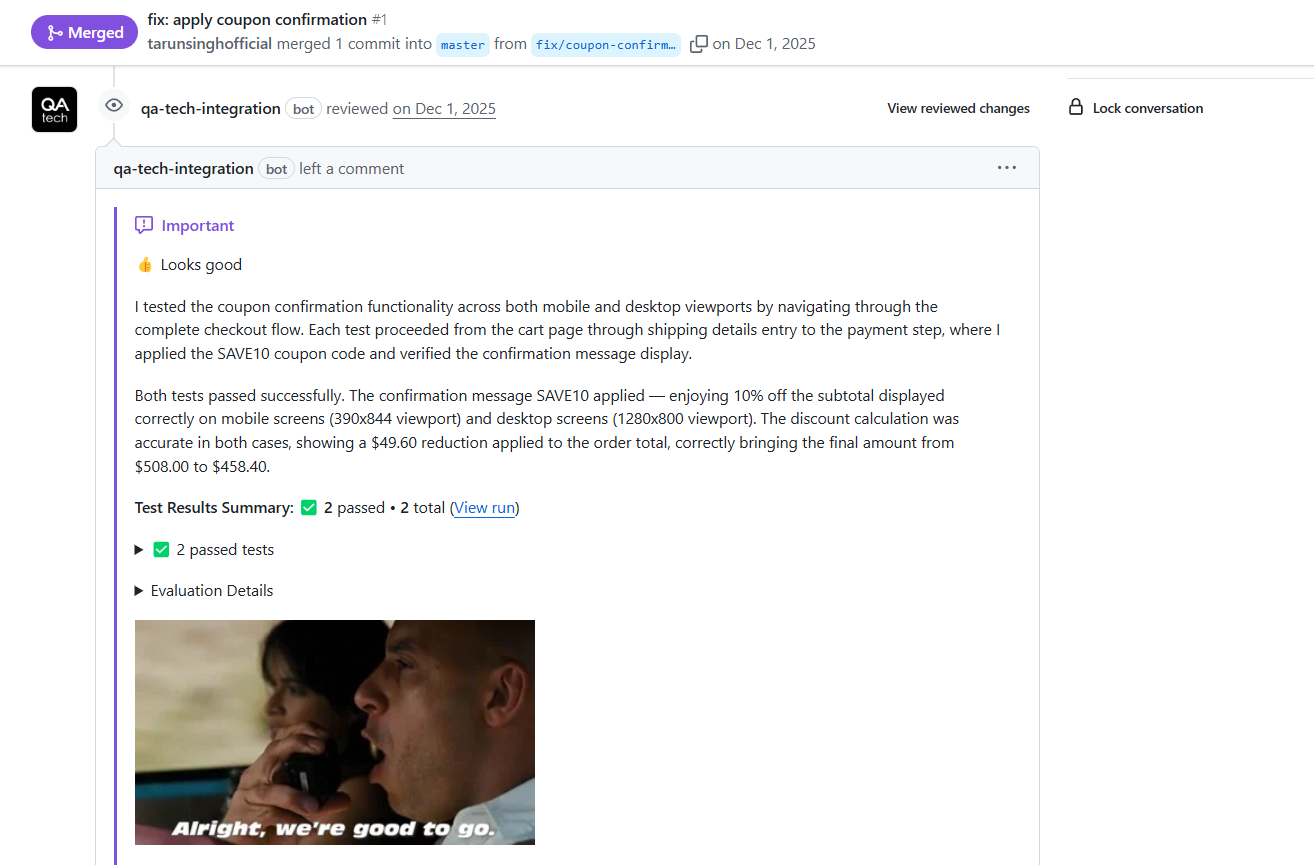
This allows you to move faster, catch bugs before they’re merged, and get early feedback.
What to Expect Next?
The future of QA isn’t just about writing test scripts; it’s about building autonomous systems using AI tools that can understand your software like a human would.
If test maintenance is eating your dev time or teams are hesitant to refactor, integrating AI tools into your workflow is a no-brainer. Similarly, if you’re constantly shipping new features, AI makes practical sense.
The whole process of adding AI into your existing QA workflow is simple: define a few key user journeys you want to test, integrate the AI agent with your CI/CD pipeline, and let it start observing your application. Most teams see their first tests up and running within a single day.
Want to learn how you can integrate AI in your workflow? Book a demo with us, and we’ll walk you through your specific use case.

Stay in touch for developer articles, AI news, release notes, and behind-the-scenes stories.