
We’ve all been there: you dread refactoring a function because you know that a line change will cause existing tests to break. Therefore, you pass over code that doesn’t handle every edge case because including new ones means your 100% coverage metric will drop.
And that’s how teams end up with a codebase that boasts complete test coverage, yet multiple new issues pile up every day, and users can’t stop complaining about bugs.
In this guide, I’ll explain why 100% coverage is a vain metric that pushes brittle tests and why it should not be the goal of development teams. Don’t worry, though, I’ll also include alternative metrics and tools like QA.tech that reveal a lot more about your code.
Let’s begin.
What Exactly Is 100% Test Coverage?
100% test coverage means that every line in a codebase was hit during the execution of a test suite. It’s typically applied to unit and integration tests to verify that no part of code was untouched during a test run.
But coverage doesn’t say anything about the quality of used assertions, the tested scenarios, or the considered edge cases. It only indicates what code was NOT tested. Working out which scenarios are missing in the first place is a different job, and it’s the one generating test cases with AI is actually good at.
There are several types of test coverage:
- Line coverage measures the lines that are run during a test. Say you have 500 lines of code and 400 have been exercised in your tests: you have 80% line coverage.
- Statement coverage tracks the statements that are executed during a test.
- Branch coverage checks how many decision paths (typically decided by if/else/while statements) are taken.
- Function coverage indicates how many functions are called. If you have 50 functions and 45 have been called in a test run, then you’ve reached 90% function or method coverage.
Code coverage actually provides more than one benefit. Sure, it reveals test gaps in your code, which is a good indicator of where bugs may show up. However, it also reduces regression breaks because existing tests run every time you push new changes.
Still, even though test coverage is an important metric to track, aiming for 100% should not be the target of development teams, and we’ll finally get into the reasons why.
Why Is 100% Test Coverage Not the Target?
Test coverage is considered to be a vanity metric for several reasons. Let’s explore why.
100% Coverage Pushes Implementation-Dependent Testing
When devs focus on hitting a coverage metric, they usually end up testing how code is written, not how it should work. Obviously, if they’re going to hit every line in a test run, the cases have to follow every line closely. That’s implementation-dependent testing, which encourages brittle tests that are tightly coupled to code.
Refactoring a function could mean dozens of unit cases failing and hours spent fixing them. And, if your new implementation requires adding more lines, your once-perfect coverage is bound to drop from 100%.
Coverage Does Not Test Code Quality or User Experience
Test coverage does not indicate whether the code or business logic aligns with user workflows. If their aim is to hit the 100% mark, devs can simply write happy-path tests that check expected scenarios or shallow tests that assert that a function hasn’t returned null.
Consider this example, where a function returns a savings amount based on the input:
def savings_amount(amount: float) -> float:
    if amount <= 1000:
        return amount * 0.10
    return amount * 0.20

def test_savings_amount():
    assert savings_amount(500) == 50
    assert savings_amount(1500) == 300
The code quality is low. It doesn't handle negative numbers, floating-point precision, and related features. Yet the test has reached 100% line and branch coverage.
Test Coverage Does Not Measure the Quality of a Test Suite
A quality test suite is highly maintainable, covers critical paths, and achieves isolation among tests. The problem is that there's no way for coverage to measure this.
A test suite can achieve 100% coverage and still be brittle or filled with flaky tests. Every line of code can run in the suite without accounting for complex scenarios and edge cases.
Some Code Is Hard to Test, Making 100% Coverage Unrealistic
After every line and method has been run, test coverage can be stuck at 90% or 95%. That’s because some lines of code are difficult to test or mock (think SQL Server connections and middleware).
Some teams compromise by lowering the benchmark to 90% or 85% coverage. However, when 100% is non-negotiable, devs may resort to tricking the system by creating useless assertions.
100% Coverage Keeps Devs Writing Unending Unit Tests
Test coverage involves devs writing and rewriting unit tests. Is there a new function? Write a test for it. Did you change two lines of code? Well, refactor the three unit tests that call those lines.
In a fast-paced startup where speed-to-market is crucial, endlessly refactoring unit tests is just too expensive. Plus, codebases grow and become more complex, which leads to maintenance hell over time.
The pain of writing unit tests might discourage devs from re-thinking and optimizing their code, and projects may end up missing deadlines.
There Are More Important Metrics than Test Coverage
Coverage tells you that every line or every function ran in a test. Nothing more, nothing less. Other metrics reveal much more about a codebase. Think about assertion density, decision coverage, and change failure rate.
Therefore, 100% test coverage alone shouldn't be the goal (or the sole reason a PR breaks, for that matter).
What Should Teams Focus on Instead? (Better Alternatives)
Dev teams should consider other factors and use alternative tools that provide deeper insight into their code. I'm not saying you should ditch coverage entirely; just don't aim at 100%. Also, combine this metric with others.
Coverage targets are one reason suites grow; we've made the case that a big regression suite is a liability regardless of what number the report shows.
Consider these alternatives to tracking unit test coverage.
Focus on User-Driven Testing, Not Implementation-Driven Testing
The most important thing to test is the user implementation of your app. Instead of focusing on unit and integration tests that tell you little about UX, create user-driven end-to-end tests that check user flows.
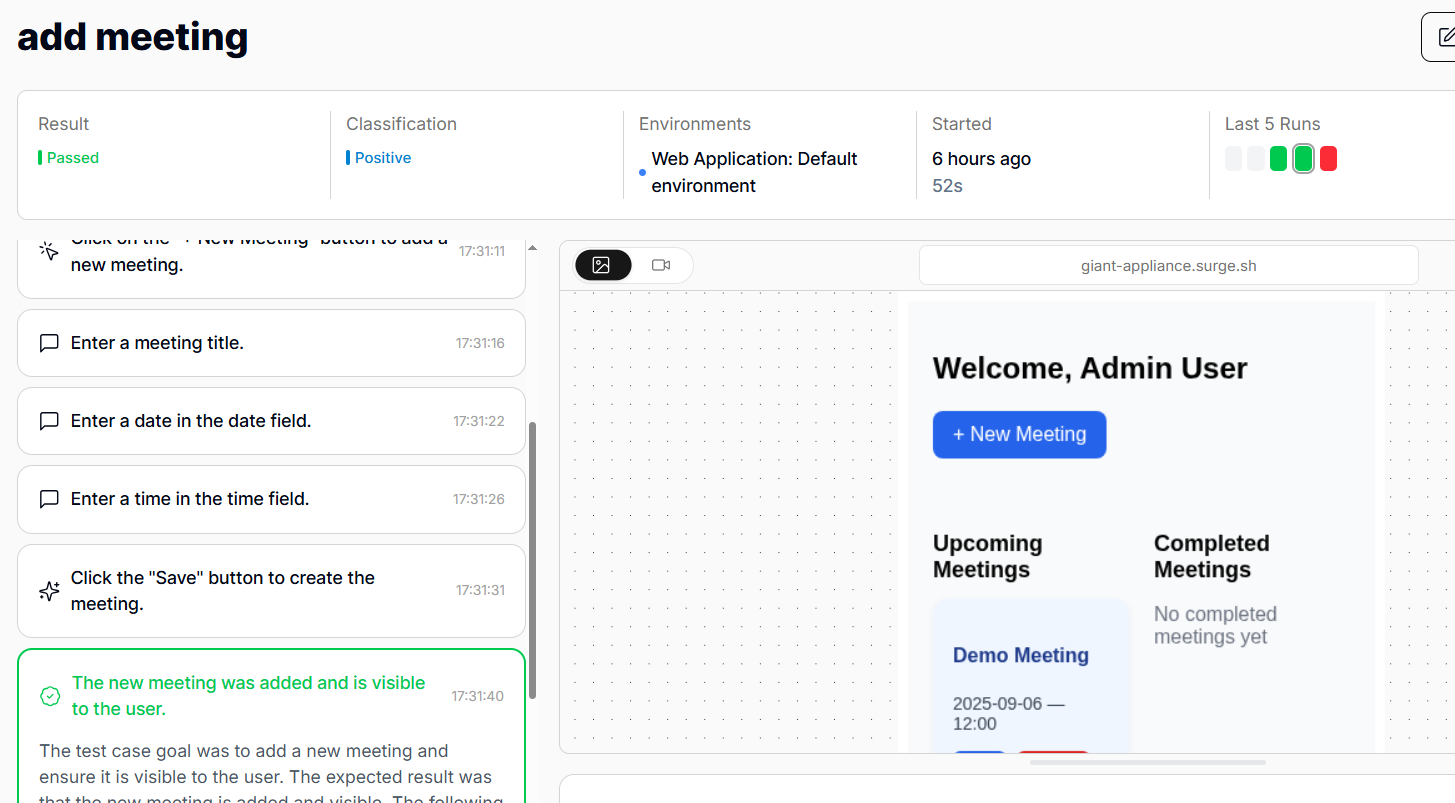
That way, devs can easily refactor when there’s a bug. They will know what failed in the system and what needs to be fixed. The focus will be on goal-driven testing, which will serve as a guarantee that no user runs into an unhandled error. That alone sets your app up for success in an already oversaturated software market.
Visualize Test Dependencies and User Flows
In a user flow, each step depends on the one before it. In a test suite, however, it may be difficult to see how tests share data and depend on one another.
However, QA.tech has a knowledge graph that tracks test dependencies. You can clearly see what steps and states are required before the next one. For instance, in the example below, a logged-in state is the first condition, and the test runs only if the previous step passes.
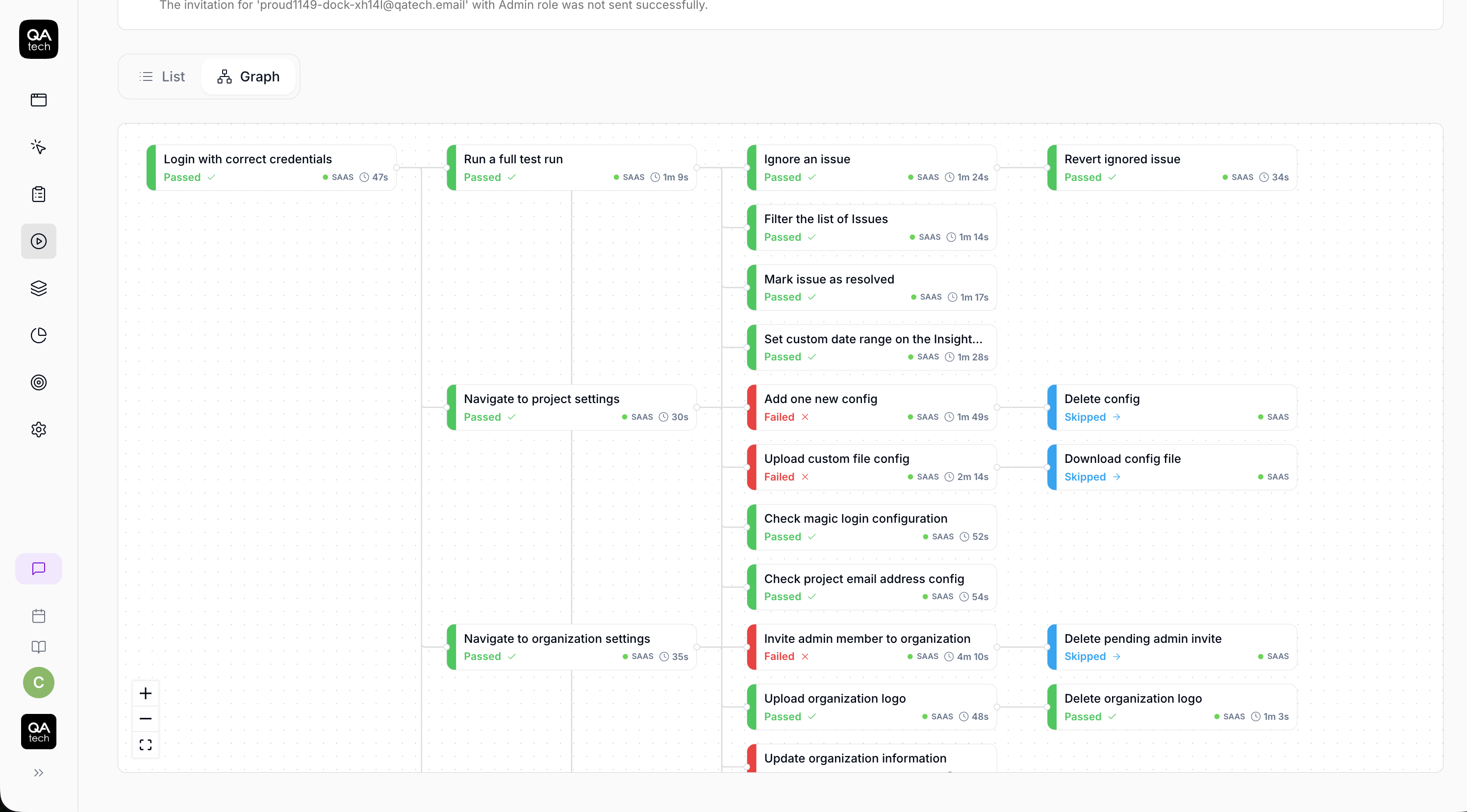
Visualizing test dependencies helps you identify the root causes of bugs in E2E tests, and you can prioritize failures. If you have a dozen failing tests, you can figure out which ones to fix first based on their positions in the knowledge graph.
Test Critical Paths to Build Confidence, Not Coverage
To push changes with confidence, you need to be sure the code works as required and meets user expectations. Also, in a startup environment where speed is essential, you should start by testing critical paths.
Create tests that cover the user flows that are most likely to cause expensive bugs, such as those that lead to crashes or customer loss. This way, even though you’re not targeting mere coverage, you are pushing code with confidence, knowing that specific paths are protected no matter what.
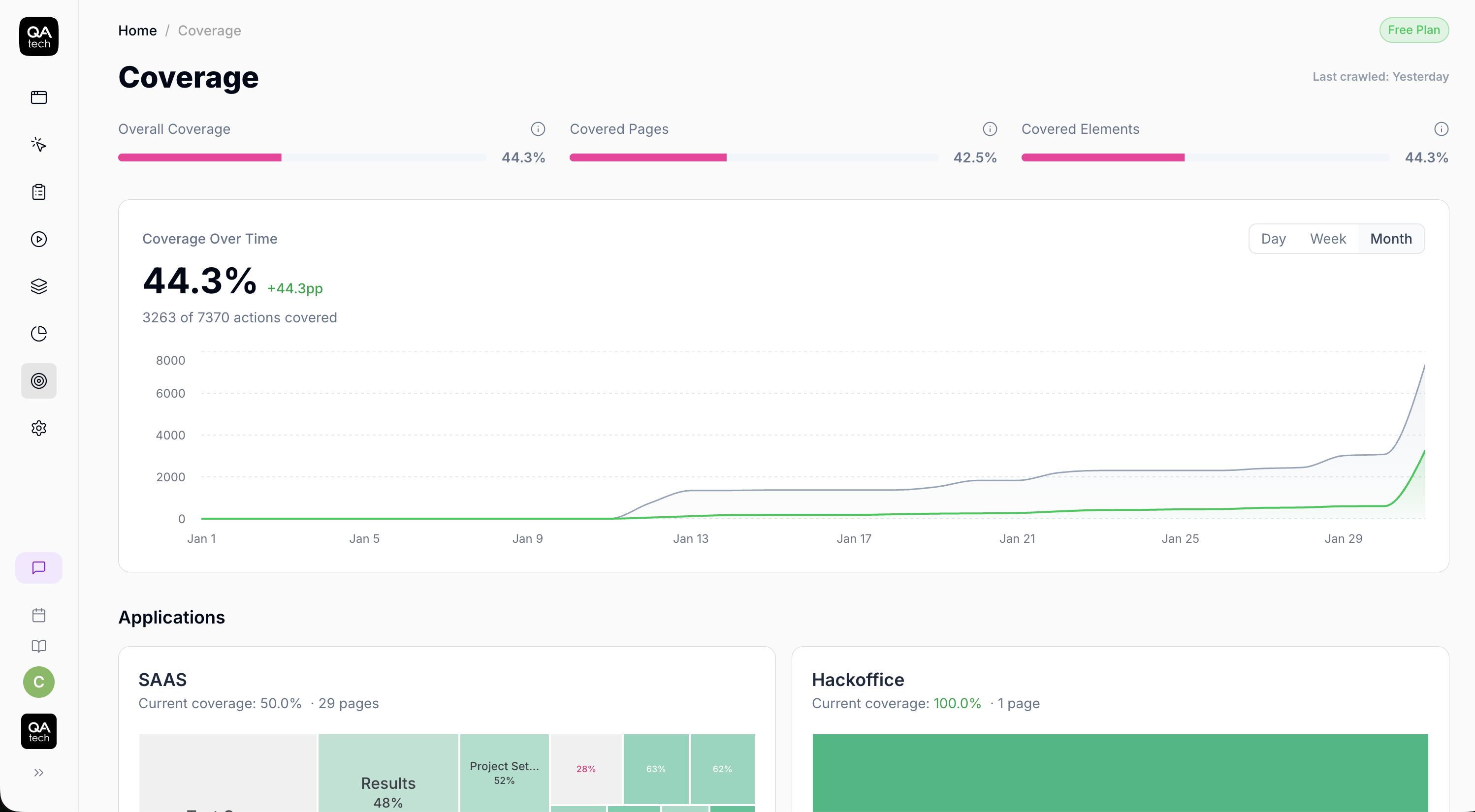
Plus, you can use QA. tech to monitor coverage, not for individual test cases, but for user actions.
Generate Test Cases with AI Agents
One of the reasons why some dev teams resist 100% test coverage is that it requires constant updates to the test suite. However, you can incentivize devs to push for more coverage by introducing AI agents that can generate test cases.
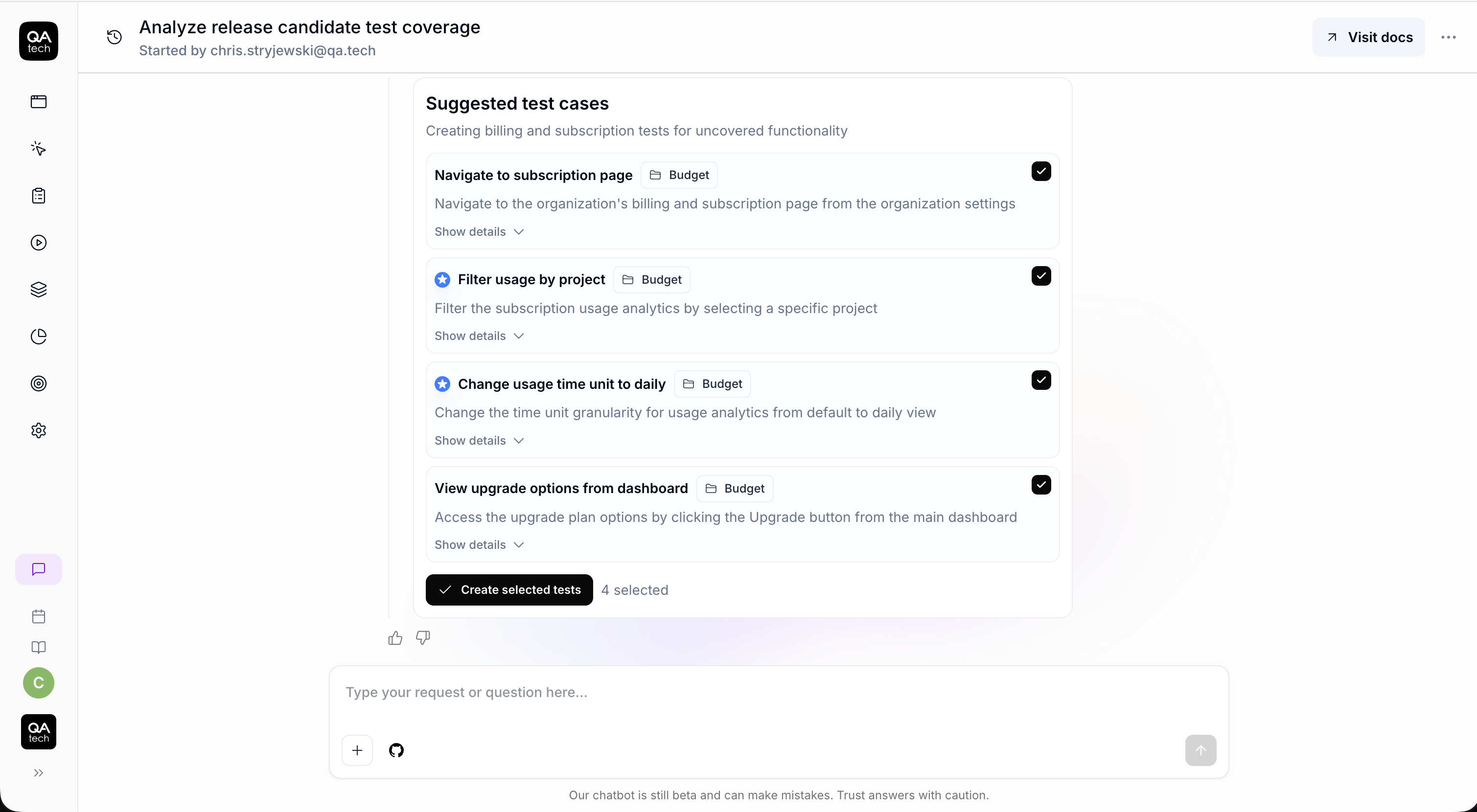
Gone are the days when devs had to work with brittle path selectors that break every time an element shifts. Now, QA.tech’s AI agent can suggest and generate test cases and complete suites after each repo push.
Set a Reasonable Test Coverage Threshold
Generally, monitoring test coverage remains a beneficial practice, particularly for teams focused on scaling and optimization, where internal implementation is critical.
However, in such cases, it’s wise to set a reasonable threshold and leave it at that. Educate your developers on the importance of maximum test coverage and encourage them to strive for it, but set your target in the 70%-80% range.
Final Words
Instead of enforcing arbitrary coverage metrics, you should focus on verifying that users can navigate your app without issues.
Many teams shy away from E2E test suites because they are the hardest to build and the most time-consuming to maintain. Plus, there’s a high level of flakiness.
Fortunately, with agentic AI testing, all that hassle is gone. If you're comparing vendors, see our guide to the best agentic QA tools in 2026. Agents interact with your app like real users and notify you of any issues. Even better, they can be integrated into your CI/CD pipeline for critical regression tests.
With QA.tech, you can set up and run an entire suite of E2E tests in under a day. Book a demo today to find out.
For teams used to framework-based testing, here is how QA.tech compares with Cypress.