

With AI coding tools like Cursor and GitHub Copilot, your team is shipping faster than ever. What used to be done on a weekly basis is now done daily, sometimes even multiple times a day. However, when it comes to the QA side, they haven't really kept up with this pace.
For most organizations, there's a growing disconnect between how fast you can write code and how fast you can test it. This, again, creates a huge risk of production incidents. And every week, that gap widens.
If you're a CTO watching your team ship features at a fast pace with QA still catching up, this guide will show you how you can close that gap with a practical, scalable agentic QA strategy.
Why "Hire More QA" and "Write More Scripts" Don't Scale
When QA becomes a bottleneck, the instinctive response is often to hire more QA engineers. On the surface, that may make sense. However, AI-assisted development/coding means a single developer can now generate code at two or three times their previous pace. This is much faster than what humans can realistically test, so hiring more QA testers doesn't seem like the best solution for dealing with this gap.
The next logical step teams try is script-based test automation since it does scale better than manual testing. But it comes at a cost: a maintenance burden that grows alongside your codebase. Every change has the potential to break something in your test suite, and you will end up spending more time fixing tests than actually writing them.
Even if you combine both approaches, you won't address the real issue: QA is still dependent on human decision-making per test. For every new feature, somebody has to decide what to test, write the test, maintain it, interpret the results, and figure out whether a failure is a real bug or just a flaky script. This whole process doesn't scale with AI-driven development.
This is where agentic QA enters the picture. Instead of using scripts that follow pre-defined steps, this type of testing uses AI agents that understand user intent. They can navigate your application like a real user would and adapt when there are UI changes.
Agentic QA Rollout
As a CTO who is considering implementing agentic QA in your QA team, having a strategy without a timeline is not ideal. So, here's a phased playbook drawn from real POCs that engineering leaders can realistically execute.
Phase 1: Technical Validation
Pre-POC Preparation
Before you kick off the process, you should make sure the following prerequisites are in place:
- Access to a staging or test environment (a URL is enough to start with)
- Dedicated test credentials (never production)
- Any firewall or IP whitelisting your network requires (for example, Cloudflare or network restrictions)
- A designated POC owner on your side and a shared Slack channel for day-to-day communication
- A clear definition of what "good" looks like that's been agreed on in advance so that you have something to measure against
Then run the validation:
- Start small by picking out 1–2 user journeys from a single application. Choose the ones that are critical and have the highest traffic. It could be your user onboarding or checkout flows.
- Have a kickoff call to make sure you agree on goals and best practices.
- Crawl the application, then build the first test cases with QA.tech's solutions engineer working alongside the customer team.
- Choose one or two internal people with a clear goal.
- Treat your agent like a new hire if you want it to work well. Remember, it needs onboarding and context.
- Recreate 10 of your existing end-to-end tests as agentic tests (this can be done in minutes) and run both suites in parallel.
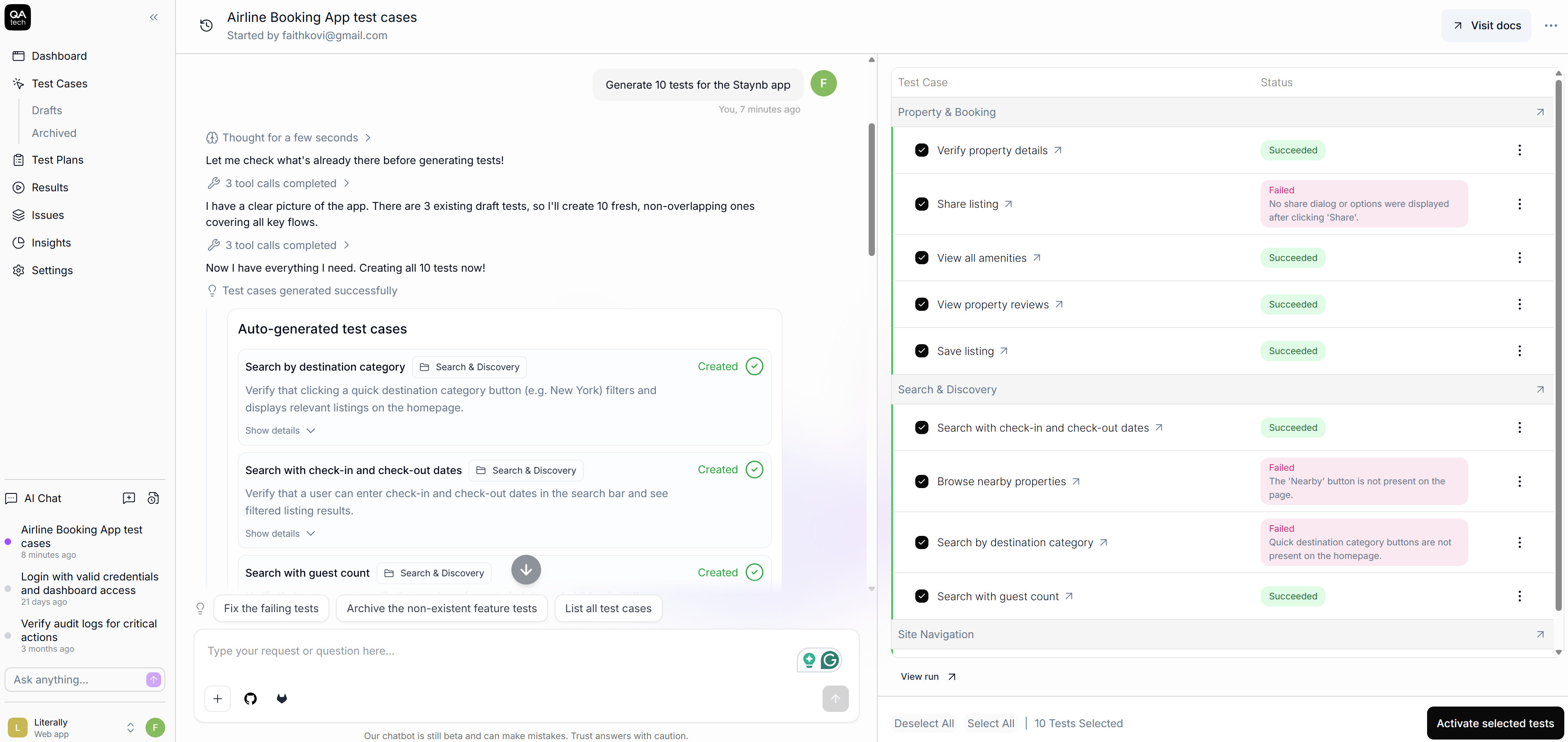
Creating an agentic test in QA.tech
With this, you will be able to build a baseline and measure three significant aspects: how long it takes to author each test, how many maintenance events each suite triggers, and what the false-positive rates are.
Soon, you'll likely see what companies like Upsales have discovered with QA.tech: test creation time drops from days to minutes when you describe tests in plain language rather than scripting every process. That's generally your signal that you are ready to move forward.
Phase 2: Proof of Value / Limited Rollout
Once you've established your baseline with Phase 1, you can now expand your coverage to two or three additional product areas by:
- Building out a regression suite from the initial user journeys, adding more flows as you go;
- In larger organizations, bringing in engineers from other teams so they can see the agent working in their own domain;
- Investing roughly an hour a day (far less than Phase 1) to evaluate results and iterate;
- Starting to take down script tests where the agent coverage is reliable; after all, there's little value in maintaining two systems for the same coverage;
- Holding mid-POC check-ins to address obstacles and keep momentum;
- Tracking the time your QA team has saved, along with the number of bugs caught before production that your previous test suite would have missed.
For example, Pricer, a global electronic shelf label provider, saw this kind of improvement. Now that they've integrated AI-driven test automation into their deployment pipelines, they save roughly 320 hours of testing every quarter.
Phase 3: Full Organizational Rollout
By this point, agentic tests are gradually becoming your primary end-to-end suite.
- Start with an internal growth model by getting one person or team genuinely excited. Let them see the real results, and then FOMO will drive the organic spread to other teams.
- Integrate agentic tests into your CI/CD pipeline. Connect QA.tech to GitHub Actions (or equivalent) so tests run automatically on every pull request.
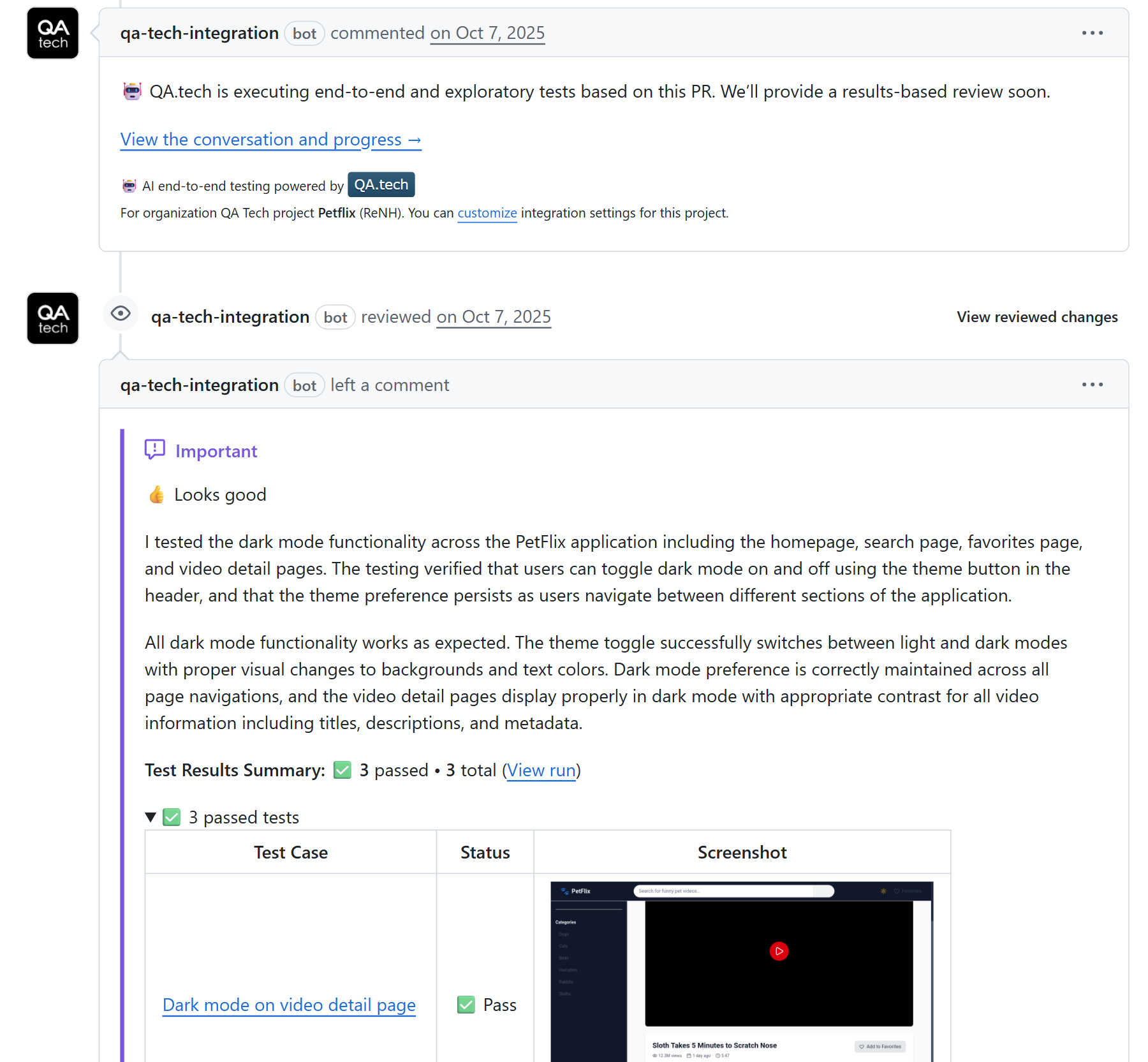
Agentic test results at the PR level after integration into the CI/CD pipeline
- Expand gradually to additional applications; don't do it all at once.
- At scale, settle on a platform or enablement team owning the test infrastructure. Product teams can use it as a part of their workflow.
With this, your QA team's day-to-day work shifts from creating and maintaining scripts to something much more valuable: curating edge cases, defining the test strategy to use, and reviewing the agent output for signs that go beyond simple pass/fail.
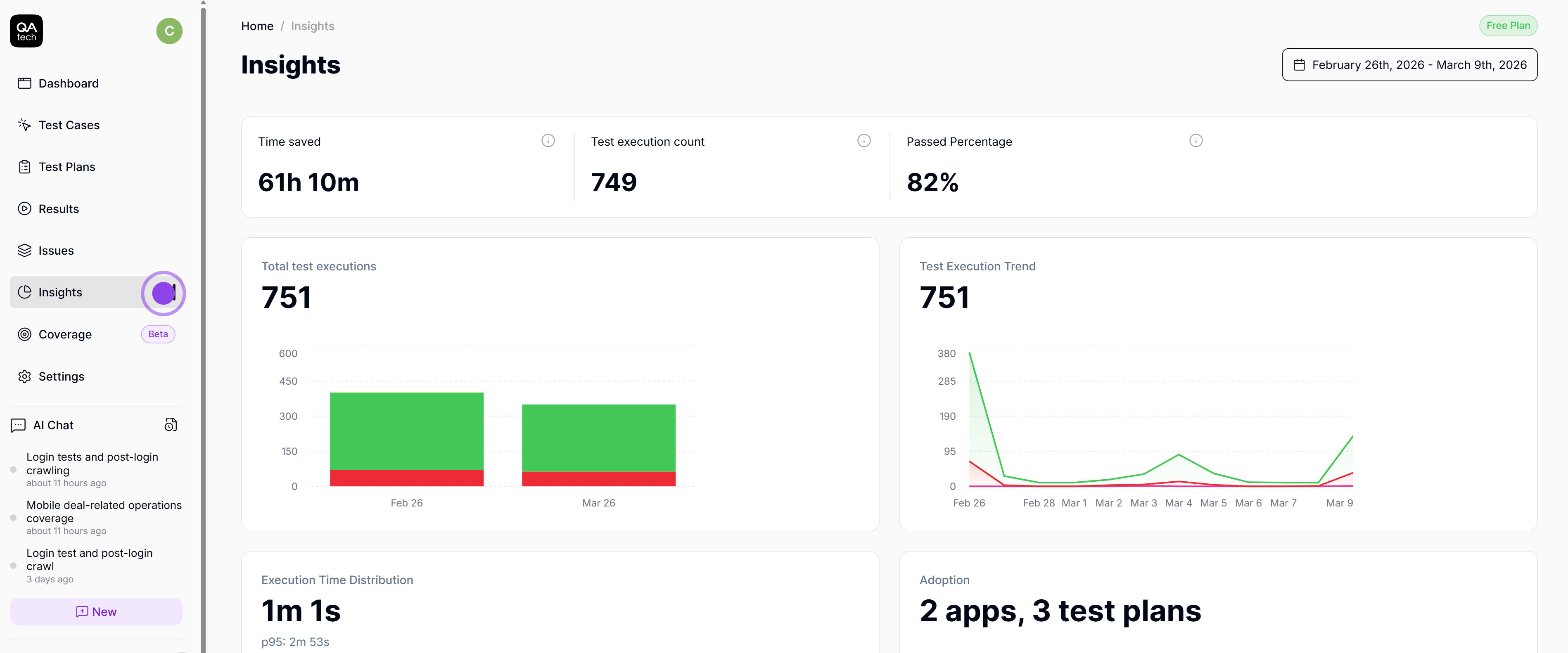
Metric insights for test cases on QA.tech
As a CTO, this is what you're aiming for. You should be able to measure success by tracking release velocity, production incident rate, and how efficient your QA headcount is.
Staffing and Budget Implications
Now, let's address the question most engineering leaders have on their minds: does agentic QA necessarily mean fewer QA engineers?
To be honest, what it means is different roles within the team. The focus shifts from maintaining scripts to shaping which quality strategy is to be used. So instead of wasting hours debugging brittle selectors, QA engineers spend their time identifying risk areas, defining test coverage, and evaluating results at a higher level.
The conversation around budget shifts from high headcount to a tool-first approach. And in most cases, the math favors the tools. For example, thanks to QA.tech, Pricer moved from 8 QA engineers to 2 while increasing coverage across thousands of stores worldwide, and Virtusize automated multi-site QA across hundreds of storefronts, eliminating manual bottlenecks without increasing operational overhead.
Here's the practical way to think about it: if your QA team has one or two people, agentic QA becomes a force multiplier. With it, a small team can cover far more surface area without burning out. If your team features five or more members, it becomes an opportunity to restructure, one that frees up experienced engineers' time so that they can focus on higher-impact work across the organization.
How to Measure Success
You can't improve what you don't measure, and your QA strategy is no exception. But the key is tracking the metrics that actually reflect progress.
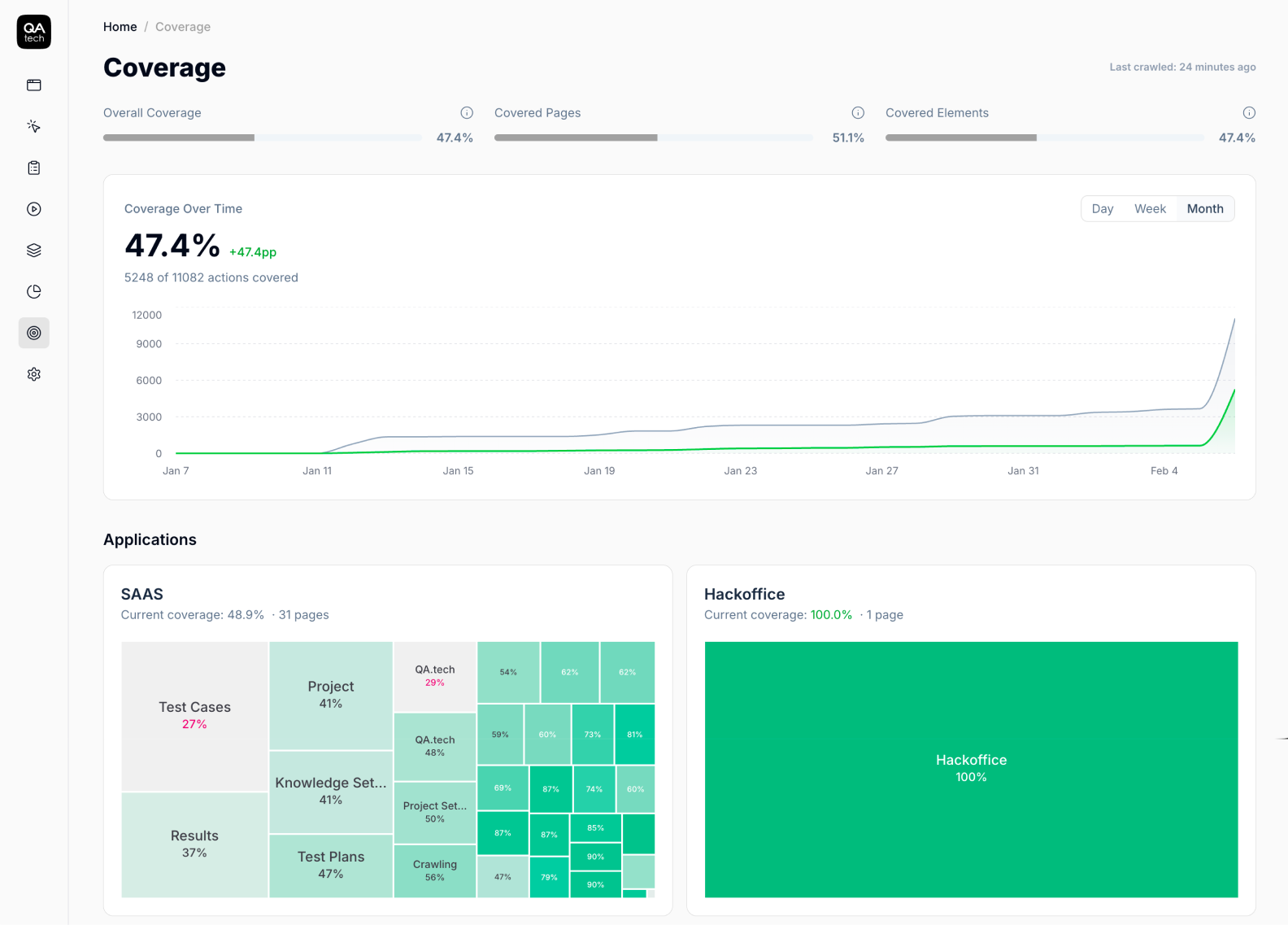
Coverage dashboard on QA.tech showing the overall coverage for applications
To do this, start with these leading indicators that tell you whether the strategy is working day to day:
- Look at authoring time per test. Basically, this is how quickly your team can create new test coverage.
- Track maintenance events per sprint. This refers to how often tests break without a meaningful product change.
- Watch your PR-to-deploy cycle time. If QA is still slowing down your releases, then the bottleneck hasn't moved.
Then focus on lagging indicators that show whether the strategy is delivering real business outcomes. These include:
- production incident rates
- rollback frequency
- customer-reported bugs
These are the numbers leadership teams and your customers actually care about.
If you had to track just one metric, it should be the ratio of QA effort to shipped features. If your team ships twice as many features with the same QA capacity or maintains the same output with significantly less QA overhead, then the strategy is working.
It's a simple yet powerful metric. Plus, it ties QA directly to business value, which makes it much easier to justify continued investment.
Wrap-Up
Agentic QA reflects a shift in how your organization approaches quality. As a CTO, your role is to set the direction, allocate resources, and measure outcomes.
The teams that move fastest are already running pilots, measuring results within weeks, and building QA strategies that can keep up with how fast development is moving. So if you're accelerating your development with AI, extending that same approach to QA is overdue.
For further reading:
- Start with "What is Agentic Testing?" if you want to understand agentic QA better;
- Then explore "From Manual to Autonomous QA" for a practical guide on transition.
To find out how agentic QA works in practice, check out the QA.tech case studies to see how companies like Pricer, Upsales, Join, and more have made this transition. Or book a demo to get started.