
Here's a situation too many team leads have been in. A feature is completed and scheduled for deployment, but several days later, it still isn't live. You want to know what happened, so you start digging around, only to find out that QA is blocked because new code has broken tests in the Selenium suite. Maybe devs have added state loaders or moved locators; either way, a few dozen tests have to be updated before deployment can continue. Suddenly, a project that was on track is now several days behind.
Selenium is a browser automation framework commonly found in legacy projects, along with Playwright and Cypress. It can handle extensive testing, from the API to the UI. But teams using Selenium start to feel the maintenance burden fast. A handful of tests is fine, but once you start creating dozens of cases, you'll suddenly find yourself spending hours testing before deployment. And in legacy systems, there are often zero implemented best practices, which only makes things harder.
In this article, we will discuss how you can migrate from Selenium to AI-powered testing with QA.tech. And before you assume this means rewriting your entire test suite or switching everything over at once, don't worry. You won't be doing it; at least, not all at the same time. You will migrate only UI tests, and you will do so gradually over the course of a month. You'll notice the shift right away: no more hoping your suite survives regression testing, just confidently shipping changes.
When Selenium Starts Hurting
Selenium becomes a problem when you repeatedly have to choose between quality software and an early release.
Once there are 100+ cases, they can easily run for over an hour. That's when teams start to feel the pain, and that could be just smoke tests! A full regression suite often runs into hundreds. I've seen cases where 500 UI tests take over 15 hours per cycle. Now imagine having to deploy several times per week.
Time aside, Selenium is notoriously brittle. Teams often just accept the fact it's going to fail when locators change; in fact, it's common to hear devs talk of a "normal flakiness overhead". Regardless of whether you use Thread.sleep(), implicit waits, nested XPaths, or data-testid, at some point Selenium assumes your DOM is stable. And when there are assumptions, there are bound to be errors. On top of that, waiting to ensure elements are fully loaded and continuously scanning the DOM tree slows things down even further.
Even worse, Selenium suites often show up in legacy projects. And as you probably know, trying to rebuild those unusable bare-metal Python or Java Selenium suites is nearly impossible.
Therefore, the main solution is to replace Selenium with AI testing. Even though tools like Playwright or Cypress probably come to mind, at the end of the day, they still rely on scripted assumptions about UI behavior and require ongoing upkeep.
Agentic testing, like the approach used by QA.tech, avoids plenty of typical Selenium issues. For starters, it's a lot faster. It handles waits automatically and doesn't need to search for selectors. QA.tech also uses semantic testing, where the agent navigates flows like a real user would, which removes flakiness out of the equation.
What You're Actually Migrating (and What You're Not)
Migrating from Selenium to AI testing with QA.tech is a lot easier than you think.
You will not be rewriting every test. Instead, you will be migrating coverage intent; that is, what each test is supposed to verify. In practice, that means mapping Selenium concepts to their agentic testing equivalents.
Selenium Locators to Agent Perception
Locators are a common reason why scripts break, mainly because developers might change them over time. And every time that happens, tests tend to require updates.
But when you migrate, you won't have to deal with locators anymore. No more IDs, class names, tags, XPaths, or CSS selectors. Instead, the agent perceives the locations of elements and interacts with them.
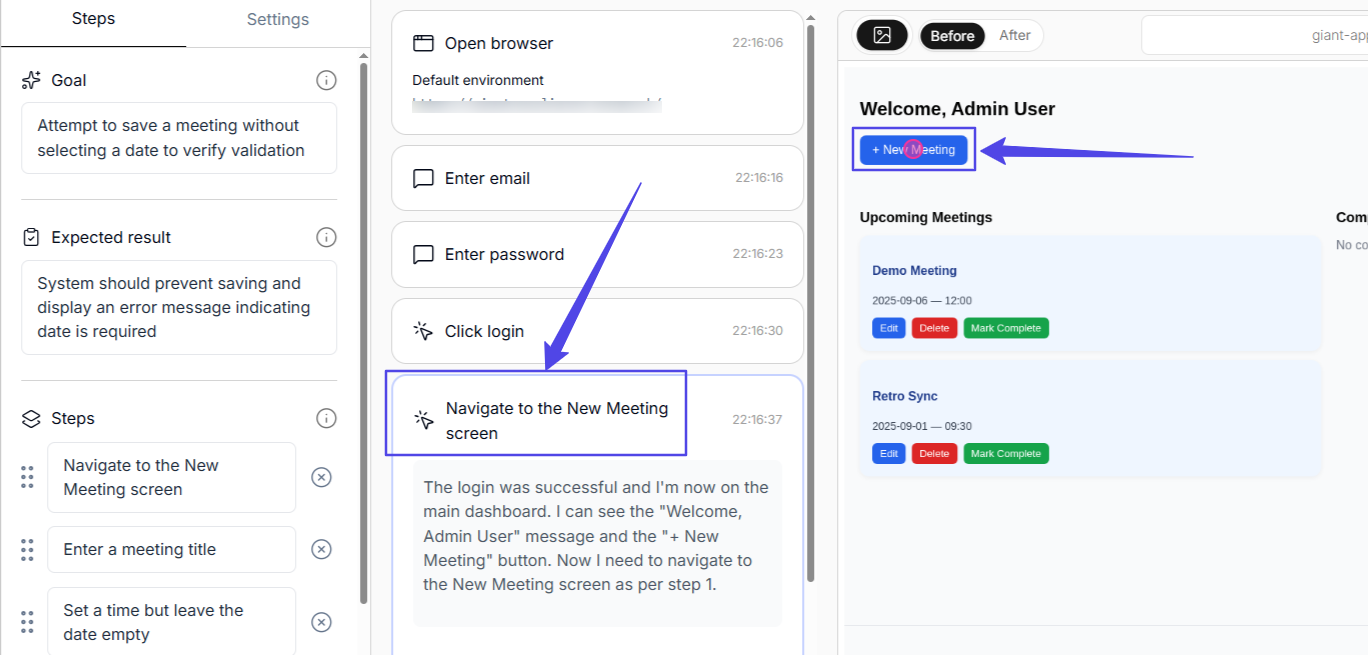
A button click and a highlight around the stated test step
Explicit/Implicit Waits to Automatic Loading State Adaptations
Too many scripts break because an element isn't loaded or clickable yet. That's why QA engineers end up constantly tweaking scripts just to figure out the right amount of time to wait.
In AI-based testing, you no longer need to rely on explicit and implicit wait methods. The agent automatically handles loading states. It's aware of context and can understand when an element is still loading. More importantly, it doesn't just look at where an element is on the screen, it understands what that element actually represents and what its purpose is.
Page Object Model to Natural Language Test Steps
Admittedly, Page Object Model reduces maintenance, because when a locator changes, you only have to fix it in one file. But, POM still doesn't eliminate the problem. A class file for a single page can grow to be thousands of lines long, and you still have to deal with states.
Luckily, migrating to AI from Selenium lets you drop the POM in favor of natural-language test instructions. The agent basically figures out how to complete an action based on the intent. It uses reasoning loops to decide which steps to take.
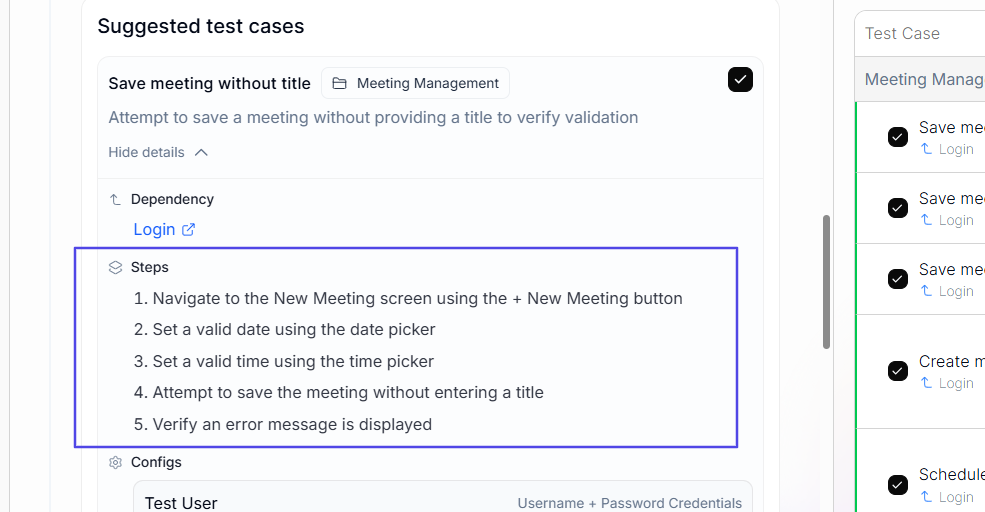
A highlight of generated test steps
Also, tests are no longer grouped by pages, such as loginPage, checkoutPage, profilePage, and similar. Instead, the agent does it by feature, including logIn, completeCheckout, etc.
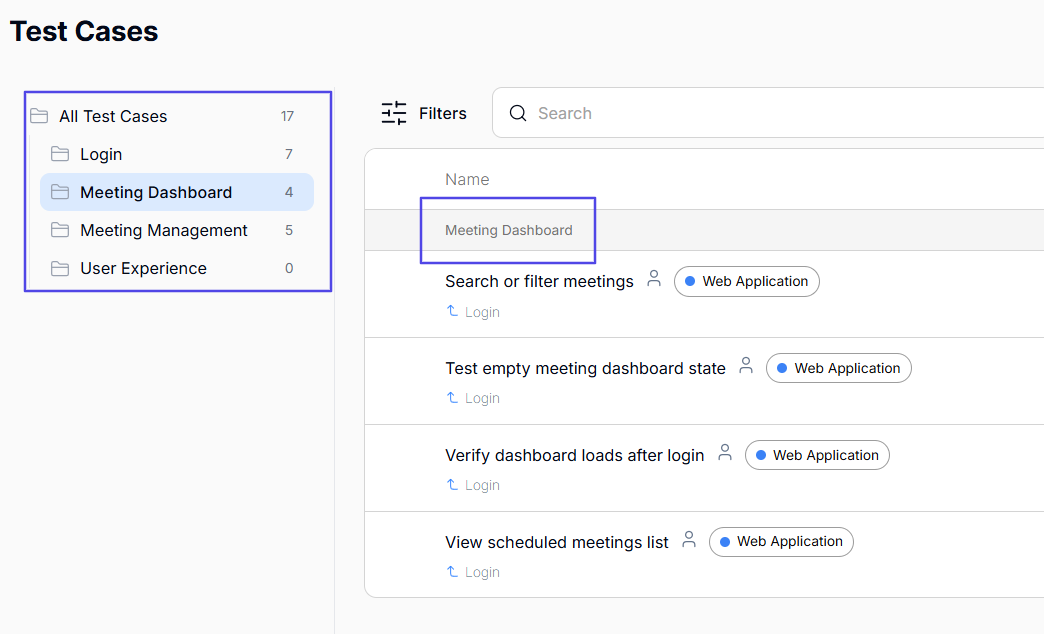
Test cases grouped according to feature
Assertions to Goal-Based Pass/Fail Evaluations
Assertions break for many reasons, including race conditions and dynamic pages. As a result, they contribute to false negatives and flakiness. So when you migrate, drop UI assertions for goal-based tests.
The tests pass only when the agent completes a user action.
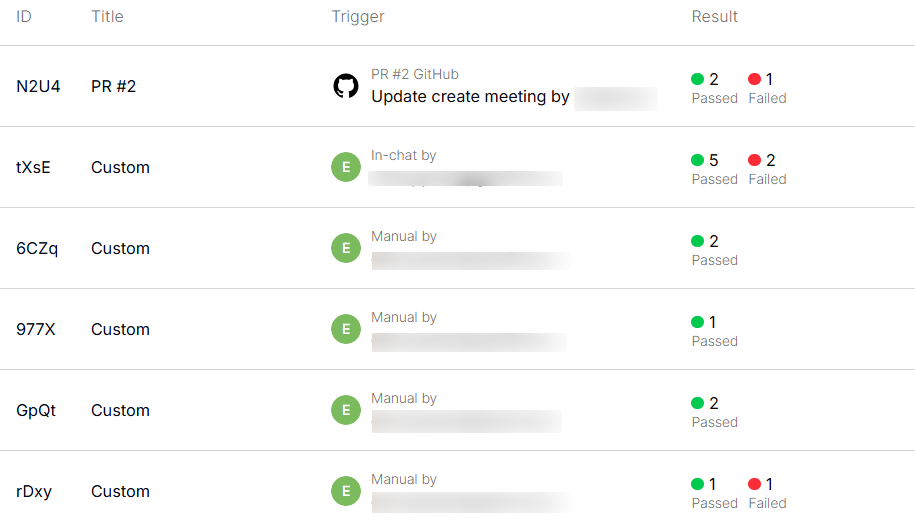
Results page showing either pass or fail for test cases
Despite all the benefits of agentic testing, some things are better left on Selenium. Keep unit and integration API tests, database validations, and exact-value calculations in your old suite because those are highly stable.
Agentic testing is best used for what it does well: validating your app visually through end-to-end flows.
Migration Path: A Three-Phase Approach
Follow this migration path to fully move your UI tests from Selenium to QA.tech. Within a month, you will start shedding the maintenance burden your team is currently saddled with. By the end of the second month, your suite will be completely moved.
Keep in mind that this timeline is only a guideline, not a rule. Your team might move faster or need more time. Still, this is what you can target roughly:
Week 1 to 2: Shadow Mode
Over the first few weeks after onboarding, create agentic tests for your top 10 most high-maintenance tests. This allows you to cover your critical paths.
Run them alongside their Selenium counterparts so you can compare them in real time. The goal is to see how agentic testing works for your suite and start building confidence quickly.
Week 3 to 4: Expand Coverage
In weeks 3 and 4, gradually migrate a few more dozen tests. Make sure to focus on creating intents for flows that break often. The goal is to move the more flaky tests over to QA.tech and stabilize your old suite. For now, keep Selenium for low-maintenance tests.
Month 2+: Invert the Ratio
From the second month on, you will be moving the remaining E2E tests to QA.tech, which will host the primary suite. Retain Selenium just for unit tests that need exact assertions.
Common Migration Mistakes
Migrating to AI-powered testing is a fairly easy process. However, you need to avoid the following mistakes for the best results.
-
Trying to replicate Selenium tests step-by-step in an agentic form: When creating new tests, focus on intents. For instance, log in, create a new meeting, or add to cart. Scripts defeat the entire purpose of AI-powered testing. The agent autonomously reasons through test steps to complete a goal.
-
Migrating everything at once rather than incrementally: It's important to start with critical flows before adding others. This allows you to track coverage without including unnecessary tests just because they already exist in your old suite. Plus, you can compare the agent's performance against your Selenium suite.
-
Not involving the team early: Agentic testing doesn't just change the tool. It also changes QA workflows. Devs will start writing intents for the features they code, which will help them implement shift-left development. The QA team will integrate agentic testing into their processes to achieve the best results. As you can see, there's no need to leave migration solely to a few team members, even in its early phases.
QA.tech can run a full regression pass on every pull request before it merges.
Finally…
Migrating from Selenium to AI is not a weekend task, but it's not a year-long project either. If done right, you will stabilize testing for important user flows and see results in the first two weeks.
The best thing about our recommended migration plan is that you're not forced to abandon your entire Selenium suite on day one. You can adopt agentic testing for the most flaky tests and gradually work your way through the rest of the suite.
On top of that, you'll have confidence that you're not just migrating to another version of the same problem, like with Playwright, but that you are actually changing the way you test your UI for the better.
Book a demo to get started.