Release notes··4 updates

Voice dictation in chat, login-gated docs crawling, and session sync settings

4 updates shipped on October 22, 2026.

  1. Highlight

    Featured this release

    Dictate chat messages with your voice

    Click the mic in the chat composer, speak, and the transcript lands at your cursor.

    The chat composer has a mic button next to the model picker. While you record you get a waveform, a timer and ✕ and ✓ buttons, and a grey preview of the transcript appears at the caret as you talk. Press ✓, Enter or Tab to insert the text, or ✕ or Esc to discard the take. Takes are capped at 3 minutes.

    More on this: product and exploratory testing.
    # Direct link

  2. Update 02 of 04

    Crawl documentation that sits behind a login

    Web Link knowledge items can sign in before crawling, so login-gated help centers get indexed.

    When you add or edit a Web Link under Settings → Knowledge, expand the new Authentication section. Enter a username or email and password, plus an optional login page URL and custom request headers. QA.tech signs in once and crawls with that session. Saved credentials are write-only, and changing them re-ingests the item. SSO, 2FA and captchas are not supported.

    More on this: authentication testing and product.

    # Direct link

  3. Update 03 of 04

    Session sync settings and chat control

    Turn on session sync for web applications from Application settings or from chat.

    Application settings has a new Session sync card. List the storage keys to sync as Type and Key rows, with quick-add presets for a refresh cookie and WorkOS AuthKit. Rules apply to your next run or crawl. You can also ask the chat agent to view or update them – it sees key names, never values.

    The Session sync docs have a new walkthrough.

    More on this: web testing, authentication testing and Session sync docs.

    # Direct link

  4. Update 04 of 04

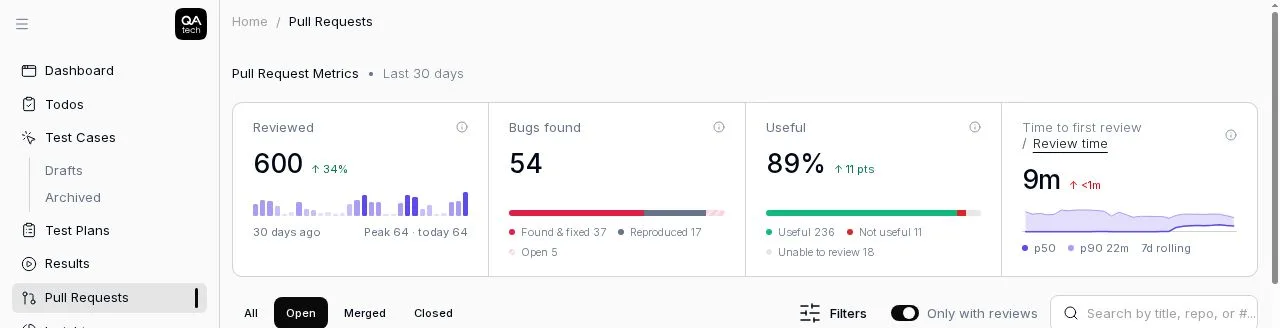
    Time to first review on PR metrics

    The PR reviews metrics row shows how fast QA.tech reviews your pull requests, with a 7-day trend.

    On the Pull Requests page, a duration cell toggles between Time to first review (PR opened to first completed review) and Review time (kickoff to completion for each round). The headline is the median over the last 7 days, compared with the 7 days before. Hover a day on the sparkline to see its median, p90, range and sample count.

    Pull request metrics with time to first review and a 7-day trend

    More on this: PR testing and for CTOs.

    # Direct link

Your team moves fast. Can your testing keep up?

QA.tech agents test your product autonomously, so moving fast never means shipping broken. See how it works in a 30‑minute demo.

Book a demo