1. Highlight

    Featured this release

    Logic verification for rule-heavy code (beta)

    QA.tech can find concrete inputs that break your business rules, such as dates, money, permissions, limits and status transitions.

    In chat, ask it to verify logic in any project with code access. For PR reviews, enable Logic Verification (beta) under Code Access in the GitHub or Azure DevOps repository settings. Findings with a reachable screen become targeted tests; backend-only findings appear in the review as issues found in code, not confirmed in the app.

    More on this: PR testing, roles and permissions testing and testing AI-generated code.
    # Direct link

  2. Highlight

    Featured this release

    Repository mapping imports recent PRs and maps your test suite

    Connecting a repository pulls in its 30 most recent pull requests and builds a map of your existing tests.

    Mapping a GitHub, GitLab or Azure DevOps repository imports its 30 most recent pull requests, so a fresh project starts with history. With code access on, QA.tech also reads your unit, integration and e2e tests and saves a Test suite map to your project library: which layers exist, reusable test data, flows already covered, gaps ranked by risk and specs worth porting. The scan is read-only and never runs your tests.

    More on this: integrations and end-to-end testing.

    # Direct link

  3. Update 03 of 06

    Clearer PR review comments and a retrospectives tab

    Review comments open with a Verified, Bugs found or Couldn't verify pill, and retrospectives get their own chat tab.

    The progress checklist shows a check, spinner or grey circle per step. Recorded PR retrospectives open in a canvas tab with the verdict, what went well and wrong, and follow-up todos. Review tabs show which commit was reviewed and link to newer reviews.

    More on this: PR testing and shift-left testing.

    # Direct link

  4. Update 04 of 06

    GitLab code access and the post-merge agent on Azure DevOps

    GitLab projects can give QA.tech read access to code, and Azure DevOps gets the post-merge agent.

    GitLab repository mappings support Code Access, and each repository has its own settings with applications, a review trigger, environment mapping and review instructions, plus a ready-made .gitlab-ci.yml snippet. On Azure DevOps, turn on the Post-Merge Agent in the repository settings, review screenshots show inline, and a follow-up @qa.tech mention continues the existing review thread.

    More on this: integrations, PR and CI/CD testing and GitLab CI/CD guide.

    # Direct link

  5. Update 05 of 06

    Cancel the Start-up plan and edit billing details in-app

    Billing admins can cancel the Start-up plan and manage invoicing details without leaving QA.tech.

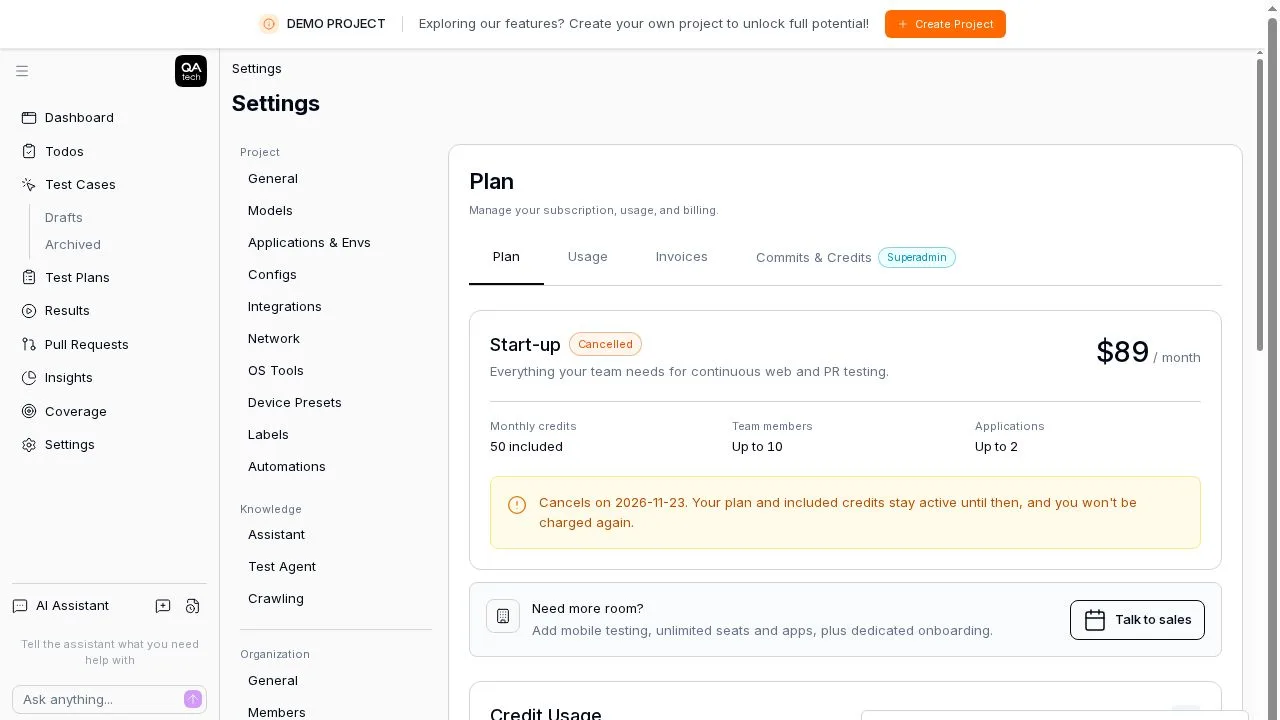
    Click Cancel Plan on the Start-up card, pick a reason, and the plan stays active until the end of the paid period with a Cancels on note. The new Billing Details tab covers company name, billing email, up to 5 CC recipients, address, tax IDs, PO number and invoice memo. Members without billing permission see it read-only.

    A cancelled Start-up plan showing the date access ends

    More on this: pricing and account settings testing.

    # Direct link

  6. Update 06 of 06

    Set up your project knowledge from chat with /knowledge

    A guided skill walks you through your knowledge library, memories and agent rules without leaving the chat.

    Type /knowledge in the chat input, or pick the new card on the empty chat screen, and the assistant helps you set up and clean up library items, memories, agent rules and custom skills. It is listed with the other built-in skills under Settings → Knowledge → Assistant.

    More on this: product and AI test generation.

    # Direct link

Your team moves fast. Can your testing keep up?

QA.tech agents test your product autonomously, so moving fast never means shipping broken. See how it works in a 30‑minute demo.

Book a demo