Release notes··4 updates

Web performance metrics, GitHub-triggered automations, and project management through MCP

4 updates shipped on November 10, 2026.

  1. Highlight

    Featured this release

    Run automations on GitHub pull request events

    Trigger test plans, assistant prompts and PR reviews from GitHub pull request events.

    Under Settings → Automations, pick a GitHub trigger for pull requests that are labeled, opened, merged or closed. Filter by label, target branch, repository and draft status, then run a test plan, an AI assistant prompt or the new Review pull request action. This connects AI testing to the pull request events your team already uses.

    The automations page includes Review on a label, Review when ready and Test after merge examples. Saving a GitHub trigger requires at least one repository connected under Settings → Integrations → GitHub.

    More on this: PR testing, PR and CI/CD testing and automations API.
    # Direct link

  2. Highlight

    Featured this release

    Web performance metrics in test runs

    Record Core Web Vitals, blocking tasks, memory and CPU for a run and inspect them in the Performance tab.

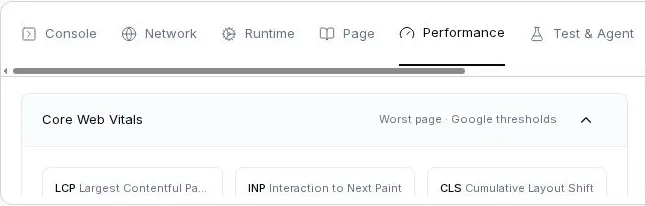
    Turn on the performance issue reporter for a run to record LCP, INP and CLS per page, page load timings, JS heap, main-thread busy share and the longest blocking tasks with their script and function. Recording is off by default and is opt-in per run.

    The Performance tab with the Core Web Vitals section and LCP, INP and CLS labels

    The new Performance tab in the trace view highlights rows and charts that overlap the selected step. Chat can read the same measurements and identify the pages and elements behind the worst vitals.

    More on this: web testing and test plans.

    # Direct link

  3. Update 03 of 04

    Manage labels, test plans and issues from the API and MCP

    Coding agents can manage labels and test plans and ignore or reopen issues through REST and MCP.

    Coding agents can list, create, edit and delete labels and test plans through the public API and MCP. Test plan updates can also add and remove test cases, so agents can assemble the plan they need before starting a run.

    The issue update endpoint accepts ACTIVE or IGNORED, letting agents reopen or ignore an issue without opening the dashboard.

    More on this: MCP for coding agents, test plan API reference and issue status API reference.

    # Direct link

  4. Update 04 of 04

    Setup guidance for Netlify visitor access

    Chat recognizes Netlify visitor access redirects and explains how to make an environment available for testing.

    When a Netlify visitor access page blocks a test environment, chat explains the available setup options: make the project public, protect previews only, or use shared-password access with a login test. Chat also adds the Netlify configuration step as a setup todo.

    The new Environment access guide describes these options and how to configure them.

    More on this: Netlify protection guide and multi-environment testing.

    # Direct link

Your team moves fast. Can your testing keep up?

Our QA agents test your product autonomously, so moving fast never means shipping broken. Start free or get a 30-minute demo.