Release notes··6 updates

Signed webhooks, public run links, and API keys from chat

6 updates shipped on November 20, 2026.

  1. Highlight

    Featured this release

    Signed webhooks for completed runs and PR reviews

    Push run results and PR review outcomes to your own endpoints instead of polling the API.

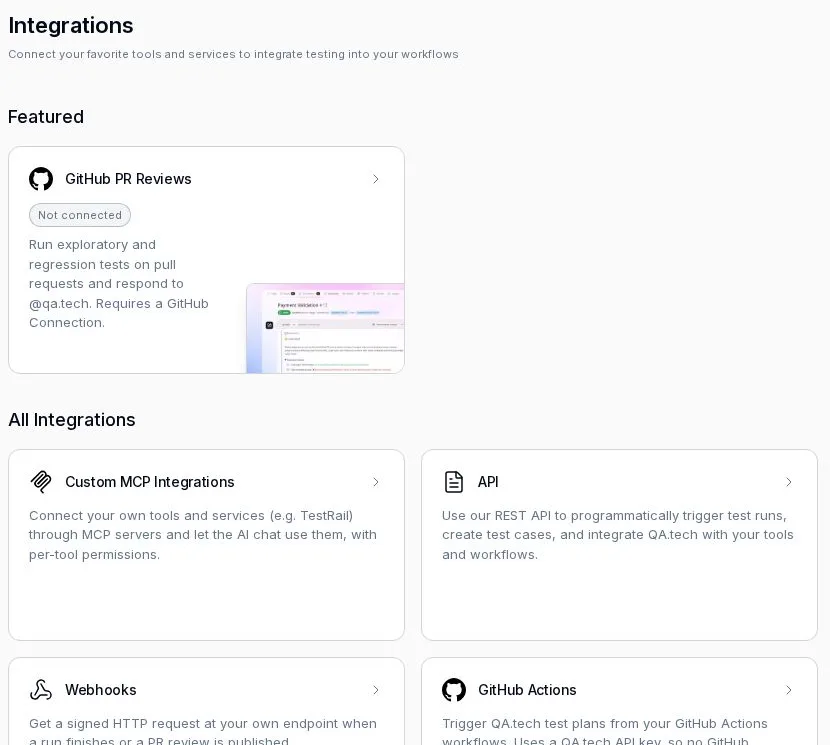
    Add an endpoint under Settings → Integrations → Webhooks and choose the events to send: run.completed, pr_review.published or both. Requests follow the Standard Webhooks spec, signed with HMAC-SHA256 and a whsec_ secret you can reveal or rotate at any time.

    QA.tech Integrations settings page listing Webhooks alongside API, GitHub Actions and custom MCP integrations

    For run.completed you can limit delivery to selected test plans, or to failed and errored runs only. Payloads include the run result and counts, environments, git branch, commit and PR, plus the failure reason and expected behavior for each failed test. Use "Send test" to try an endpoint, and the delivery log to inspect and redeliver each payload. Failed deliveries retry automatically with backoff.

    More on this: integrations, PR and CI/CD testing and notifications testing.

    # Direct link

  2. Update 03 of 06

    Get an API key and connect MCP from chat

    Ask the chat for API or MCP access and it sets things up inline, with a project-scoped key and install steps for your AI coding tool.

    Ask QA.tech chat to set up API access and an inline card creates a personal API key scoped to your current project, then shows a ready-to-run first call that lists the project's latest runs. The key is copied straight to your clipboard and never shown in the conversation. If you already have a usable key, pick it from the card.

    Ask to connect MCP instead and the card shows install steps for Claude Code, Cursor, Codex and Continue, with OAuth first so you do not need a key. These match Settings → MCP Server.

    More on this: MCP server, API testing and AI-generated code testing.

    # Direct link

  3. Update 04 of 06

    Earn free credits by setting up QA.tech

    A new "Earn credits" card on the Billing page shows every reward you can earn, what you have earned and what is left.

    Open Organization settings → Billing to see each reward with its credit amount and status: Pending, Granted, or a short reason when it does not apply. Rows like "Connect your code", "Connect your tickets" and "Connect your chat" link straight to the right settings page, and matching steps in the welcome checklist show "+N credits". You can also ask the chat "How can I earn free credits?" for a summary card and a Rewards side panel.

    More on this: pricing and integrations.

    # Direct link

  4. Update 05 of 06

    Fast-experimental handles new tabs, popups and dialogs

    Tests on the Fast-experimental agent can follow links that open new tabs, sign in through OAuth or payment popups, and get past confirm dialogs.

    With the Fast-experimental agent, links with target="_blank", window.open calls and sign-in or payment popups open as real tabs. The agent sees which tabs are open, can switch between and close them, and returns to the original tab when a popup closes itself. JavaScript alert, confirm and prompt dialogs are accepted and reported on any tab.

    When a test uses more than one tab, the run's browser view shows a tab strip, and tab switches get their own steps in the trace. Choose Fast-experimental as the agent on a test case to try it; other agents work as before.

    More on this: authentication testing, checkout flow testing and web testing.

    # Direct link

  5. Update 06 of 06

    Update projects from the API and MCP

    Rename a project or change its default application with `PATCH /v1/projects/{projectShortId}` or the `manage_projects` MCP tool.

    Send name, defaultApplicationShortId or both; only the fields you pass change. MCP clients now use manage_projects with operation: "create" or operation: "update", which replaces the create_project tool.

    More on this: MCP server and multi-environment testing.

    # Direct link

Your team moves fast. Can your testing keep up?

Our QA agents test your product autonomously, so moving fast never means shipping broken. Start free or get a 30-minute demo.