
The right mobile build for automated testing on cloud simulators and emulators is an iOS simulator build (a .app, zipped) for iPhone and an APK for Android. An .ipa and a TestFlight build are signed for physical devices. An .aab is a publishing format for Google Play. All three are the wrong input, and release pipelines often produce them by default. EAS Build, for one, outputs an AAB unless you ask for an APK.
| File | Platform | What it's for | Use it for automated testing on simulators and emulators? |
|---|---|---|---|
.app (simulator build), zipped | iOS | Running on Simulator | Yes |
.ipa | iOS | Installing on registered or App Store devices | No |
| TestFlight build | iOS | Beta distribution to testers' devices | No |
.apk | Android | Installing directly on a device or emulator | Yes |
.aab | Android | Publishing to Google Play | No, convert it to an APK first |
iOS: the simulator .app and the .ipa
A simulator build and a device build are different compiled outputs. Expo's docs say development builds for iOS Simulators "are generated in the .app format which is different from iOS devices." A simulator build also needs no code signing, which is one less secret in your CI.
An .ipa is the signed archive Apple uses for distribution, and Apple's docs say testers "can run your app only on the devices that you add to the provisioning profile."
How to get a simulator .app depends on your build tool:
- Xcode or
xcodebuild: build for an iOS Simulator destination. The output lands under a*-iphonesimulatorproducts folder. - Bitrise: use the
xcode-build-for-simulatorstep in place ofxcode-archive. The app path is in$BITRISE_APP_DIR_PATH. - EAS Build: set
"ios": { "simulator": true }on the profile. - fastlane: build with
xcodebuildfor a simulator destination in a lane of its own;gymis the tool for signed device and store exports.
Then zip it: zip -r MyApp.zip MyApp.app. The .app is a folder, and most upload APIs want a single file.
All of this needs a Mac, because Xcode only runs on macOS. On GitHub Actions that means a macos-15 or macos-26 runner. The macos-14 image was retired on 2 November 2026, so update any workflow still pinned to it.
Why TestFlight isn't a test input
TestFlight is how you hand a beta to people. It supports up to 10,000 external testers, builds expire after 90 days, and the first build for external testers may need Beta App Review. Every one of those details is about humans installing the app on their own phones.
TestFlight also inherits App Store rules. Since 28 April 2026, uploads to App Store Connect must be built with Xcode 26 and the iOS 26 SDK. One team we spoke with couldn't ship to iOS for a while because of a TestFlight SDK requirement they had no control over. A simulator build for testing has none of those gates, so tests can keep running on every change while the release side is blocked.
Android: APK and AAB
Google Play has required new apps to publish as Android App Bundles since August 2021. An AAB defers APK generation and signing to Play, so it can't be installed on a device or emulator as it is. EAS Build produces one by default.
If your pipeline only makes an AAB, convert it with Google's bundletool in universal mode:
bundletool build-apks --bundle=app.aab --output=app.apks --mode=universal
unzip -p app.apks universal.apk > app.apk
The universal APK is larger than a device-specific one, which doesn't matter for testing. Or skip the conversion and build an APK directly: ./gradlew assembleDebug (or assembleRelease with a signing config set), or "android": { "buildType": "apk" } on an EAS profile.
Watch for two Android problems. Some apps detect the emulator as a rooted device and refuse to start, so turn that check off on the build you test. And if you ship native code, test on Google's 16 KB page size emulator images: from 1 February 2027, Play blocks updates that don't support 16 KB pages for apps targeting Android 15 or higher.
Build the test binary from the same commit
The store build and the test build should come from the same commit, in the same pipeline run, so a passing test is about the code you're shipping. Tag each upload with the commit SHA. On pull requests, upload the PR's build and pin the run to it. On main, upload the merged build and make it the default, so scheduled runs never test something stale. Our guide to mobile pull request testing walks through that pipeline end to end.
What QA.tech accepts
QA.tech is an AI testing platform for pull request and regression testing across web, mobile and API, so one upload serves both the pre-merge review and the scheduled plans on main. It accepts the two files in the "yes" rows above, a zipped simulator .app (.zip or .tar.gz) or an .apk up to 4 GB each, and runs them on cloud iOS Simulators and Android Emulators (store .ipa and TestFlight builds aren't accepted).
You can upload a build in the app, or from CI over the API in three calls: get an upload URL, upload the file, register the build. The returned build ID is what you pin a test run or a pull request review to. If your app needs a companion app on the same device, say a separate login app, you can install up to three more builds alongside it. Expo teams can upload EAS preview APKs directly. The Expo steps are in our mobile testing docs, with separate guides for Bitrise and fastlane.
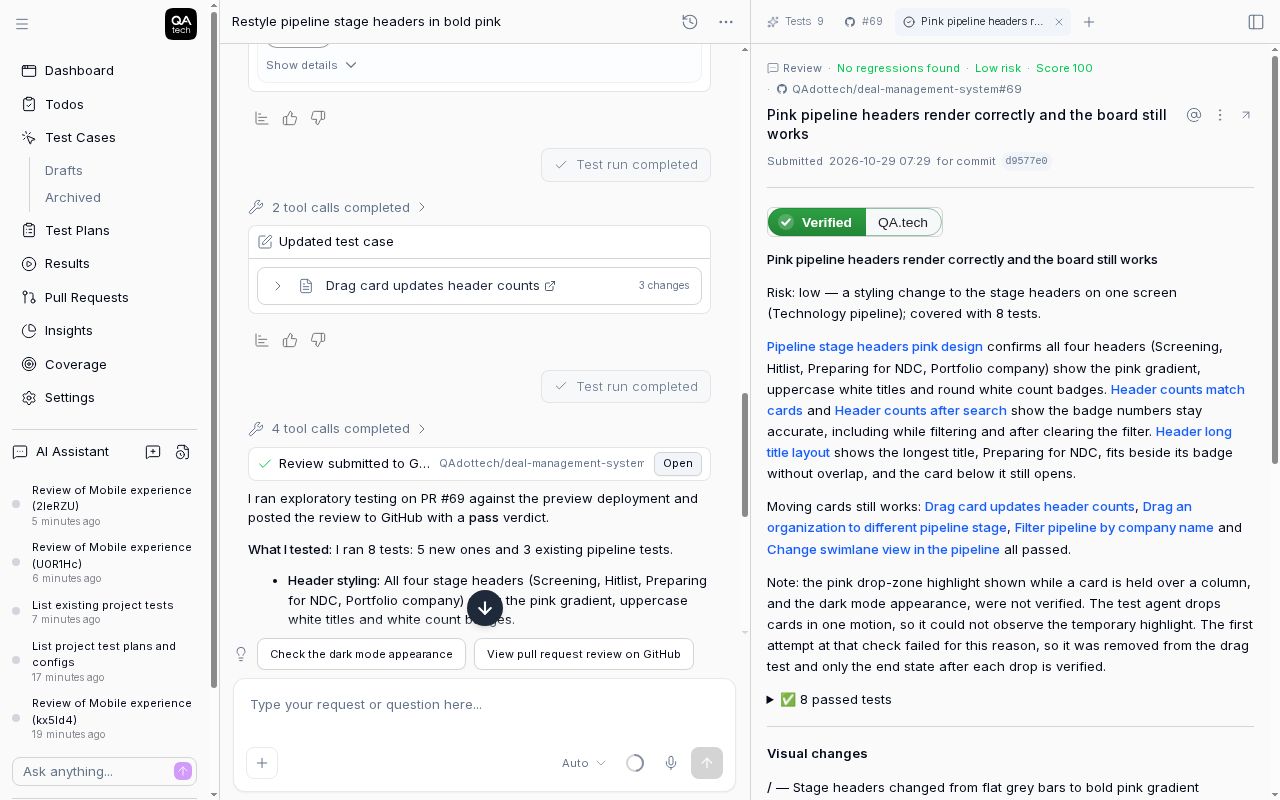 A verified verdict and the tests behind it, from a web review. A mobile review shows the same view for the uploaded build it was pinned to.
Uploading mobile builds needs a Growth or Enterprise plan; see mobile testing for what's included.
FAQ
Can I run automated tests on an IPA file?
Not on a simulator. An .ipa is signed for specific physical devices or the App Store. Build a simulator .app from the same commit and test that.
Can automated tests run against a TestFlight build? Only on physical devices with the TestFlight app installed, which rules out cloud simulators. For automated runs, upload a simulator build from the same commit.
How do I convert an AAB to an APK?
Run bundletool build-apks with --mode=universal, then extract universal.apk from the resulting .apks file.
Does a simulator build need code signing? No. Simulator builds don't need signing certificates or provisioning profiles, which is why they're easier to produce in CI.
Debug or release build for testing? Test the configuration closest to what you ship. React Native's docs describe E2E testing as "building your app in the release configuration and running the tests against it." For native apps, a debug build is fine for flows, as long as it doesn't rely on a local dev server.