
For emulator vs real device testing, the split that works is emulators and simulators on every pull request, and real devices on the release candidate and anything that touches hardware. Google's own example testing setup is close to that: feature tests run "pre-merge" on "local and emulators", application tests add one phone and one foldable "post-merge", and eight phones, a foldable and a tablet are kept for "pre-release" (Android Developers, testing strategies).
What Google and Apple say
Google is direct about emulators: "In most cases, the emulator is the best option for your testing needs," and it "provides almost all the capabilities of a real Android device."
Apple is more cautious about Simulator. Its docs say simulators "don't replicate the performance or features of a physical device", and that to verify your app runs exactly as intended, you should run it on physical devices.
A terminology note: Apple ships a simulator, which runs your app compiled for the Mac. Android ships an emulator, which emulates the device hardware. Most teams use the words interchangeably, and for planning tests the difference matters less than what each can't do.
What simulators and emulators can't tell you
| Area | Simulator or emulator | Real device |
|---|---|---|
| User flows, navigation, forms, state after restart | Yes | Yes |
| Layout across screen sizes and OS versions | Yes, for the models you configure | Yes, for the devices you own or rent |
| Deep links and push payloads | Yes, simulated | Yes |
| Camera, QR codes, microphone | iOS Simulator: no. Android Emulator: a simulated camera scene and host microphone input | Yes |
| Biometrics | Simulated on both platforms (the Android Emulator can fake fingerprint scans), no real sensor | Yes |
| NFC, Bluetooth | No | Yes |
| Performance, memory, battery, thermal | No. Apple says simulators "don't replicate the performance or features of a physical device" | Yes |
| Manufacturer skins and firmware | No | Yes, for the models you test |
| Real carrier networks | No (the Android Emulator can fake incoming calls and SMS) | Only on devices with SIMs; AWS Device Farm devices have no carrier connection |
Small differences show up too. A tester at one of our customers noticed during a pilot that tapping a field on a real phone selected the existing text, so you could type straight over it, while the emulator left it unselected. Nobody on that team expected an emulated phone to differ on something that small.
What they're good at
Speed, mostly. A cloud emulator starts from a clean state every time and runs in parallel without anyone managing a rack of phones. That makes it the practical default for running tests on every pull request, where the question is "did this change break a flow?" and the answer is needed before someone hits merge.
They're also where you get breadth cheaply. Apple's App Store numbers show 79% of all iPhones on iOS 26, as measured on 7 June 2026, so roughly one in five is on something older. Adding an older OS means downloading a simulator runtime or emulator image, which costs far less than buying the phone.
A split that works
| When | Where it runs | What it covers |
|---|---|---|
| Every pull request | Emulators and simulators | The flows the change can reach, on both platforms |
| Every merge to main, or nightly | Emulators and simulators | A short critical-path suite, the handful of flows that must never break |
| Release candidate | Real devices | The critical path on your oldest supported OS, the newest, a low-end Android and any foldable you support |
| Hardware features | Real devices, by hand or on a device farm | Camera, biometrics, NFC, Bluetooth, performance |
Two platform deadlines are worth putting on that release checklist. Since 28 April 2026, App Store uploads must be built with Xcode 26 and the iOS 26 SDK. And Google Play will block app updates that don't support 16 KB memory page sizes from 1 February 2027, if your app targets Android 15 or higher and ships native code. Google publishes 16 KB emulator images, so you can check that one before you touch a device.
Real-device clouds in 2026
If you rent devices, check the vendor's roadmap. Firebase Test Lab is deprecated and shuts down on 30 September 2027; Google points users to Developer Device Platform on Google Cloud. AWS Device Farm runs tests on real phones and tablets in its Oregon region. BrowserStack and Sauce Labs run your existing Appium, Espresso or XCUITest scripts on real hardware; we compare that category in BrowserStack alternatives.
Most of them run scripts you write and maintain. The exceptions are narrow: Device Farm's built-in fuzz test, BrowserStack's low-code authoring for apps, which is in beta, and Sauce Labs' AI authoring add-on.
How QA.tech handles the split
QA.tech is an AI testing platform in which one agent handles web, mobile and API testing, reviewing each change before merge while scheduled regression plans recheck main after it. Its pull request runs use cloud iOS Simulators and Android Emulators, which puts it on the per-PR half of the table above, and real devices are available through Amazon Device Farm when a flow needs one.
Your CI uploads the build for each pull request, and the agent tests the change on it before merge. Device presets set the model, OS version, orientation and location, so the same test cases run across the configurations you care about without being rewritten. A test case describes the goal in plain language, for example "reorder the last delivery from the order history", so a smaller screen or a tablet layout doesn't break it. That leaves your release-time device pass for hardware and feel, since the flows were already checked on every change.
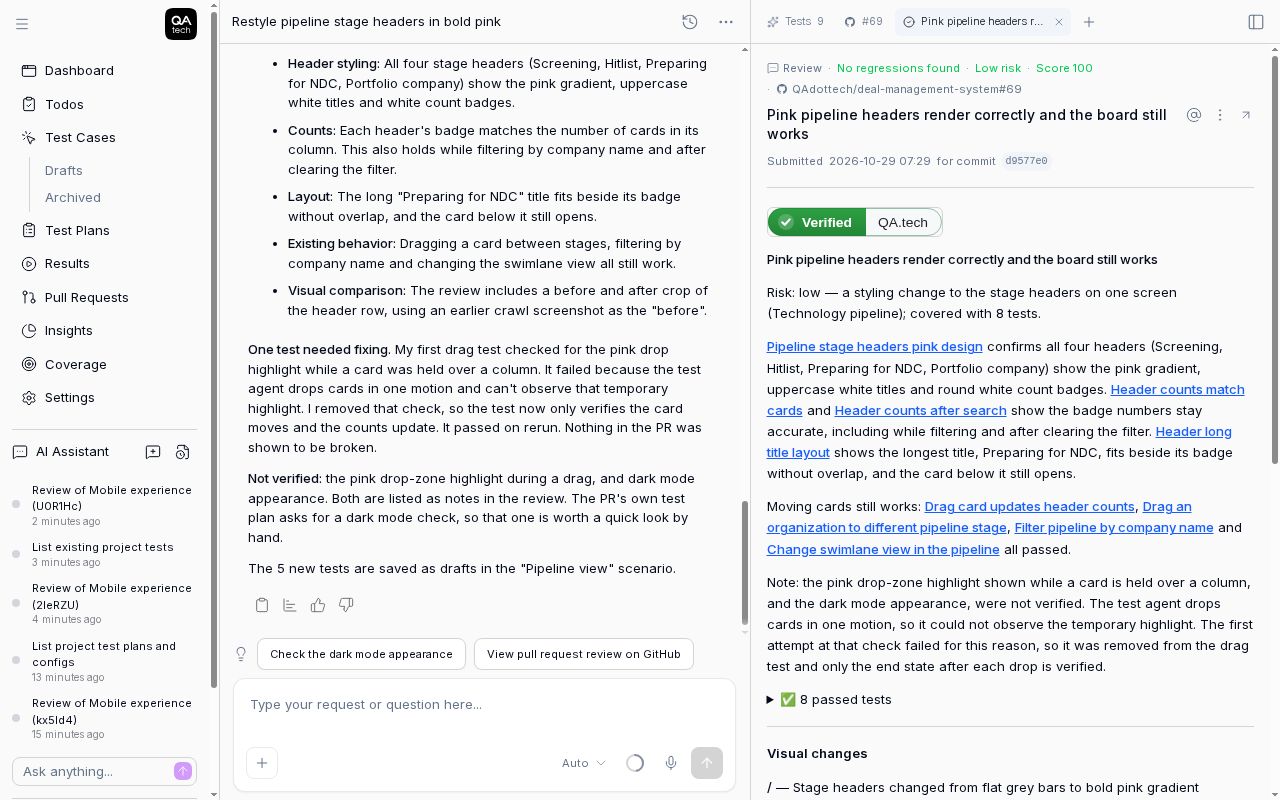 Eight passed tests and a separate list of what the agent couldn't verify, from a web review. On a simulator or emulator build, a step that needs hardware the virtual device lacks goes on that unverified list.
For setting up the per-PR half, start with mobile pull request testing. For the file to upload, see which mobile build to use for automated testing. If you're testing for Apple's foldable, we've covered iPhone Duo testing separately.
FAQ
Is emulator testing enough? For checking that each change keeps your flows working, yes. It isn't enough for hardware features, performance, or manufacturer-specific behaviour, so keep a real-device pass before release.
What's the difference between a simulator and an emulator? Apple's iOS Simulator runs your app compiled for the Mac and simulates the device. Android's emulator emulates the phone's hardware and runs the real Android system image. For test planning, treat both as virtual devices: good for flows and layout, weak on hardware, performance and manufacturer quirks.
Should I test on real devices on every pull request? Usually not. Real-device runs are slower and pricier, and most PRs don't touch hardware. Run them on the release candidate, and on PRs that change camera, biometrics or similar features.
Is Firebase Test Lab still available? Until 30 September 2027. Google has deprecated it and points users to Developer Device Platform on Google Cloud.
Which real devices should be in a release check? Your oldest supported OS version, the newest, a low-end Android, and any form factor you support, like a tablet or foldable. Your analytics will tell you which models your users actually have.