
A pull request testing tool opens your app on the PR's build and tells you, on the PR, whether the changed flows still work. The tools built for it in 2026 include QA.tech, Momentic, QA Wolf, TestSprite and CodeRabbit Verify, with newer mobile-first entrants such as Autosana. They differ in three ways that matter. Does the tool write tests for the change, or pick from a suite you maintain? Where do those tests end up living? And can the result actually stop a merge?
We built one of these tools, so read our ranking with that in mind. Everything said about the others comes from their own docs and product pages, checked on 25 November 2026, and each claim links to its source.
Quick comparison: what each tool runs on a pull request
| Tool | Tests for the change | Where the tests live | Runs against | Can block the merge | Native mobile PRs |
|---|---|---|---|---|---|
| QA.tech | Picks existing test cases and writes new ones for gaps | In QA.tech, no files in your repo | PR preview, or staging/production after merge | Yes, requirable GitHub check | iOS Simulator and Android Emulator builds from CI |
| Momentic | AI picks from your existing YAML tests; your coding agent writes new ones | .test.yaml files in your repo | PR preview deployment | Yes, CI job exit code | Not documented for PRs |
| QA Wolf | Agents pick from your existing suite | Playwright and Appium code | PR preview deployment | Yes, requirable status | Mobile build testing documented separately |
| TestSprite | Tests the preview URL on each PR | In TestSprite | PR preview deployment | Yes, required check | Not documented for PRs |
| CodeRabbit Verify | Writes scenarios from the diff | In CodeRabbit | CodeRabbit's own sandbox | No, posts no check run | No, web only |
| Playwright or Cypress in GitHub Actions | Whatever you list in the workflow | Your repo | Wherever you point it | Yes, required job | Separate tooling |
What counts as pull request testing
A PR check that reads code (linters, static analysis, an AI reviewer) never opens the app. That half of the gate has its own crowded market, and we compared it in our list of AI code review tools. This page is only about tools that run the product.
That distinction is why teams go looking. An engineer at a multi-tenant B2B platform described their end-to-end suite to us like this: "we are surprised when they pass". It hovers around a 90 to 95% pass rate, he said, and "we just see red so often that we're kind of just looking at it, like, oh, it's probably just like flakiness." A check that's red one day in ten trains people to merge through it. That's the problem every tool below is trying to fix.
1. QA.tech: tests chosen and written from the change
QA.tech is an AI testing platform that reviews a pull request the way a tester would, on the running app. The GitHub App kicks off a review whenever a PR is opened or pushed to, and you can call it by hand with an @qa.tech comment. It reads context in a fixed order: the PR description, any linked Jira or Linear ticket, the changed files, the commits (PR testing docs). From that it reuses the test cases that already touch the affected flows, writes new ones where nothing does, and runs the lot against the PR's preview deployment.
The result lands as one review comment and a check run named QA.tech / PR Review, titled Fully Verified, Partially Verified, Bugs Found or Can't Verify. That last one matters more than it looks. Most PR checks only know green and red, so a run that never touched the change comes back green. You can require the check in branch protection, or use the Change Review Action when the workflow itself should wait for the verdict.
No preview environments? The review can run after merge against staging or production and post its result on the merged PR. When a reviewed PR merges, a post-merge agent (GitHub and Azure DevOps) can promote the test cases it needed into your regression suite. Coverage grows with the features you ship. Nobody writes a backlog of scripts to get there.
It won't do everything. Web tests run in a Chromium-based browser. Native mobile runs on iOS Simulators and Android Emulators (the docs list physical devices as coming soon). And the merge-blocking check is GitHub only. If you're evaluating AI-driven testing platforms that integrate into GitHub pull request workflows, start here. PR testing has a free trial, and Starter costs $89 a month (pricing, checked 25 Nov 2026).
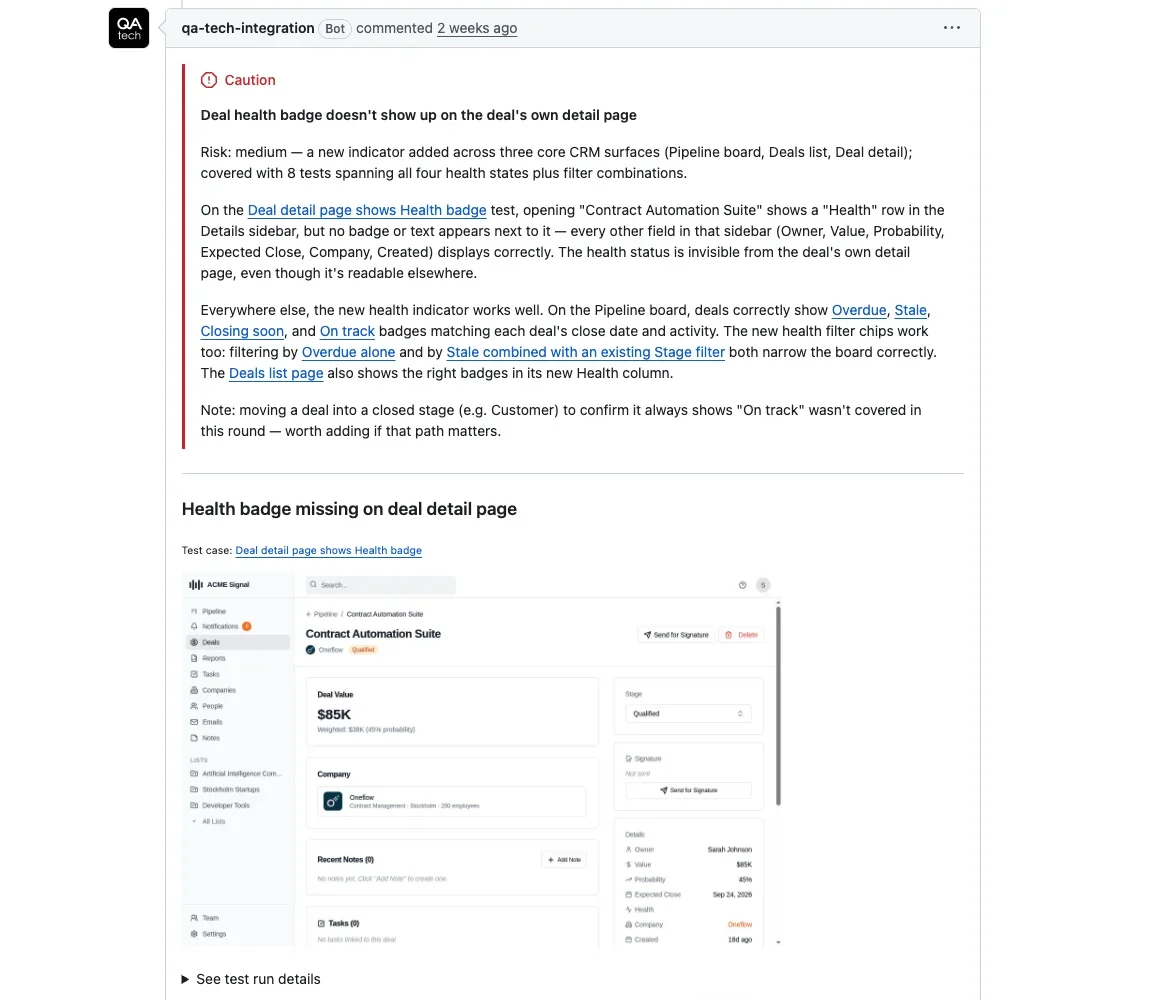
A review on pull request #46 of our demo CRM. Eight tests were picked from the diff. The badge showed up on the board and in the list. On the deal page itself it was gone, and nothing in the diff hinted at that.
2. Momentic: AI selection over a YAML suite you own
Momentic runs web, iOS and Android tests written as YAML files that live in your repo. On a pull request, its CI guide runs only the tests its AI test selection picks from the diff against origin/main, pointed at the preview deployment. A failed run exits non-zero, so the job can be a required check. New tests for the change come from your coding agent, which writes fresh .test.yaml files into the same PR.
The upkeep is a test suite in your repository. Momentic's auto-heal tries to repair broken steps and opens a pull request with the fix, and quarantined tests "run but do not fail the check by default", per the same guide. Both are reasonable features. Both also mean a test changed or stopped counting without a person deciding the product was fine. The Momentic alternatives page and our QA.tech vs Momentic comparison go deeper.
3. QA Wolf: a Playwright suite with agents choosing the subset
QA Wolf runs your flows against each PR's preview deploy and reports two GitHub checks; QA Wolf Test Results is the one to require in branch protection. On its pricing page, "Smart Smoke Suites" pick the tests each pull request needs, and "Agents write the tests in open-source Playwright and Appium."
You end up with a Playwright and Appium suite, written and repaired by QA Wolf's agents and, on its full-service plans, its people. That's the real pitch, and it's a fair one if you want testing off your team's plate entirely. The selection still draws from a suite built ahead of time, so a brand-new flow in the PR is covered only once someone has written a test for it.
4. TestSprite: the preview URL, tested on every PR
TestSprite waits for a PR's preview deployment, tests that URL and comments pass, fail and blocked counts with a "fix prompt for your coding agent". A required check makes merges wait until it's green. Blocked cases are reported separately, which is the right call: an environment gap shouldn't read as a regression.
Less is documented here than for the tools above. The PR page doesn't say how tests are chosen for a given change, so ask in a trial whether a ten-line copy fix and a checkout rewrite get the same run.
5. CodeRabbit Verify: a code reviewer that started running apps
CodeRabbit Verify reads the diff, writes test scenarios and runs them against your app inside CodeRabbit's sandbox, mostly through a browser. It went into public beta on 18 November 2026 and test runs are free during the beta.
The limits are in its own docs. It "posts no check run and no commit status, so a failing or unfinished Verify run never blocks a merge." Native mobile apps aren't supported. And the app has to start from a script inside CodeRabbit's sandbox, so your own preview never gets tested. Our QA.tech vs CodeRabbit Verify page compares the two in detail.
6. Playwright or Cypress in GitHub Actions, and the agent you build yourself
The baseline every team already has: a workflow that runs your Playwright or Cypress suite against the preview URL and fails the job when a test fails. It's free, it's deterministic, and it tests exactly what you wrote, on every push, whether the change touched those flows or not.
The newer version of the DIY route is a coding agent with the Playwright MCP server or Playwright's test agents clicking through the preview. One engineering lead running his own agent factory told us their PR check was "just a skill" that runs Playwright, reads the code and looks harder at the risky parts of the change. It works, and it has two gaps. The agent that wrote the change is grading its own work, and nobody built it to say "I couldn't test this". Vilhelm von Ehrenheim, QA.tech's co-founder and Chief AI Officer, keeps the bar simple: "without kind of looking at the end product, it's very hard to actually verify that stuff is working properly." Looking at the end product is the easy half. Deciding what to look at, and admitting when it couldn't, is the half you'd be building yourself.
What to check before you pick one
A preview environment, or a plan for life without one. Every tool here except CodeRabbit Verify tests a deployed build. If your PRs don't get previews yet, either set them up (our guide to preview environments covers it) or pick a tool that can review after merge.
A check that can say "couldn't tell". Ask every vendor what their check reports when the tests ran but never exercised the change. Green is the wrong answer.
What you'll own in six months. A tool that writes YAML or Playwright into your repo gives you a suite to review, heal and prune. A tool that keeps tests on its side gives you less to maintain and less to take with you. Decide which you want before the trial.
How it handles PR volume. A team shipping 30 to 50 PRs a week doesn't need every one tested the same way. Look for triage that skips docs-only changes and goes deeper on risky ones, and for a way to trigger a run by hand.
Frequently asked questions
What is a pull request testing tool? A tool that runs your application against the code in a pull request, usually on the PR's preview deployment, and reports on the PR whether the change works for a user. It sits next to code review, which reads the diff but never runs the app.
Which AI testing tools integrate with GitHub pull requests? QA.tech, Momentic, QA Wolf, TestSprite and CodeRabbit Verify all run tests against a pull request and report back on GitHub. They differ on whether they write tests for the change or pick from a suite you already maintain, where those tests live, and whether the result can block the merge.
Do I need a preview environment to test pull requests? Most tools need one, because they test the PR's own deployment. QA.tech can also review the pull request after merge against staging or production, so teams without previews still get a result on the PR. CodeRabbit Verify builds the app in its own sandbox instead.
Can a pull request testing tool block a merge? Some can. QA.tech posts a QA.tech / PR Review check you can require in GitHub branch protection. Momentic and QA Wolf report a CI status you can require. CodeRabbit Verify posts no check run, so it never blocks a merge.
What's the difference between AI code review and pull request testing? Code review reads the diff and comments on the code. Pull request testing opens the running app and checks whether the changed flows still work. You want both on a busy repository, because a clean diff can still ship a broken screen.
How many tests should run on each pull request? As many as the change needs, and no more. A copy change needs a quick look; a change near sign-up or payments needs depth. Tools that scope the run to the change keep PR checks fast without running the whole suite on every push.