

Vercel builds a preview of every pull request, and often the only thing that opens it is a reviewer clicking around before they approve. Automating that visit comes down to picking the right preview URL and starting the tests when the build is ready. Then you have to get them past the login page Vercel puts in front of previews by default.
What is a Vercel preview deployment?
A preview deployment is a full build of your app from a branch that isn't production. Vercel's docs list three triggers: a push to a non-production branch, a pull request on GitHub, GitLab, Bitbucket or Origin, and a CLI deploy without --prod. Previews read their own Preview-scoped environment variables.
Every preview gets two URLs, and for testing the difference matters:
| URL | Format | What it serves |
|---|---|---|
| Commit URL | <project>-<hash>-<scope>.vercel.app | That exact commit, for as long as deployment retention keeps it |
| Branch URL | <project>-git-<branch>-<scope>.vercel.app | Whatever was pushed to the branch last |
Test the commit URL. A test run takes a few minutes, and if someone pushes to the branch halfway through, the branch URL starts serving new code to the second half of your tests. The result then describes neither commit. Vercel's generated URLs page says the View deployment button on a pull request opens the commit URL, and Visit Preview in Vercel's comment opens the branch URL.
Start the tests when the preview is ready
A workflow on pull_request starts before Vercel has finished building, which is how teams end up with a sleep 90 in CI. The preview itself tells you when it's ready, in one of two ways.
From GitHub Actions. Vercel still sends a deployment_status event by default, and since April 2025 it recommends repository_dispatch instead. The dispatch events have types like vercel.deployment.success and carry the URL in client_payload. The two behave differently on a pull request. We compare them in deployment_status vs repository_dispatch.
From the deployment record. Vercel for GitHub records each preview through GitHub's Deployments API, so any tool watching the pull request can read the URL without a workflow at all. That's how a GitHub App can review every PR with zero YAML.
A monorepo adds a wrinkle, because one pull request can build a preview for every Vercel project in the repo. We cover how to make sure the tests hit the app in multiple Vercel previews on one pull request.
Get past Deployment Protection
Vercel turned on Deployment Protection by default for all new projects on 2 November 2023, and teams can now set their own default for new projects. Under Standard Protection, every URL except your production domains is protected, and with Vercel Authentication the visitor has to log in with Vercel. A test browser can't, so the first automated run on a new project usually lands on a login page and fails everything else for the same unhelpful reason.
The fix is Protection Bypass for Automation, available on every plan. Enable it in Settings → Deployment Protection, then send the secret on each request as the x-vercel-protection-bypass header. For browser tests, add x-vercel-set-bypass-cookie: true so Vercel sets a cookie and later requests in the session get through. Vercel also accepts the secret as a query parameter, but a secret in a URL ends up in logs and screenshots, so keep it in headers.
Most of the trouble starts after that step, with third-party scripts that break and auth redirects that lose access. We go through six of these failures in testing a protected Vercel preview.
Decide what to test on each preview
Running the full end-to-end suite on every preview feels thorough. It's also slow, and flaky tests add up: if each test fails falsely 1% of the time, a 100-test run has a 63% chance of at least one red result that has nothing to do with the change (1 − 0.99¹⁰⁰). A better split is a small suite for the flows that must never break, like sign-up and payment, plus tests chosen from what the pull request changed. A copy change on the pricing page needs the pricing page checked on two viewports. A change to the checkout API needs checkout run end to end with a real card form.
Give the preview real data to work with. Test against a hosted environment that's as close to production as you can make it, and mock as little as you can. On Vercel, that usually means Preview-scoped environment variables pointing at a seeded database, and a test account that exists on every preview.
The result also needs three states. "Passed" and "failed" leave out the run that never reached the changed screen, and that run shouldn't come back green.
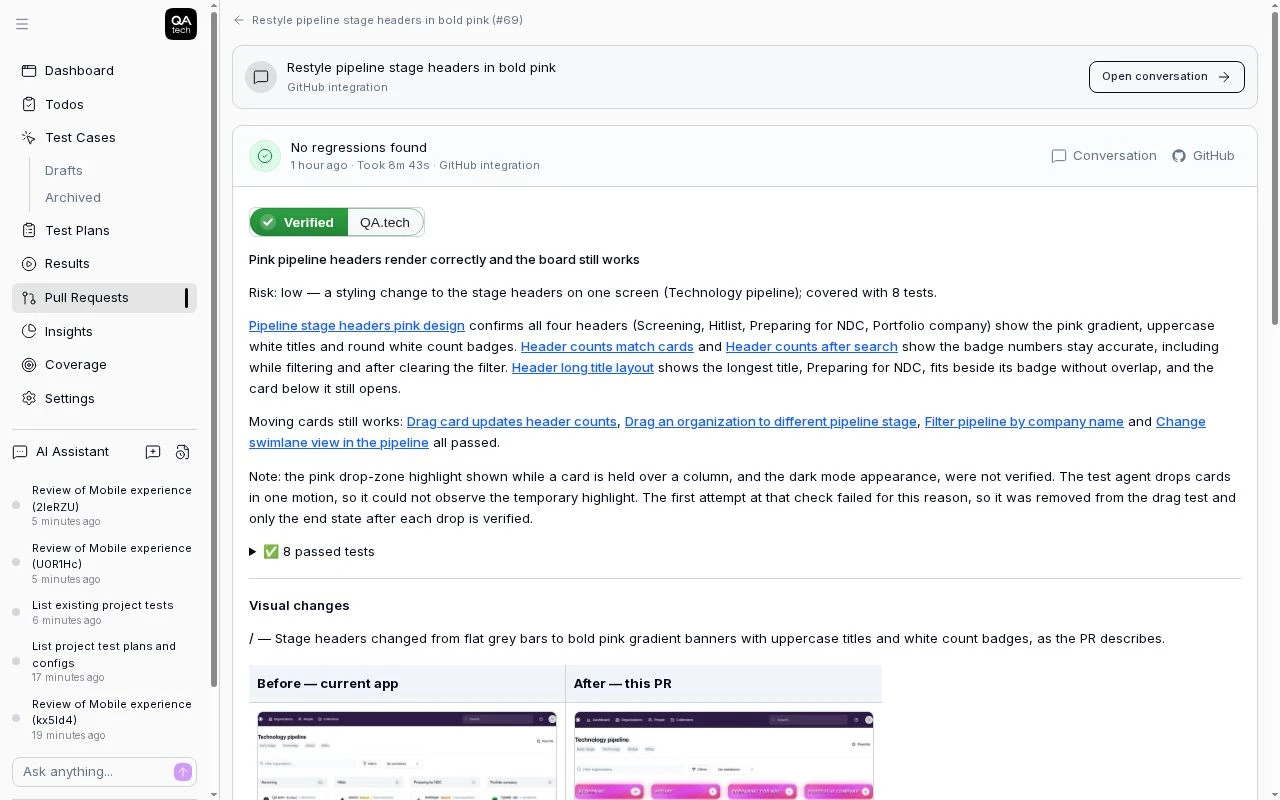
A finished review on a pull request: the verdict, what was tested, and a visual diff of the changed screen.
Testing Vercel previews on every pull request
QA.tech, an AI testing platform for end-to-end testing on pull requests, needs something deployed to test. For a web app that's the preview URL. A backend change is tested through the user-facing flow it powers or, on the Growth plan, through an API application pointed at the preview's base URL, and a native mobile PR needs CI to upload the build instead of a URL. It won't comment on code quality, and a bug only shows up in its review when a test reproduces it. Code review, human or AI, reads the diff; this is the step that opens the app. For web apps on Vercel, PR testing picks up the preview from the deployment Vercel records on the pull request, so nothing goes in your workflow files. The agent reads the diff, the PR description and any linked Jira or Linear ticket, chooses the existing test cases that cover the change, writes new ones only where coverage is missing, runs them on the preview and posts the result as a review comment and a QA.tech / PR Review check you can require before merge.
For the reviewer, that removes the trip into the preview to try the change by hand. The clicking has already happened by the time they open the pull request, which makes it easier to review and merge.
The bypass secret goes in once, under the application's Preview defaults, and every new preview inherits it. The free trial includes PR testing on one application, so you can sign up, install the GitHub App and open a pull request on a Vercel project to see the first review.
FAQ
How do I test a Vercel preview deployment automatically?
Trigger your tests when the preview reports success, either from a deployment_status or repository_dispatch event in GitHub Actions, or from a tool that reads the deployment record on the pull request. Run them against the commit URL and send the Protection Bypass for Automation secret as a header.
Which Vercel preview URL should tests use? The commit URL. It always serves one commit, while the branch URL switches to the newest push, which can change the code under a test run that's already going.
Why do my tests see a Vercel login page?
Deployment Protection has been on by default for new projects since November 2023, unless your team has set a different default, and Standard Protection covers every preview URL. Enable Protection Bypass for Automation and send x-vercel-protection-bypass on each request.
Can I put the bypass secret in the URL? Vercel accepts it as a query parameter, but URLs get logged, screenshotted and pasted into tickets. Headers keep the secret out of all three.
Should I run my full end-to-end suite on every preview? Run a small critical-path suite on every preview and choose the rest from what the pull request changed. Full runs on every PR are slow and pick up flaky failures unrelated to the change.
Can I test Vercel previews without GitHub Actions? Yes. Vercel records each preview on the pull request through GitHub's Deployments API, so a GitHub App can find the URL and start tests without a workflow file.