
In April 2025 Vercel started recommending repository_dispatch over deployment_status for running GitHub Actions after a deploy. deployment_status keeps working for backwards compatibility. The two events reach the same workflow file, but they attach the run to different commits, and for tests on a pull request that decides whether the result shows up where the reviewer is looking.
deployment_status vs repository_dispatch at a glance
deployment_status | repository_dispatch | |
|---|---|---|
| Sent by Vercel | By default, unless you turn it off in Git settings | When the deployment status changes |
| Event to listen for | deployment_status, then check the state | types: [vercel.deployment.success] |
| Preview URL | github.event.deployment_status.environment_url | github.event.client_payload.url |
GITHUB_SHA | The commit being deployed | The last commit on the default branch |
| Workflow file must be on | The branch being deployed | The default branch |
The GITHUB_SHA row comes from GitHub's event reference, and it's the one that matters. A check created by a deployment_status run lands on the pull request's commit. A repository_dispatch run belongs to your default branch, so its result doesn't appear as a check on the pull request unless you post it there yourself.
Scenario: you want a red check that blocks the merge
Use deployment_status. Filter out production and anything that isn't a success, and run against the URL from the event:
name: Critical paths on preview
on: deployment_status

jobs:
  e2e:
    if: >
      github.event.deployment_status.state == 'success' &&
      github.event.deployment.environment != 'production'
    runs-on: ubuntu-latest
    steps:
      - uses: QAdottech/run-action@v4
        with:
          project_short_id: 'proj_abc123'
          api_token: ${{ secrets.QATECH_API_TOKEN }}
          test_plan_short_id: 'pln_abc123' # your critical-path plan
          blocking: true
          applications_config: |
            {
              "applications": {
                "app_abc123": {
                  "environment": {
                    "url": "${{ github.event.deployment_status.environment_url }}"
                  }
                }
              }
            }
deployment_status fires for production deploys too, and for every Vercel project in the repo, which is why the if: is there. Check the exact environment names on one of your pull requests, since a monorepo has one per project. With blocking: true the step waits for the run and fails on a failed result, and you can make the job required in branch protection.
Keep this plan small. Sign-up, login, checkout, whatever must never break. Everything else on the pull request is better chosen from the change.
Scenario: you want the deployment details Vercel adds
Use repository_dispatch when the job doesn't need to report on the pull request: posting to Slack when a preview is ready, warming a cache, running a smoke check against production after a promotion. Vercel's GitHub docs list event types for each state, including vercel.deployment.success, vercel.deployment.error and vercel.deployment.promoted, and the payload carries the deployment URL and environment.
on:
  repository_dispatch:
    types: [vercel.deployment.success]

jobs:
  notify:
    if: github.event.client_payload.environment != 'production'
    runs-on: ubuntu-latest
    steps:
      - run: echo "Preview ready at ${{ github.event.client_payload.url }}"
The workflow only runs once this file is on your default branch, so a pull request that adds it won't trigger it until it merges.
Scenario: you turned off deployment_status events
Vercel's Git settings have a toggle for deployment_status events, and the docs tell you to check that no workflow depends on them first. Any workflow written as in the first scenario stops running. If your pull request reviews come from a GitHub App that reads deployments rather than a workflow, open a test pull request after flipping the toggle and confirm the review still starts. If it doesn't, you can always start one by commenting @qa.tech with the preview URL.
You may not need a workflow at all
Both events exist so that a workflow can find the preview. A tool that reads the deployment record on the pull request finds it without one. That's how PR testing from QA.tech, an AI testing platform, works on Vercel: the agent reads the diff and the PR description, picks the test cases that cover the change, writes new ones for gaps, runs them on the preview and posts a review with a QA.tech / PR Review check you can require before merge. It can't test a change with no UI behind it, and it needs the preview to be reachable, so set up Vercel preview protection first.
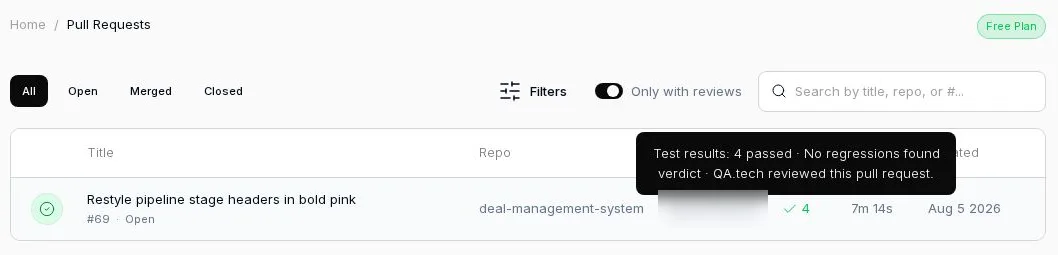
The common setup is both: a small critical-path plan on deployment_status, plus a review chosen from each pull request. For the full picture, start with Vercel preview protection.
FAQ
Is Vercel's deployment_status event deprecated?
No. Vercel recommends repository_dispatch for new workflows, and says deployment_status events continue to work for backwards compatibility. You can turn them off per project in Git settings.
How do I get the Vercel preview URL in GitHub Actions?
On deployment_status, read github.event.deployment_status.environment_url. On repository_dispatch, read github.event.client_payload.url.
Why doesn't my repository_dispatch workflow show a check on the pull request?
GitHub runs repository_dispatch workflows against the last commit on the default branch, so the run isn't attached to the pull request's commit.
Why didn't my repository_dispatch workflow run? The workflow file has to exist on the default branch. A pull request that adds it won't trigger it before merge.
Which Vercel event should trigger end-to-end tests on a pull request?
deployment_status, filtered to successful non-production deployments, because its run is attached to the commit being deployed and its checks appear on the pull request.